# Introduction
{% hint style="warning" %}
Documentation under construction
{% endhint %}
## Getting Started
* [Learn how to build a subnet](/build-a-subnet/introduction)
* [Learn how to use the platform](/network/subnet)
* [Learn about Overwatch Nodes](/overwatch-nodes/introduction)
* [Learn how to deploy smart contracts](/smart-contracts-evm/introduction)
# Introduction
Hypertensor is a distributed intelligence platform for decentralized AI applications—**open** and **verifiably decentralized AI** protocols run by the world.
On a more technical level, Hypertensor is a network of pools of sub-networks (known as subnets). A subnet is a distributed network of computers (known as nodes) running software related to AI that can verify AI-related work. Nodes in these subnets either compete or collaborate on AI tasks and evaluate each other's quality of performance in real time.
On a higher level understanding, **Hypertensor is a decentralized AI economy**. Currently, companies such as OpenAI, Anthropic, ElevinLabs, and xAI are among the top companies in the centralized AI economy. What if OpenAI **allowed anyone to host LLMs** and run inference tasks in return for income, or Anthropic **allowed anyone to validate inference tasks** in return for income?
**This is what Hypertensor is**: an economy where any team can [build a fully decentralized AI startup](/build-a-subnet/introduction)—in a fully decentralized AI economy.
# Tensor
**Tensor (TENSOR)** is the cryptocurrency used for many things in the Hypertensor network. Tensor is distributed to subnets based on the fundamental and economic performance of a subnet, and to the subnet validator nodes based on their performance within the subnet. Tensor is also the only acceptable form of payment for transaction fees on-chain.
The Tensor cryptocurrency supports a pricing mechanism for Hypertensor's computing power. When users want to make a transaction, they must pay Tensor to have their transaction recognized on the blockchain. These usage costs are known as block weight (also known as gas fees), and the fee depends on the amount of computing power required to execute the transaction and the network-wide demand for computing power at the time.
# Understanding Subnets
Hypertensor subnets are fully decentralized compute sidelayers that run in parallel to the Hypertensor blockchains' consensus mechanism.
A way to understand the architecture is to compare it to the Ethereum ecosystem. Each subnet is a layer 2 blockchain that consists of a mesh of nodes validating transactions and relaying them to Ethereum to settle.
In Hypertensor, each subnet is a mesh of nodes performing AI-related tasks, scoring and validating each other, and relaying that data to Hypertensor to settle and finalize consensus. Just like L2s are off-chain from Ethereum, subnets are off-chain from the Hypertensor blockchain, but are their own decentralized networks.
Those scores are relayed to the Hypertensor blockchain by the randomly elected subnet validator (see [Incentive Mechanism](/incentive-mechanism)). Each other validator in the subnet can confirm the accuracy of the elected validator's consensus data by voting and reaching a consensus, thereby ensuring the security and integrity of the subnet.
## Subnet Architecture
All subnets verifiably use a Kademlia distributed hash table (kad-dht) (see [Kademlia visualizer](https://hypertensor-blockchain.github.io/kademlia_vis)). This is the same P2P technology as Ethereum, Base, Arbitrum, Polkadot, Optimism, and more. Hypertensor subnets are blockchains with all computational limitations removed, enabling the use of AI "on-chain" in a decentralized network of computers.
1. Each subnet incentive mechanism defines the work a node must perform. This work is evaluated by all of the nodes in the subnet.
* The blockchain is node-role agnostic, meaning each subnet can create one or multiple roles within the subnet for nodes.
2. Nodes evaluate and score each other, and how these nodes come to evaluate and score each other is computed within the subnet.
3. Blockchain validators finalize the on-chain **attestation-based consensus mechanism** and distribute rewards based on the in-consensus scores of each node.
## Subnet Requirements
#### For a subnet to stay alive, it must meet the following conditions:
1. **Minimum delegate stake balance**
2. **Minimum number of nodes**
Blockchain validators check each subnet for these conditions at the start of each epoch. If they do not meet these conditions, they are removed.
### Minimum Delegate Stake Balance
The minimum delegate stake balance ensures each subnet is constantly engaging and receiving support from the community.
#### This amount increases based on two factors:
1. **Inflation**
The required balance increases with inflation and acts as the base for the minimum delegate stake balance for all subnets.
$$
base = total\_issuance \*x
$$
2. **Node count**
The node count acts as a multiplier to the minimum delegate stake base.
This function linearly increases the minimum required delegate stake multiplier as more nodes become electable in a subnet (see [gamification](/gamification-and-more#more-nodes-more-stake)). The multiplier adjusts based on the minimum and maximum multiplier relative to the minimum and maximum number of nodes.
$$
f(x) =
\begin{cases}
y\_{\min}, & \text{if } x \leq x\_{\min} \\
y\_{\max}, & \text{if } x \geq x\_{\max} \\
y\_{\min} + \left( \dfrac{x - x\_{\min}}{x\_{\max} - x\_{\min}} \right) \cdot (y\_{\max} - y\_{\min}), & \text{otherwise}
\end{cases}
$$
### Minimum Number of Nodes
The minimum number of nodes a subnet must have at all times is 3.
## Subnet Nodes
In Hypetensor, a **node** is any instance in a subnet ("sub-network" or "sidelayer"). They participate in subnets—self-contained, peer-to-peer networks—and collaboratively or competitively (depending on the subnets' incentive mechanism) run tasks related to artificial intelligence, maintain the sub-network's security, and evaluate other nodes.
To run a node for a subnet, the node must register and stake on-chain to tell the subnet it wants to connect to its network. This registration and stake balance act as a proof-of-stake for the subnet to allow it to connect and continuously communicate with other nodes in the subnet.
# Understanding Overwatch Nodes
Coming soon.
# Incentive Mechanism
{% hint style="warning" %}
This documentation is not finalized. More information will be released for mainnet.
{% endhint %}
## Subnets
In Hypertensor, the overall token emission is split across multiple subnets every epoch. To determine how much of the total emission each subnet receives, the protocol uses a weighting system based on **delegate stake**, **node count**, and **Overwatch weights**.
This ensures a free market where subnets with **more stake from delegators** supporting the subnet, **more nodes** connecting and contributing to a subnet, and **benchmarking** from Overwatch Nodes, receive a larger share of emissions—but dampened and normalized, to avoid centralization, and to increase fairness and opportunity.
**Each subnet gets a weight on each epoch based on 3 factors**:
* Delegate stake weight
* Nodes count
* Overwatch weights
### Delegate Stake Weight
One factor in a subnet's weight is the **amount of stake delegated to it** by users.
$$
\text{dstake weight} = \left( \frac{delegate:stake}{total:delegate:stake}\right)
$$
### Node Count Weight
Another factor is how many nodes are participating in a subnet. Node count weight matters because it’s a proxy for how much interest, usefulness, and security a subnet brings to the network.
$$
\text{node count weight} = \left( \frac{node:count}{total:node:count}\right)
$$
### Overwatch Weight
The resulting weight from Overwatch Nodes is applied to each of the weight factors above, delegates stake weight, and node count weight.
$$
\text{subnet weight} = dstake:weight \* node:count:weight
$$
The relationship between stake and rewards is **not linear**. Instead, each subnet's resulting weight is passed through a **tunable power curve**.
**This means**
* Subnets with more stake get **more rewards**
* But the increase is **not 1-to-1**—the curve **slightly flattens** the difference
* This helps prevent large subnets from dominating all emissions, and gives smaller or newer subnets a fairer share
**The power curve looks like this**
$$
\text{subnet weight} = (subnet:weight) ^p
$$
After weights are calculated for all subnets, they're **normalized** so that they sum to 100%. This gives each subnet a **final emission share**—its percentage of the total tokens emitted that epoch.
#### Why This Works
* Subnets are rewarded based on how much the community supports them through delegation, contribution, and benchmarking.
* The curve ensures no single subnet can dominate the network just by having more weight on any of the factors.
* This creates a healthier, more diverse ecosystem where smaller subnets can still thrive and grow.
* Fresh subnets will receive a premium of their weight-to-emissions ratio because the power curve distributes rewards.
***
## Subnet Nodes
### Consensus Mechanism
> Refer to node [classifications](/network/subnet-node/classifications) to understand how a node is created, its lifecycle, and becomes eligible for rewards.
The Hypertensor's on-chain subnet consensus mechanism is based on the **attestation-based consensus mechanism**.
Each **subnet** defines its own **incentive mechanism**, where nodes perform work and **score each other** based on the quality or utility of their output. Nodes in the subnet interact **peer-to-peer** and produce **output scores** reflecting how useful or correct each other's contributions are. These scores are **submitted as weights**—essentially reputation scores—where:
* Elected validator node submits a vector of weights for all nodes.
* The weights reflect how much trust, usefulness, or performance one node attributes to others.
These weights form a **decentralized reputation mesh**, unique to the purpose and rules of the subnet.
Once these weights are submitted, other validator nodes (non-elected validators) can **begin to attest** to the submitted consensus data. The validator **must receive a 66% attestation ratio** to have rewards emitted to the subnet; otherwise, the subnet and the elected validator node will accrue penalties, incentives are skipped, and the **validator will be slashed**.
### Rewarding Nodes
These weights are used to determine how rewards are distributed to each participating node in the subnet.
At the end of every epoch, Hypertensor uses the **finalized weight vector** (proposed by the elected validator and attested by others) to distribute **token emissions** to the participating subnet nodes.
Each node is rewarded based on its final weight relative to the **sum of all weights in the subnet** for that epoch. In other words, the more highly a node is scored by its peers, the larger its share of the total reward pool.
***
## Overwatch Nodes
Coming soon.
# Emissions
#### Emissions to nodes are calculated through levels:
1. Overall network inflation
2. Subnet distribution
3. Node distribution
#### Overall Network Inflation
The Hypertensor inflation mechanism is **disinflationary**. As the overall network's number of sub-network nodes increases, the inflation rate decreases.
Inflation is based on the activity of subnet validator nodes.
$$
\text{inflation}(u) = r\_t - (r\_t - r\_0) \cdot
\begin{cases}
\frac{1}{1 + e^{k \cdot |u - m|}}, & \text{if } u > m \\
\frac{e^{k \cdot |u - m|}}{1 + e^{k \cdot |u - m|}}, & \text{if } u \leq m
\end{cases}
$$
This function defines a **sigmoid-shaped curve** for yearly inflation based on network utilization:
* ***u***: current node utilization ratio (active nodes / max nodes)
* ***m***: midpoint of the curve (utilization where inflation changes fastest)
* ***k***: steepness of the curve (higher = steeper transition)
* ***r******0***: initial (max) inflation rate
* ***r******t***: terminal (min) inflation rate
As utilization increases:
* Inflation starts high at ***r******0***
* Decreases smoothly as more of the network is used
* Levels off near ***r******t*** when saturation is reached
This incentivizes early participation while gradually stabilizing rewards as network activity increases.
#### Subnet Distribution
From the overall inflation, the emissions are distributed to subnets based on economic and fundamental mechanisms.
The final subnet weights are calculated once per epoch based on the delegate staking weight and the node weight of each subnet.
#### Node Distribution
Node distribution is based on the consensus that a subnet comes to each epoch.
# FAQ
## Network & Sub-network
#### What's the difference between the Hypertensor blockchain and subnets?
The blockchain is the on-chain consensus and execution layer. Subnets are sidelayers that run in parallel to the Hypertensor's on-chain consensus mechanism.
#### What is a subnet?
A subnet is a decentralized sidelayer, similar to an L2, a mesh of nodes in a distributed hash table that compete or collaborate on a task or tasks, such as inference and training.
Each subnet is essentially a decentralized & open AI startup company. For example, enabling anyone to serve or validate AI models for the company in return for rewards (**Think:** *What if OpenAI allowed anyone to host their models in return for income?*).
#### How are subnets decentralized?
We took blockchain technology and stripped all of the computational limitations that prevent AI from being served and executed on-chain, and created what we now call the [Subnet Template](/subnet-template/introduction).
#### How do you ensure or verify that sub-networks are decentralized?
[Overwatch Nodes](/overwatch-nodes/introduction). In short, Overwatch Nodes ensure subnets are decentralized, true, and consensus is accurate.
#### Who makes the subnets?
Developers who specialize in blockchain or AI development.
#### How can I build a subnet?
Visit the [Build A Subnet](/build-a-subnet/introduction) section of the documentation.
#### How can I run nodes in subnets?
Visit our Discord or contact subnets to learn how to deploy a node.
#### Can subnets communicate with each other?
Currently, no, although in the future we plan on creating interoperability by introducing one big DHT (distributed hash table) of subnets (integrating each subnet's primary DHT) to allow for optional communication.
#### Are nodes in subnets validating or mining blocks?
No, nodes in subnets produce work specific to the subnet itself, such as inference or training, and are scored based on their work within the subnet under a proof of useful work mechanism.
#### What are all of the node types?
* [Subnet Nodes](/understanding-subnets#subnet-nodes)
* [Overwatch Nodes](/understanding-overwatch-nodes)
## Token
#### What is the difference between TENSOR and Wrapped TENSOR?
TENSOR is the native coin only available on the Hypertensor network. Wrapped TENSOR is a digital asset that represents TENSOR on non-native blockchains such as Ethereum.
#### How to bridge between Hypertensor and Ethereum?
You can bridge bidirectionally between Hypertensor and supporting blockchains by going to bridge.example.com.
#### Does Hypertensor maintain the bridge?
No, the bridge was built and is maintained by [Round Table 21](https://www.roundtable21.com/).
Hypertensor is committed to decentralization and the cypherpunk vision. Leveraging the community to bootnode the first bridge is a step in that direction, increasing censorship resistance and decentralization.
#### What is TENSOR used for?
TENSOR is used to pay for transaction fees, computational services, and subnet deployment.
# Triple Consensus Mechanism
# Wallet
The blockchain is an EVM-compatible substrate blockchain. All EVM-compatible wallets can be used.
## Talisman
{% hint style="warning" %}
Talisman has no mobile app.
{% endhint %}
{% embed url="" %}
### Create Account
1. Navigate to settings > Manage Accounts > Add Account
2. Create a new account > New Ethereum Account
1. Enter the name of the new account, and click Create
### Setup Network
1. Navigate to settings > Manage Networks > Add Network
2. Choose "Polkadot"
1. **RPC Url**: wss\://rpc.hypertensor.app:443
1. Once pasted, the remaining variables should fill in.
2. Check the **This is a testnet** checkbox if using a testnet network.
After setting up the network, you can use the [explorer](/testnet/explorer) to navigate the blockchain.
# RPC
## URL
Coming soon!
# Faucet
{% hint style="warning" %}
Not live
{% endhint %}
The following is documentation on how to obtain testnet tokens using the Discord faucet.
**Get Tokens**
1. [Create an account](/blockchain/wallet).
2. Go to the [#faucet](https://discord.gg/pD9QtuK8) channel and use the `/faucet` command to have TENSOR testnet tokens transferred to you.
1. Type `/faucet` into the channels text box, enter the address to send TENSOR to, and submit the message.
# Explorer
[Visit the explorer](https://polkadot.js.org/apps/?rpc=wss%3A%2F%2Frpc.hypertensor.app%3A443#/explorer)
# Introduction
{% hint style="success" %}
The decentralized subnet template, named the Subnet Template, is tested in a Linux environment, but should be able to be built in a macOS environment. The Windows environment may require further development. For Windows environments, use WSL.
{% endhint %}
## GitHub
## Introduction
At the heart of the **Hypertensor** platform is a simple but powerful ethos: every **subnet** should operate as a fully decentralized peer-to-peer (P2P) network. These subnets sit at the intersection of **blockchain** and **AI—not** to be confused with the Hypertensor blockchain itself — and provide a robust foundation for building decentralized AI-native applications.
Each **Hypertensor subnet** leverages the same foundational technologies that power leading blockchain ecosystems. This includes **libp2p**, the modular P2P networking stack used by major chains like Ethereum, Base, Arbitrum, Polkadot, Avail, Unichain, Hypertensor, applications like IPFS, and hundreds of other blockchains and decentralized applications. For a full list of libp2p adopters, see the [official list of libp2p builders](https://docs.libp2p.io/concepts/introduction/users/).
By combining blockchain-grade peer-to-peer (P2P) infrastructure with AI-native capabilities, Hypertensor subnets enable developers to create fully decentralized, intelligent applications.
You can think about subnets like **blockchains designed for AI**. **All computational limitations** related to gas and block weight **have been removed, allowing for AI applications to be built in decentralized networks.**
## Getting Started
This documentation will focus on building a subnet over the SubnetTemplate.
As a builder, the primary focus is on building the application logic and how nodes will be able to form consensus and score each other.
In the inference-subnet (an example subnet), the focus is on the Inference Protocol (see [protocols](/build-a-subnet/protocols)), and a commit-reveal scheme utilizing the [DHT Records](/subnet-template/dht-records) with a [record validator](/subnet-template/dht-records/record-validator).
***
## Start building:
#### Clone the template:
```bash
git clone https://github.com/hypertensor-blockchain/subnet-template.git
cd subnet-template
python -m venv .venv
source .venv/bin/activate
pip install .
touch .env
```
Review the `.env.example` file and fill out the variables required to use the subnet and network.
Building a subnet revolves around two main points: protocols and consensus. Everything else is built-in and ready to go.
* Protocols
* Consensus
***
## Build
### [Protocols](/build-a-subnet/protocols)
Protocols are where the application logic lives and how nodes communicate with each other. Call inference on nodes, run automated tasks, and more!
### [Consensus](/network/consensus)
Consensus is where nodes score each other, and it runs in parallel to the Hypertensor consensus mechanism for validating and attesting. This is also where you will build the [scoring](/build-a-subnet/consensus/scoring) mechanism.
***
## Security
Because subnets are decentralized, security is important. There are two basic tools the template offers for security.
See [Subnet Security](/build-a-subnet/subnet-security) for more information.
### Authorizers
Authorizers is handshake logic between two peers.
### Record Validators
Record validators validate data between peers on both `GET` (to retrieve data from peers) and `PUT` (to store data) requests.
# Requirements
Each subnet has logical requirements that are verified by [Overwatch Nodes](/overwatch-nodes/introduction):
* Public bootnodes
* PoS (proof-of-stake)
* Signature Authorizers
* `"node"` key used with the public key subkey of the node stored in the database
## Bootnodes
Each subnet must maintain at least one publicly registered bootnode on-chain. Bootnodes, also known as bootstrap nodes, facilitate peer discovery and help new nodes join the network; a familiar concept for those who have operated validator nodes on Ethereum or other blockchains.
On-chain bootnode registration is managed by the subnet owner and any whitelisted coldkeys the owner gives access to manage the main bootnodes. Individual subnet nodes may also optionally register and update their own bootnode.
Bootnodes are part of the [Overwatch Node](/overwatch-nodes/introduction) validation mechanism. Overwatch Nodes will query the on-chain bootnodes and use them to attempt joining the subnet to run its validation mechanisms. If an Overwatch Node cannot connect by the end of the [overwatch epoch](/epochs), the subnet will receive a low score, thus decreasing the subnet's overall emissions weight.
## PoS
Each subnet must utilize a proof-of-stake consensus mechanism to ensure every node that joins and communicates in the network is always staked on-chain.
> The proof-of-stake mechanism is accomplished through an [Authorizer](/subnet-template/authorizers) and has a built in signature authorizer.
[Learn how to implement PoS](/subnet-template/authorizers/pos)
## Signature Authorizers
In the built-in PoS authorizer, signature authorization is implemented natively; however, all other Protocols must also implement signature authorization between all nodes.
Integrating signature authorization between all node communications allows each peer-to-peer request and response, for example, for inference or training, to verify and authenticate who is requesting and responding to whom via a cryptographic handshake.
By knowing each peer ID, protocols can integrate fully customizable logic like rate limiting, role access, etc.
> Signature Authorizers are accomplished through an [Authorizer](/subnet-template/authorizers).
[Learn how to integrate signature authorizers into protocols](/subnet-template/authorizers/how-to-use)
[Learn more about protocols](/build-a-subnet/protocols)
## "node" key: public key subkey, and Heartbeat
Each node that joins the sub-network must be stored in the DHT records under the `"node"` key, with the public key of the node, so its peer ID can be derived from the subkey's public key.
This is accomplished via the record validator's [signature validator](/subnet-template/dht-records/record-validator/signature-validators).
#### Notes
* See the subnet template `server.py` to see how to utilize the record validator's signature validator
* See the [heartbeat](/subnet-template/server/heartbeat-thread) to learn how node data should be stored in the subnet
This is used by both the Overwatch Nodes and for public consumption of data. See our [future plans](/build-a-subnet/requirements/future).
{% hint style="info" %}
If a subnet wants to store nodes in another fashion, the subnet must maintain the above requirements in addition to its storage architecture.
{% endhint %}
***
## Overwatch Validation
Each [Overwatch Node](/overwatch-nodes/introduction) will utilize the above requirements to verify and score each subnet.
# Future
Hypertensor plans to implement further subnet standards.
## Current Future Standards
* Require subnets to have the ability to connect to them as light nodes, similar to other blockchain light nodes, so that the public can have access to their data.
* Require bootnodes to have standardized APIs for access for official blockchain scanners.
# Quick Starts
# Start/Join Subnet
Coming Soon!
# Build an Inference Subnet
Welcome to the Hypertensor protocol quickstart guide! In this walkthrough, we’ll create a simple inference protocol from start to finish. Whether you’re a seasoned developer or just starting out, this guide has got you covered.
### What You’ll Achieve
By the end of this quickstart, you’ll have built a protocol by:
* Load a model from HuggingFace
* Register RPC methods for nodes to call inference on your node
* Be able to call an inference on other nodes
* Deploying the protocol in a distributed intelligence application
### Set Up Your Development Environment
1. Clone the subnet template
```
git clone https://github.com/hypertensor-blockchain/subnet-template.git
```
2. Find the `/protocols` directory in `subnet/app/protocols` and create a new file called `inference_protocol.py` and `inference_model.py`.
3. In `inference_model.py`, copy and paste the following code:
```python
import asyncio
import threading
from dataclasses import dataclass, field
from typing import AsyncIterator, Optional, Union
import torch
from transformers import (
AutoModelForCausalLM,
AutoTokenizer,
PreTrainedModel,
PreTrainedTokenizerBase,
TextIteratorStreamer,
)
from transformers import logging as transformers_logging
from subnet.utils.logging import get_logger
transformers_logging.set_verbosity_info()
logger = get_logger(__name__)
"""
Used internally for validation
"""
def set_seed(seed: int = 42):
import random, numpy as np # noqa: E401, I001
torch.manual_seed(seed)
torch.cuda.manual_seed_all(seed)
random.seed(seed)
np.random.seed(seed)
torch.use_deterministic_algorithms(True, warn_only=True)
class InferenceModel:
def __init__(
self,
model_name_or_path: str,
device: Optional[Union[str, torch.device]] = None,
):
logger.info(f"self.device {self.device}")
self.model_name_or_path = model_name_or_path
logger.info(f"Loading {self.model_name_or_path} tokenizer...")
self.tokenizer: PreTrainedTokenizerBase = AutoTokenizer.from_pretrained(model_name_or_path)
self.model: PreTrainedModel = AutoModelForCausalLM.from_pretrained(model_name_or_path).to(self.device)
self.model.eval()
async def stream_infer(
self,
inputs: torch.Tensor,
max_new_tokens: int = 5,
do_sample: bool = True
) -> AsyncIterator[torch.Tensor]:
"""
Stream one token at a time as they're generated by the model in real time.
"""
print("stream_infer.")
logger.info("stream_infer.")
queue: asyncio.Queue[Optional[torch.Tensor]] = asyncio.Queue()
loop = asyncio.get_event_loop()
# Move inputs to device
inputs = inputs.to(self.device)
attention_mask = torch.ones_like(inputs, dtype=torch.long)
# Setup TextStreamer
streamer = TextIteratorStreamer(
self.tokenizer,
skip_prompt=True,
skip_special_tokens=False,
)
# Generation thread
def generate():
try:
with torch.no_grad():
self.model.generate(
input_ids=inputs,
attention_mask=attention_mask,
max_new_tokens=max_new_tokens,
eos_token_id=self.tokenizer.eos_token_id,
pad_token_id=self.tokenizer.eos_token_id,
do_sample=do_sample,
use_cache=True,
streamer=streamer,
)
except Exception as e:
logger.exception(f"Exception during model.generate: {e}", exc_info=True)
loop.call_soon_threadsafe(queue.put_nowait, None)
# Streaming thread
def stream_worker():
try:
for decoded_token in streamer:
token_ids = self.tokenizer.encode(decoded_token, add_special_tokens=False)
for tid in token_ids:
print("tid", tid)
loop.call_soon_threadsafe(queue.put_nowait, torch.tensor([tid]))
except Exception as e:
logger.exception(f"Exception in stream_worker: {e}", exc_info=True)
finally:
loop.call_soon_threadsafe(queue.put_nowait, None)
# Start both threads
threading.Thread(target=generate, daemon=True).start()
threading.Thread(target=stream_worker, daemon=True).start()
# Yield tokens as they arrive
while True:
token = await queue.get()
if token is None:
break
logger.debug(f"Yielding token: {token}")
yield token
@dataclass
class InferenceTask:
tensors: torch.Tensor
future: asyncio.Future
@dataclass(order=True)
class PrioritizedTask:
priority: int
count: int # Tie-breaker to ensure FIFO order for same priority
task: InferenceTask = field(compare=False)
class AsyncInferenceServer:
def __init__(self, model: InferenceModel):
self.model = model
self.queue: asyncio.PriorityQueue[PrioritizedTask] = asyncio.PriorityQueue()
self._counter = 0 # For FIFO ordering of equal-priority tasks
async def start(self):
asyncio.create_task(self._worker())
async def submit(self, tensors: torch.Tensor, priority: int = 10) -> AsyncIterator[torch.Tensor]:
"""
Submit an inference task to the queue with an optional priority level.
This method packages a tensor input into an `InferenceTask` and places it
into an internal priority queue for asynchronous processing. Tasks with
lower priority values (e.g., 0) are processed before those with higher
values (e.g., 10). This allows important tasks (e.g., internal validator
jobs) to cut ahead of less urgent ones.
Args:
tensors (torch.Tensor): The input tensor to be processed by the model.
priority (int, optional): A numeric priority value for the task. Lower
values mean higher priority. Defaults to 10.
Returns:
AsyncIterator[torch.Tensor]: An asynchronous iterator that yields
inference outputs from the model.
Example:
stream = await model.submit(my_input_tensor, priority=5)
async for token in stream:
print(token)
"""
logger.debug(f"Task submitted to async inference server, priority={priority}")
print(f"Task submitted to async inference server, priority={priority}")
future = asyncio.get_event_loop().create_future()
task = InferenceTask(tensors=tensors, future=future)
self._counter += 1
prioritized_task = PrioritizedTask(priority=priority, count=self._counter, task=task)
await self.queue.put(prioritized_task)
return await future
async def _worker(self):
logger.debug("Priority queue worker started...")
while True:
try:
prioritized_task: PrioritizedTask = await self.queue.get()
task = prioritized_task.task
logger.debug(f"Processing task with priority {prioritized_task.priority}")
try:
stream = self.model.stream_infer(task.tensors)
task.future.set_result(stream)
except Exception as e:
logger.error(f"Inference failed: {e}", exc_info=True)
task.future.set_exception(e)
finally:
self.queue.task_done()
except Exception as e:
logger.error(f"Worker error: {e}", exc_info=True)
```
This will load the model from Hugging Face and allow others to call inference that you will return as a stream.\
4\. In `inference_protocol.py` start by creating the `InferenceProtocol` class:
from __future__ import annotations

import asyncio
import io
import multiprocessing as mp
from typing import AsyncIterator, Optional

import torch

import subnet
from subnetimport DHT, get_dht_time
from subnet.compression.serialization import deserialize_torch_tensor, serialize_torch_tensor
from subnet.p2p import P2P, P2PContext, PeerID, ServicerBase
from subnet.proto import dht_pb2, inference_protocol_pb2, runtime_pb2
from subnet.app.protocols.inference_model import AsyncInferenceServer, InferenceModel
from subnet.app.utils.consensus import get_consensus_key
from subnet.app.utils.key import extract_rsa_peer_id, extract_rsa_peer_id_from_ssh
from subnet.utils import get_logger
from subnet.utils.asyncio import switch_to_uvloop
from subnet.utils.auth import AuthorizerBase, AuthRole, AuthRPCWrapperStreamer
from subnet.utils.mpfuture import MPFuture
from subnet.utils.serializer import MSGPackSerializer

logger = get_logger(__name__)


class InferenceProtocol(mp.context.ForkProcess, ServicerBase):

    _async_model: AsyncInferenceServer

    def __init__(
        self,
        dht: DHT,
        subnet_id: int,
        model_name: Optional[str] = None,
        balanced: bool = True,
        shutdown_timeout: float = 3,
        authorizer: Optional[AuthorizerBase] = None,
        start: bool = False,
    ):
        super().__init__()
        self.dht = dht
        self.subnet_id = subnet_id
        self.peer_id = dht.peer_id
        self.node_id = dht.node_id
        self.node_info = dht_pb2.NodeInfo(node_id=self.node_id.to_bytes())
        self.balanced, self.shutdown_timeout = balanced, shutdown_timeout
        self._p2p = None
        self.authorizer = authorizer
        self.ready = MPFuture()
        self.rpc_semaphore = asyncio.Semaphore(float("inf"))
        self._inner_pipe, self._outer_pipe = mp.Pipe(duplex=True)
        self.model_name = model_name
        self.daemon = True

        if start:
            self.run_in_background(await_ready=True)
***
Let's add a way to start the protocol and load the model. Add:
```python
def run(self):
torch.set_num_threads(1)
loop = switch_to_uvloop()
stop = asyncio.Event()
loop.add_reader(self._inner_pipe.fileno(), stop.set)
async def _run():
try:
self._p2p = await self.dht.replicate_p2p()
"""Add rpc_* methods from this class to the P2P servicer"""
if self.authorizer is not None:
logger.info("Adding P2P handlers with authorizer")
await self.add_p2p_handlers(
self._p2p,
AuthRPCWrapperStreamer(self, AuthRole.SERVICER, self.authorizer),
)
else:
await self.add_p2p_handlers(self._p2p, balanced=self.balanced)
if self.model_name is not None:
model = InferenceModel(self.model_name)
self._async_model = AsyncInferenceServer(model)
asyncio.create_task(self._async_model._worker())
self.ready.set_result(None)
except Exception as e:
logger.debug(e, exc_info=True)
self.ready.set_exception(e)
try:
await stop.wait()
finally:
await self.remove_p2p_handlers(self._p2p)
try:
loop.run_until_complete(_run())
except KeyboardInterrupt:
logger.debug("Caught KeyboardInterrupt, shutting down")
def run_in_background(self, await_ready: bool = True, timeout: Optional[float] = None) -> None:
"""
Starts InferenceProtocol in a background process. If :await_ready:, this method will wait until
it is ready to process incoming requests or for :timeout: seconds max.
"""
self.start()
```
This will start the protocol and register the RPC methods we will later add, in the child process.
***
We now need a way to gather the RPC methods so others can call inference on your node, and so you can call inference on other nodes. Add:
```python
def get_stub(self, p2p: P2P, peer: PeerID) -> AuthRPCWrapperStreamer:
"""
Get a stub that sends requests to a given peer.
It's important here to wrap the stub with an authentication wrapper, see AuthRPCWrapper
"""
stub = super().get_stub(p2p, peer)
return AuthRPCWrapperStreamer(stub, AuthRole.CLIENT, self.authorizer, service_public_key=None)
```
***
Now, let's add the inference methods. The `call_inference_stream` will allow others to call inference on you, and you to call inference on others. The `rpc_inference_stream` method is the RPC method registered to the DHT that others can gather to call an inference request on you, and for you to call on others.
Add:
```python
async def call_inference_stream(
self, peer: PeerID, prompt: str, tensor: torch.Tensor
) -> AsyncIterator[torch.Tensor]:
"""
Call another peer to perform an inference stream on the `tensor`
The inference will be returned as a streamed
"""
input_stream = inference_protocol_pb2.InferenceRequestAuth(
input=prompt,
max_new_tokens=5,
tensor=serialize_torch_tensor(tensor),
)
try:
async with self.rpc_semaphore:
p2p = await self.dht.replicate_p2p()
response_stream = await self.get_stub(p2p, peer).rpc_inference_stream(input_stream)
async for response in response_stream:
for tensor_bytes in response.tensors:
tensor = deserialize_torch_tensor(tensor_bytes)
yield tensor
except Exception as e:
logger.error(f"InferenceProtocol failed to stream from {peer}: {e}", exc_info=True)
return
async def rpc_inference_stream(
self, requests: inference_protocol_pb2.InferenceRequestAuth, context: P2PContext
) -> AsyncIterator[inference_protocol_pb2.InferenceResponseAuth]:
"""
A peer wants us to perform an inference stream
"""
tensor = deserialize_torch_tensor(requests.tensor)
async for token_tensor in await self._async_model.submit(tensor):
yield inference_protocol_pb2.InferenceResponseAuth(
peer=self.node_info,
dht_time=get_dht_time(),
output=str(token_tensor.item()),
tensors=[serialize_torch_tensor(token_tensor)]
)
```
***
Let's put it all together, here's the final results:
```python
from __future__ import annotations
import asyncio
import io
import multiprocessing as mp
from typing import AsyncIterator, Optional
import torch
import subnet
from subnetimport DHT, get_dht_time
from subnet.compression.serialization import deserialize_torch_tensor, serialize_torch_tensor
from subnet.p2p import P2P, P2PContext, PeerID, ServicerBase
from subnet.proto import dht_pb2, inference_protocol_pb2, runtime_pb2
from subnet.app.protocols.inference_model import AsyncInferenceServer, InferenceModel
from subnet.app.utils.consensus import get_consensus_key
from subnet.app.utils.key import extract_rsa_peer_id, extract_rsa_peer_id_from_ssh
from subnet.utils import get_logger
from subnet.utils.asyncio import switch_to_uvloop
from subnet.utils.auth import AuthorizerBase, AuthRole, AuthRPCWrapperStreamer
from subnet.utils.mpfuture import MPFuture
from subnet.utils.serializer import MSGPackSerializer
logger = get_logger(__name__)
class InferenceProtocol(mp.context.ForkProcess, ServicerBase):
_async_model: AsyncInferenceServer
def __init__(
self,
dht: DHT,
subnet_id: int,
model_name: Optional[str] = None,
balanced: bool = True,
shutdown_timeout: float = 3,
authorizer: Optional[AuthorizerBase] = None,
start: bool = False,
):
super().__init__()
self.dht = dht
self.subnet_id = subnet_id
self.peer_id = dht.peer_id
self.node_id = dht.node_id
self.node_info = dht_pb2.NodeInfo(node_id=self.node_id.to_bytes())
self.balanced, self.shutdown_timeout = balanced, shutdown_timeout
self._p2p = None
self.authorizer = authorizer
self.ready = MPFuture()
self.rpc_semaphore = asyncio.Semaphore(float("inf"))
self._inner_pipe, self._outer_pipe = mp.Pipe(duplex=True)
self.model_name = model_name
self.daemon = True
if start:
self.run_in_background(await_ready=True)
def run(self):
torch.set_num_threads(1)
loop = switch_to_uvloop()
stop = asyncio.Event()
loop.add_reader(self._inner_pipe.fileno(), stop.set)
async def _run():
try:
self._p2p = await self.dht.replicate_p2p()
"""Add rpc_* methods from this class to the P2P servicer"""
if self.authorizer is not None:
logger.info("Adding P2P handlers with authorizer")
await self.add_p2p_handlers(
self._p2p,
AuthRPCWrapperStreamer(self, AuthRole.SERVICER, self.authorizer),
)
else:
await self.add_p2p_handlers(self._p2p, balanced=self.balanced)
if self.model_name is not None:
model = InferenceModel(self.model_name)
self._async_model = AsyncInferenceServer(model)
asyncio.create_task(self._async_model._worker())
self.ready.set_result(None)
except Exception as e:
logger.debug(e, exc_info=True)
self.ready.set_exception(e)
try:
await stop.wait()
finally:
await self.remove_p2p_handlers(self._p2p)
try:
loop.run_until_complete(_run())
except KeyboardInterrupt:
logger.debug("Caught KeyboardInterrupt, shutting down")
def run_in_background(self, await_ready: bool = True, timeout: Optional[float] = None) -> None:
"""
Starts InferenceProtocol in a background process. If :await_ready:, this method will wait until
it is ready to process incoming requests or for :timeout: seconds max.
"""
self.start()
def shutdown(self):
if self.is_alive():
self.join(self.shutdown_timeout)
if self.is_alive():
logger.warning(
"InferenceProtocol did not shut down within the grace period; terminating it the hard way"
)
self.terminate()
else:
logger.warning("InferenceProtocol shutdown had no effect, the process is already dead")
def get_stub(self, p2p: P2P, peer: PeerID) -> AuthRPCWrapperStreamer:
"""
Get a stub that sends requests to a given peer.
It's important here to wrap the stub with an authentication wrapper, see AuthRPCWrapper
"""
stub = super().get_stub(p2p, peer)
return AuthRPCWrapperStreamer(stub, AuthRole.CLIENT, self.authorizer, service_public_key=None)
async def call_inference_stream(
self, peer: PeerID, prompt: str, tensor: torch.Tensor
) -> AsyncIterator[torch.Tensor]:
"""
Call another peer to perform an inference stream on the `tensor`
The inference will be returned as a streamed
"""
input_stream = inference_protocol_pb2.InferenceRequestAuth(
input=prompt,
max_new_tokens=5,
tensor=serialize_torch_tensor(tensor),
)
try:
async with self.rpc_semaphore:
p2p = await self.dht.replicate_p2p()
response_stream = await self.get_stub(p2p, peer).rpc_inference_stream(input_stream)
async for response in response_stream:
for tensor_bytes in response.tensors:
tensor = deserialize_torch_tensor(tensor_bytes)
yield tensor
except Exception as e:
logger.error(f"InferenceProtocol failed to stream from {peer}: {e}", exc_info=True)
return
async def rpc_inference_stream(
self, requests: inference_protocol_pb2.InferenceRequestAuth, context: P2PContext
) -> AsyncIterator[inference_protocol_pb2.InferenceResponseAuth]:
"""
A peer wants us to perform an inference stream
"""
tensor = deserialize_torch_tensor(requests.tensor)
async for token_tensor in await self._async_model.submit(tensor):
yield inference_protocol_pb2.InferenceResponseAuth(
peer=self.node_info,
dht_time=get_dht_time(),
output=str(token_tensor.item()),
tensors=[serialize_torch_tensor(token_tensor)]
)
```
### Starting Your Protocol
In the `/server` directory in `subnet/app/server` navigate to `server.py` and find the `run()` function in the Server class.
Replace `MockProtocol` with your newly developed protocol.
Because we are testing, remove or comment out the `ConsensusThread` class that is under the `MockProtocol` class. This way, you can run this locally without requiring the blockchain.
#### Setting up your environment
If you're running a native Linux environment, you can skip this.
If you're not using a native Linux environment, such as WSL, you will need to route your IP and ports to your WSL environment.
**Steps:**
1. Create the `.wslconfig` file in your user's home directory in Windows with the following contents:
```
[wsl2]
localhostforwarding=true
```
2. In WSL, find out the `inet` IP address of your WSL container (`172.X.X.X`):
```
sudo apt install net-tools
ifconfig
```
3. In Windows (PowerShell), allow traffic to be routed into the WSL container (replace `172.X.X.X` with the IP address (`inet`) from step 2):
{% code overflow="wrap" %}
```
netsh interface portproxy add v4tov4 listenport=31330 listenaddress=0.0.0.0 connectport=31330 connectaddress=172.X.X.X
```
{% endcode %}
4. Set up your firewall (e.g., Windows Defender) to allow traffic from the outside world to port 31330/tcp.
1. You can also add an inbound rule for the port in the Windows Defender Firewall with Advanced Security settings.
1. Type in the Windows search bar "Windows Defender Firewall with Advanced Security"
2. Go to Inbound Rules
3. Create a new rule for ports (TCP) 33130 and 33131 to allow traffic
5. If you have a router, set it up to allow connections from the outside world (port 31330/tcp) to your computer (port 31330/tcp).
1. This is usually not required
In Windows PowerShell, you can run `netsh interface portproxy show all`. The WSL IP and port of choice should be shown if you did this correctly. This is the IP address you will use to start the node.
{% hint style="info" %}
**Note:** We are not using the Windows IP address; we are using the WSL IP address. The WSL IP normally changes on each restart, but we locked the WSL IP from changing in step 1.
{% endhint %}
***
## Start The Subnet
We're going to use a small but powerful 1B parameter model, [TinyLlama/TinyLlama-1.1B-Chat-v1.0](https://huggingface.co/TinyLlama/TinyLlama-1.1B-Chat-v1.0).
For both nodes, replace the `127.0.0.1` placeholder IP address with your IP address. If you're using WSL, use the IP address we got when running `netsh interface portproxy show all`.
The subnet template comes with 2 test RSA private keys in the root, `server2.id` and `server3.id`.
### Start your first node:
We start this node using port 31330. This will be used as the bootnode node for the second node to connect to.
{% code overflow="wrap" %}
```bash
subnet-server-mock TinyLlama/TinyLlama-1.1B-Chat-v1.0 --host_maddrs /ip4/0.0.0.0/tcp/31330 /ip4/0.0.0.0/udp/31330/quic --announce_maddrs /ip4/127.0.0.1/tcp/31330 /ip4/127.0.0.1/udp/31330/quic --new_swarm --identity_path server2.id --subnet_id 1 --subnet_node_id 1
```
{% endcode %}
Keep this node running and open a new CLI tab.
### Start the second node (in a separate CLI)
We start this node using port 31331.
{% code overflow="wrap" %}
```bash
subnet-server-mock TinyLlama/TinyLlama-1.1B-Chat-v1.0 --public_ip 127.0.0.1 --port 31331 --identity_path server2.id
```
{% endcode %}
We now have a fully decentralized network of nodes hosting models where nodes can call inference on each other.
[^1]:
# Build a Scoring Mechanism
Welcome to the Hypertensor protocol quickstart guide! In this walkthrough, we’ll create a simple scoring mechanism that will be used for consensus that utilizes a commit-reveal scheme from start to finish. Whether you’re a seasoned developer or just starting out, this guide has got you covered.
### What You’ll Achieve
By the end of this quickstart, you’ll have built a scoring mechanism by:
* Developing a commit-reveal scheme for nodes to prove their tasks
* Utilize decentralized storage
* Validate node reveals and score each node
### Set Up Your Development Environment
1. Clone the subnet template
```
git clone https://github.com/hypertensor-blockchain/subnet-template.git
```
{% hint style="warning" %}
Documentation coming soon!
{% endhint %}
# Examples
Subnet examples
## Inference
Inference Subnet
{% hint style="info" %}
Built on top of the template
{% endhint %}
This subnet is a decentralized and open version of OpenAI, where anyone can run models for the company in return for TENSOR, or validate those that are running the models. There are two roles, Hosters and Validators. Hosters are responsible for hosting the model, and validators are responsible for validating hosters once per epoch.
### Roles
* **Hoster**: Hosts the model and performs inference for clients.
* **Validator**: Validates hoster nodes.
### Specs
* Proof-of-stake.
* Ed25519 signature authentication between RPC methods.
* Built for blazing-fast and decentralized inference.
### Consensus
Both hosters and validators use a commit-reveal schema for consensus. Consensus takes place directly in the subnet itself through the decentralized storage, and the scores are submitted to the blockchain.
On each epoch, the chosen subnet validator (chosen by blockchain nodes) uploads their scores for both hosters and validators from the previous epoch to the blockchain and submits a randomized tensor (prompt) to the DHT. If no tensor is submitted by a certain point in the epoch, any node can take over this task.
Commit-reveal is used to ensure that no nodes are able to copy scores from each other. Due to randomized tensors being used, scores can differ from epoch to epoch slightly.
#### Hoster
* Hosters get the random tensor from the DHT and run inference with it.
* A commit of the output is stored in the DHT as a hash during the commit phase of the epoch.
* In the reveal phase of the epoch, they store the salt in the DHT that was used to commit.
#### Validator
* Validators then get all hosters' commit-reveals to unhash and validate them.
* Validators use this data to score each hoster by computing the accuracy for each hoster based on proximity to the mean output. The node does this by comparing each successful hoster's output tensor to the mean tensor of all valid outputs using the L2 norm. Scores are inversely proportional to the distance from the mean — the closer a hoster's output is to the average, the higher the score.
* Each validator commits the scores to the DHT as a hash in the current epoch.
* In the following epoch, they store the salt of the commit to the DHT.
* These reveals are used to score the validators in the next epoch.
Since every node has access to the same data, the scores are expected to be identical for all validators. Therefore, there are no discrepancies.
#### Client
This example enables and allows nodes to enter as client that build frontend chat interfaces using their `client_peer_id`'s connected to their on-chain subnet node as their proof-of-stake. These clients are not added to other nodes routing tables but are able to call inference on hosters.
## DSN
Decentralized Subnet
This subnet is the first installment of the Hypertensor subnet standards. It is a fully decentralized and fault-tolerant AI subnet where each node hosts a chain of AI model transformer blocks.
### Roles
* **Validator**: Hosts a chain of transformer blocks and serves inference to clients.
### Specs
* Proof-of-stake.
* Ed25519 signature authentication between RPC methods.
* Advanced Pytorch wrappers for decentralized inference.
* Built for decentralized and fault-tolerant AI.
# Protocols
Custom **Protocols** define the core logic of your subnet — they are the building blocks that power how nodes communicate, coordinate, and perform general or distributed tasks.
As a subnet developer, protocols are where you implement the **application-layer behavior** for your decentralized AI system. Whether you're building a model inference engine, a validator network, or a task delegation system, protocols are where the logic lives.
A subnet can have one or multiple protocols, and they can interact with each other.
Each protocol should have a parent and child process, which can be accomplished using the Python builtins [multiprocessing](https://docs.python.org/library/multiprocessing.html) library.
{% hint style="info" %}
The template includes the [**DHT Protocol**](/subnet-template/dht#dhtprotocol) built in and should not be altered without P2P expertise. The DHT Protocol is the native protocol of the decentralized network, which handles the core security, storage, and communication logic, and more.
Subnet builders will create custom protocols tailored to the specific use case of the subnet, such as inference or training.
{% endhint %}
[Skip to view the example protocol](#protocol-example).
### What a Protocol Does
Protocols register RPC methods to the P2P network and expose them to other nodes, enabling nodes to call these RPC methods on each other in a decentralized manner.
{% hint style="info" %}
If a subnet's use case doesn't require peers to communicate with each other, protocols are not required to register RPC methods.
{% endhint %}
### **Structure of a Protocol**
Each protocol typically consists of two parts:
* **Parent Process (Main Process)** – Manages the core application logic, P2P interactions, and spawns child processes.
* **Child Process (Worker Process)** – Handles compute-intensive or blocking tasks (e.g., model inference), often run using Python's `multiprocessing` library to avoid blocking the event loop.
### **RPC Registration**
Protocols register **RPC (Remote Procedure Call)** methods that allow other nodes in the subnet to interact with them.
* These RPC methods are registered with the DHT and can be called remotely using `get_stub()`.
* All methods in the protocol class that start with `rpc_*` will be registered. See [RPC methods formatting](#rpc-methods-formatting) below for more information on proper formatting.
* The `ServerBase` class provides the `get_stub()` utility, and protocol implementations expose their own `get_server_stub()` for convenience.
* These RPCs can be:
* **One-shot methods** that return data or acknowledge a command.
* **Streaming methods** that yield results over time (async generators).
**Example use cases include and are not limited to**:
* Submitting inference jobs
* Fetching model outputs or scores
* Notifying peers of new tasks or events
* Automating tasks
* Requesting data from a node
***
## ServicerBase
Every protocol in a Hypertensor subnet must subclass `ServicerBase`, which acts as the foundation for defining and handling **P2P RPC methods**.
### **What `ServicerBase` Provides**
#### **`add_p2p_handlers()`**
This method registers all `rpc_*` methods defined in your protocol as RPC endpoints. It inspects the method signatures using type annotations to automatically infer the **Protobuf request and response types**.
Once registered, these methods become callable by other nodes in the subnet via the DHT-based P2P layer.
> 🔧 **Note**: You must call `add_p2p_handlers()` from within the **child process** where the protocol is running. Otherwise, the handlers won't be bound correctly.
#### **`get_stub(p2p, peer)`**
This method creates a stub object that exposes all the `rpc_*` methods of a remote peer.
* Calling a method on the stub translates into a remote RPC call to the target peer.
* Under the hood, it uses the same method names and protobuf interfaces as the local implementation.
> 🔐 **Best practice**: Always wrap `get_stub()` with an authentication layer (e.g., proof-of-stake, signature verification, etc.) to ensure the identity and trustworthiness of the peer you're interacting with.
### RPC Methods Formatting
When defining RPC methods for your protocol, they must follow a specific signature format that is compatible with `add_p2p_handlers()` from `ServicerBase`.
Each `rpc_*` method must:
1. Be `async def`
2. Accept two parameters:
* A Protobuf request message
* A `P2PContext` object (provides metadata about the calling peer)
3. Return either:
* A single Protobuf response (`Awaitable[TOutputProtobuf]`), or
* An async generator for streaming responses (`AsyncIterator[TOutputStream]`)
**Expected Signature Format**
```python
Union[TInputProtobuf, TInputStream], P2PContext
→
Union[Awaitable[TOutputProtobuf], AsyncIterator[TOutputStream]]
```
[See full examples below](#rpc-method-examples)
***
### Protobuf Message Examples
[Learn more about protobufs](/subnet-template/protobuf).
All messages between peers must have a Protobuf message.
See [RPC Method Examples](#rpc-method-examples) for how to create a function to have a peer request another peer to perform and respond to the request.
See [Peer-to-peer Communication](#peer-to-peer-communication) for how to request a peer to perform a task.
Here's an example of request/response Protobuf messages used in inference:
```go
message InferenceRequest {
string input = 1;
int32 max_new_tokens = 2;
Tensor tensor = 3;
}
message InferenceResponse {
repeated Tensor tensors = 1;
}
```
***
Subnets should have mechanisms for nodes to interact with each other, ensuring that nodes can be verified by other nodes, run automated tasks, and make requests to each other, among other purposes.
To expose methods to the DHT for nodes to call on each other, format those functions using `rpc_*`. Each `rpc_*` method should have a corresponding function that calls them (See example below).
### RPC Method Examples
Each `rpc_*` method in the protocol must abide by specific formats.
#### Examples
**Unary (Single Request → Single Response)**
```python
def rpc_something(
self,
request: inference_pb2.InferenceRequest,
context: P2PContext
) -> inference_pb2.InferenceResponse:
...
```
**Streaming (Single Request → Streamed Responses)**
```python
def rpc_do_stream(
self,
request: inference_pb2.InferenceRequest,
context: P2PContext
) -> AsyncIterator[inference_pb2.InferenceResponse]:
...
```
**Streaming (Stream Request → Streamed Responses)**
```python
async def rpc_stream_something(
self,
requests: AsyncIterator[runtime_pb2.StreamRequest],
context: P2PContext
) -> AsyncIterator[runtime_pb2.StreamRequest]:
...
```
> 💡 Ensure your Protobuf messages are imported and type-annotated correctly. The system relies on type hints to automatically register and route handlers via `add_p2p_handlers()`.
### Peer-to-peer Communication
To call a method on a peer, you must be a node in the P2P network (subnet).
#### Calling from within the protocol
```python
async def call_something(
self, peer: PeerID, data: str
) -> str:
something = protocol_pb2.SomethingRequest(something=data)
try:
async with self.rpc_semaphore:
p2p = await self.dht.replicate_p2p()
response = await self.get_stub(p2p, peer).rpc_something(something)
return response
except Exception as e:
return "Error"
```
#### Calling from outside the protocol
To call the exposed RPC methods from a protocol, outside of the protocol, the protocol itself should have a `@classmethod` method that returns the RPC methods of the peer.
Each protocol that needs to be accessed from areas other than from within the protocol should have a method for getting the server's stub, such as:
```python
@classmethod
def get_server_stub(
cls,
p2p: P2P,
peer: PeerID,
authorizer: Optional[AuthorizerBase] = None
) -> "MockProtocolStub":
stub = super().get_stub(p2p, peer)
return AuthRPCWrapperStreamer(stub, AuthRole.CLIENT, authorizer, service_public_key=None)
```
**Calling from outside the protocol example**:
```python
p2p = RemoteWorker.run_coroutine(dht.replicate_p2p())
stub = MockProtocol.get_server_stub(
p2p,
peer_id,
authorizer
)
```
***
## Protocol Example
[See the full example](https://github.com/hypertensor-blockchain).
#### Here is an example of a subnet that allows nodes to stream data from one another:
In this example, hosters serve the model and can run inference when nodes use `call_inference_stream` on a hoster peer. The `call_inference_stream` will get the stub of the peer and call `rpc_inference_stream` on the hoster peer, the hoster will then perform an inference stream and stream the results back to the calling node.
{% hint style="info" %}
The model is loaded in the child process to [avoid a deadlock](https://docs.pytorch.org/docs/stable/notes/multiprocessing.html#cuda-in-multiprocessing) with **CUDA**.
{% endhint %}
```python
from __future__ import annotations
import asyncio
import io
import multiprocessing as mp
from typing import AsyncIterator, Optional
import torch
import subnet
from subnet import DHT, get_dht_time
from subnet.compression.serialization import deserialize_torch_tensor, serialize_torch_tensor
from subnet.p2p import P2P, P2PContext, PeerID, ServicerBase
from subnet.proto import dht_pb2, inference_protocol_pb2, runtime_pb2
from subnet.app.protocols.inference_model import AsyncInferenceServer, InferenceModel
from subnet.app.utils.consensus import get_consensus_key
from subnet.app.utils.key import extract_rsa_peer_id, extract_rsa_peer_id_from_ssh
from subnet.substrate.chain_functions import Hypertensor
from subnet.utils import get_logger
from subnet.utils.asyncio import switch_to_uvloop
from subnet.utils.auth import AuthorizerBase, AuthRole, AuthRPCWrapperStreamer
from subnet.utils.mpfuture import MPFuture
from subnet.utils.serializer import MSGPackSerializer
logger = get_logger(__name__)
class InferenceProtocol(mp.context.ForkProcess, ServicerBase):
_async_model: AsyncInferenceServer
def __init__(
self,
dht: DHT,
subnet_id: int,
model_name: Optional[str] = None,
balanced: bool = True,
shutdown_timeout: float = 3,
hypertensor: Optional[Hypertensor] = None,
authorizer: Optional[AuthorizerBase] = None,
start: bool = False,
):
super().__init__()
self.dht = dht
self.subnet_id = subnet_id
self.peer_id = dht.peer_id
self.node_id = dht.node_id
self.node_info = dht_pb2.NodeInfo(node_id=self.node_id.to_bytes())
self.balanced, self.shutdown_timeout = balanced, shutdown_timeout
self._p2p = None
self.authorizer = authorizer
self.ready = MPFuture()
self.rpc_semaphore = asyncio.Semaphore(float("inf"))
self._inner_pipe, self._outer_pipe = mp.Pipe(duplex=True)
self.model_name = model_name
self.daemon = True
self.hypertensor = hypertensor
if start:
self.run_in_background(await_ready=True)
def run(self):
torch.set_num_threads(1)
loop = switch_to_uvloop()
stop = asyncio.Event()
loop.add_reader(self._inner_pipe.fileno(), stop.set)
async def _run():
try:
self._p2p = await self.dht.replicate_p2p()
"""Add rpc_* methods from this class to the P2P servicer"""
logger.info("Adding P2P handlers")
if self.authorizer is not None:
logger.info("Adding P2P handlers with authorizer")
await self.add_p2p_handlers(
self._p2p,
AuthRPCWrapperStreamer(self, AuthRole.SERVICER, self.authorizer),
)
else:
await self.add_p2p_handlers(self._p2p, balanced=self.balanced)
"""
Run pytorch functions and classes in the child process
Read more:
- https://stackoverflow.com/questions/22950047/cuda-initialization-error-after-fork/22950549#22950549
- https://github.com/pytorch/pytorch/issues/17199
"""
if self.model_name is not None:
logger.info("Loading Inference Model")
model = InferenceModel(self.model_name)
logger.info("Setting Up Async Inference Server")
self._async_model = AsyncInferenceServer(model)
logger.info("Starting Async Inference Server Worker")
asyncio.create_task(self._async_model._worker())
logger.info("Async Inference Server Complete")
self.ready.set_result(None)
except Exception as e:
logger.debug(e, exc_info=True)
self.ready.set_exception(e)
try:
await stop.wait()
finally:
await self.remove_p2p_handlers(self._p2p)
try:
loop.run_until_complete(_run())
except KeyboardInterrupt:
logger.debug("Caught KeyboardInterrupt, shutting down")
def run_in_background(self, await_ready: bool = True, timeout: Optional[float] = None) -> None:
"""
Starts InferenceProtocol in a background process. If :await_ready:, this method will wait until
it is ready to process incoming requests or for :timeout: seconds max.
"""
self.start()
def shutdown(self):
if self.is_alive():
self.join(self.shutdown_timeout)
if self.is_alive():
logger.warning(
"InferenceProtocol did not shut down within the grace period; terminating it the hard way"
)
self.terminate()
else:
logger.warning("InferenceProtocol shutdown had no effect, the process is already dead")
def get_stub(self, p2p: P2P, peer: PeerID) -> AuthRPCWrapperStreamer:
"""
Get a stub that sends requests to a given peer.
It's important here to wrap the stub with an authentication wrapper, see AuthRPCWrapper
"""
stub = super().get_stub(p2p, peer)
return AuthRPCWrapperStreamer(stub, AuthRole.CLIENT, self.authorizer, service_public_key=None)
@classmethod
def get_server_stub(
cls,
p2p: P2P,
peer: PeerID,
authorizer: Optional[AuthorizerBase] = None
) -> "InferenceProtocolStub": # type: ignore # noqa: F821
"""
Get a stub that sends requests to a given peer.
This function can be used to get the RPC methods from this protocol outside of this class.
This is useful for client-side requests.
"""
stub = super().get_stub(p2p, peer)
return AuthRPCWrapperStreamer(stub, AuthRole.CLIENT, authorizer, service_public_key=None)
async def rpc_info(self, request: runtime_pb2.Empty, context: P2PContext) -> runtime_pb2.NodeData:
"""Return metadata about stored block uids and current load"""
result = {
"version": subnet.__version__,
"dht_client_mode": self.dht.client_mode,
"role": "hoster" if self.model_name is not None else "validator"
}
return runtime_pb2.NodeData(serialized_info=MSGPackSerializer.dumps(result))
async def call_inference_stream(
self, peer: PeerID, prompt: str, tensor: torch.Tensor
) -> AsyncIterator[torch.Tensor]:
"""
Call another peer to perform an inference stream on the `tensor`
The inference will be returned as a streamed
"""
input_stream = inference_protocol_pb2.InferenceRequestAuth(
input=prompt,
max_new_tokens=5,
tensor=serialize_torch_tensor(tensor),
)
try:
async with self.rpc_semaphore:
p2p = await self.dht.replicate_p2p()
response_stream = await self.get_stub(p2p, peer).rpc_inference_stream(input_stream)
async for response in response_stream:
for tensor_bytes in response.tensors:
tensor = deserialize_torch_tensor(tensor_bytes)
yield tensor
except Exception as e:
logger.error(f"InferenceProtocol failed to stream from {peer}: {e}", exc_info=True)
return
def should_process_inference(self, tensor: torch.Tensor) -> bool:
"""
Add RPC validation
"""
return True
async def rpc_inference_stream(
self, requests: inference_protocol_pb2.InferenceRequestAuth, context: P2PContext
) -> AsyncIterator[inference_protocol_pb2.InferenceResponseAuth]:
"""
A peer wants us to perform an inference stream
"""
tensor = deserialize_torch_tensor(requests.tensor)
caller_peer_id = extract_rsa_peer_id_from_ssh(requests.auth.client_access_token.public_key)
"""
Don't allow other hosters to call inference on me if it matches
the current epochs random consensus tensors
"""
if self.authorizer is not None and not caller_peer_id.__eq__(self.peer_id):
# Don't bother pinging the decentralized storage unless we have to
run_inference = self.should_process_inference(tensor)
if run_inference is False:
raise ValueError("Invalid request. ")
async for token_tensor in await self._async_model.submit(tensor):
yield inference_protocol_pb2.InferenceResponseAuth(
peer=self.node_info,
dht_time=get_dht_time(),
output=str(token_tensor.item()),
tensors=[serialize_torch_tensor(token_tensor)]
)
```
# Consensus
> See [Consensus Thread](/subnet-template/server/consensus-thread) in the template.
The **Consensus system** governs how nodes in a subnet **agree on the behavior and performance of each other**, particularly by assigning **weights** (or scores) that reflect the quality of their contributions.
The `Consensus` class runs **independently and in parallel** to the main Hypertensor network logic, and is designed to execute during each epoch.
## What It Does
The template provides a baseline `Consensus` implementation with the following responsibilities:
#### **1. Validator**
If the current node is elected as the **validator** for this epoch:
* Collects or computes **scores** for each node (e.g., based on output similarity, task performance, latency, etc.).
* Submits these scores **on-chain** to Hypertensor**.**
#### **2. Attestor**
If the current node is assigned as an **attestor**:
* Collects or computes **scores** for each node.
* Retrieves the validator’s submitted scores for the epoch.
* Compares both sets of scores.
* Attest if they match exactly (e.g., **100% accuracy**)
> 📌 Attestation ensures accountability: validators must submit correct, verifiable scores, or face slashing, rejection, or reduced reputation.
***
## Epoch Flow Overview
1. **Epoch begins** (triggered by time or block height)
2. Each node checks its role:
* If **validator**: generate and publish scores
* If **attestor**: independently verify the scores
3. **Attestation is submitted** if scores match the validator's submitted consensus data.
***
## Customization
Subnets can extend the `Consensus` class to implement their own:
* Scoring logic (not included in template)
* Attestation criteria
* Coordination with on-chain governance or punishment systems
# Validator
Each subnet node is viewed as a validator to the blockchain. **The blockchain is subnet node role agnostic**. While role-specific logic in the subnet itself may differ, any node in the subnet can be chosen to be this epoch's current validator node to submit their view of the subnet.
Each node must have the ability to score itself and all other nodes in the subnet if it is the elected subnet validator node for the epoch.
When designing the subnet, the roles should be kept to a minimum. Many subnet use-cases and models likely only require one node role. For example, **nodes that produce work can also validate others**. Nodes that are **only validating and not producing** work are more difficult to determine if they are doing their tasks.
# Scoring
**Scoring** is a core component of the consensus system in any Hypertensor subnet. It determines how each node is evaluated based on its performance, behavior, and contributions.
Each subnet is responsible for defining its **own scoring algorithm**, tailored to its unique goals and architecture. There are no hardcoded or on-chain role restrictions — subnets are free to design and implement any node classification or evaluation strategy they choose.
#### What Can Nodes Be Scored On?
You can design scoring around virtually any metric relevant to your subnet’s use case. For example:
* **Role-specific behavior**
* Validator accuracy, timeliness, or data quality
* Worker reliability or output correctness
* **Performance metrics**
* Latency and uptime
* Speed of consensus data submission or attestation
* **Economic or trust metrics**
* Delegate stake rate
* Stake balance or reward history
* Proof-of-Work (PoW) or Proof-of-Useful-Work (PoUW)
* **Reputation or longevity**
* Time active in the network
* Historical behavior or consistency
> 💡 The scoring algorithm is executed in the Consensus class — both by the validator and by attesting peers — to ensure consistency and verifiability.
***
#### Utilize available tools for scoring
Hypertensor gives you powerful primitives for designing decentralized scoring mechanisms:
* **Decentralized Storage**\
Use **DHT Record Storage** to track task results, reveal hashes (commit-reveal scheme), validator scores, and more.
* **P2P RPC Calls**\
Use `rpc_*` methods to interact with peers, check their state, request data, or verify task completion.
* **Blockchain Integration**\
Access on-chain data such as stake amounts, delegate ratios, role registrations, or governance flags.
* **P2P Proofs**\
Require peers to upload data (e.g., inference outputs, hashes, proofs) to the DHT or directly to other peers for validation (utilizing DHT Records). Each node should be validated by both qualification and quantification techniques on the work they produce.
If you would like to brainstorm ways to properly evaluate a node's work, contact us in [Discord](https://discord.gg/bY7NUEweQp).
***
#### Design Freedom
There are **no enforced on-chain roles** in Hypertensor⸺the blockchain is **role agnostic**. Every node starts as a general-purpose peer, and the subnet itself defines what each node is responsible for and how they are evaluated.
This flexibility allows you to:
* Define custom node types (e.g., validators, trainers, relayers)
* Apply dynamic or evolving scoring models
* Experiment with staking incentives or decentralized governance
> 🎯 Your scoring system is not just a metric — it's the **mechanism of trust** that drives rewards, reputation, and responsibility within the subnet.
# Design
## Design Against Weight Copyers
Each subnet should utilize the following features to remove the possibility of weight copying:
* **Commit-reveal**
* A commit-reveal ensures no nodes are copying other nodes, and proves they did the work.
* **Randomized score multipliers**
* Have a random seed stored in the DHT per epoch that will differ the scores epoch to epoch.
* This should be done at the start of the epoch by the elected validator node by a specific point in the epoch, with the ability for anyone to fulfill the obligation if not fulfilled by the elected validator.
* **Require 100% accuracy to attest**
* All nodes require 100% accuracy to attest when comparing to the elected validators' consensus data. This eliminates ambiguity between each node, necessitating a deterministic scoring mechanism.
* **Deterministic Task Verification**
* Each node's tasks, work, or produced commodities should be deterministically qualified and quantified.
* This is likely to be designed with the use of a commit-reveal scheme and non-identical task outputs.
# Example
## Example: Commit-Reveal Scoring (Inference Subnet)
The **inference-subnet** built on the Hypertensor template demonstrates a powerful example of decentralized coordination using a **commit-reveal** model. This model ensures fairness, verifiability, and resistance to manipulation during scoring phases for both **hosters** and **validators**.
### Commit-Reveal Workflow Example
This subnet divides each epoch into **phases**, where nodes submit **commits** (cryptographic hashes of data) followed by **reveals** (the actual data), enabling transparent scoring without early data leaks.
### **Step-by-Step Process:**
1. **Validator Prompt Commit (0-15%)**
* At the start of the epoch, the **elected validator** publishes a **randomized prompt tensor** to the DHT.
* This prompt is validated using a **Pydantic schema** to ensure proper format and tensor structure.
* If the validator doesn't submit one by the 10% mark of the epoch, anyone can take over this task.
2. **Randomized Seed (0-15%)** ⸺ Score multiplier
* At the start of the epoch, the **elected validator** publishes a **randomized float** to the DHT.
* This prompt is validated using a **Pydantic schema** to ensure it's a float and is verified to be between the minimum and maximum values.
* If the validator doesn't submit one by the 10% mark of the epoch, anyone can take over this task.
3. **Hoster Inference & Commit Phase (15-50%)**
* Each **hoster** runs inference on the validator’s prompt.
* Instead of revealing the output immediately, each hoster commits a **hash** of the result (e.g., `SHA256(salt + tensor)`).
* This hash is stored in the DHT to prevent tampering or early reveals.
4. **Reveal Phase (50-60%)**
* After the commit phase ends (based on epoch progress), each **hoster reveals** their output and salt.
* The **validator** also reveals its own **score commit** from the previous epoch (i.e., the scores it assigned to each hoster).
* These reveals are matched against the original commits to verify integrity later when scored.
5. **Scoring (60-100%)**
* **Hosters** are scored based on the **distance of their output** from the **mean tensor** across all valid hoster reveals.
* **Validators** are scored based on:
* The **accuracy** of their revealed scores
* How closely their scores align with the previous validator's on-chain scores in relation to the attestation ratio.
6. **Validator Commit Scores (60-100%)**
* Validators commit a hash of their scores to the DHT that is revealed on the following epoch.
***
#### [Predicate Validator](/subnet-template/dht-records/record-validator/predicate-validator) Integration
All commit and reveal actions are **validated by a `PredicateValidator`**, which:
* Enforces **phase correctness** (e.g., commits and reveals in specific periods of an epoch)
* Ensures each record (commit or reveal) is **schema-compliant** and **authenticated**
* Prevents out-of-order or invalid submissions
***
#### Authentication Requirement
Every reveal must be cryptographically linked to its original commit using the same keypair. This ensures:
* No node can **forge or steal** another node’s output
* Scores are only assigned to **authenticated participants**
***
#### Why This Matters
This design enables decentralized, trustless coordination and evaluation of AI work — all without central servers or privileged roles.
> 🔐 The commit-reveal model ensures fairness, resists manipulation, and enables transparent peer scoring at scale.
## Overview
# Removing Nodes
When subnet node slots become full, there must be a way to remove nodes that are the lowest performing in the queue.
#### There are two methods to remove nodes
1. **Leaving a node absent from the consensus data**
1. When a node is absent from the consensus data, i.e., the scores a validator submits, all absent nodes will have their reputation decreased, which will ultimately have them removed once it goes below the minimum reputation set by the subnet owner.
2. **Utilizing the queue management system**
1. When a validator submits consensus data, there are two [optional inputs](/network/consensus), `prioritize_queue_node_id` and `remove_queue_node_id`. By using `remove_queue_node_id`, the subnet can come to a consensus to remove a node in the queue.
2. Registered (see [classifications](/network/subnet-node/classifications)) nodes that are in the queue can only be activated once a slot is available. If a registered node in the queue is evaluated in the subnet to be higher-performing than a currently active subnet node, the node that is lower-performing should be left out of the consensus data for its reputation to go below the minimum allowable reputation until it's removed (see [minimum reputation](/network/subnet-owner#update-minimum-subnet-node-reputation) in the subnet owner section). This will create room by opening a slot for one of the registered subnet nodes that are in the queue to become activated to take their place.
# Subnet Security
Securing a subnet starts with securing the Protocols, which is primarily where nodes communicate. It's important to implement security measures to avoid unwanted entries, record spam, sybil attacks, etc.
#### There are two main features to secure a subnet:
* [Authorizers](/build-a-subnet/subnet-security#authorizers)
* [Record Validators](/build-a-subnet/subnet-security#record-validators)
***
## [Authorizers](/subnet-template/authorizers)
Authorizers are middleware between peer-to-peer communication requests and responses. With Authorizers, custom logic can be deployed in protocols for all node communication. For example, an authorizer can include [rate limiting](/subnet-template/authorizers/rate-limiter) in an inference subnet, require a [proof-of-stake](/subnet-template/authorizers/pos) when joining a subnet, or require [signing requests and responses](/subnet-template/authorizers/signature-authorizer) for communication between nodes.
**Note**: The template comes with the above options, and developers can create their own custom Authorizers.
**At a minimum**, the DHT protocol (the main protocol for node communication and record storage) must implement the [PoS](/subnet-template/authorizers/pos) authorizer to ensure only nodes with a proof of stake can join the subnet and access the records, and communicate with nodes.
{% hint style="info" %}
The subnet template comes with PoS (proof-of-stake) built in. Authorizers only need to be added to the protocols that subnet teams build **if** a subnet requires peer-to-peer communication for its application logic. **If a subnet does not require peer-to-peer communication** for its application logic, then Authorizers are not needed anywhere other than the built-in PoS authorizer.
{% endhint %}
As well, **at a minimum**, each custom protocol should implement a [signature authorizer](/subnet-template/authorizers/signature-authorizer) (the signature authorization logic is built into the PoS authorizer).
**For example**, in a subnet for inference that utilizes the signature authorizer, one peer will call another peer to perform an inference task, the requesting peer will sign the data, and the responding peer will validate the signed data and respond with a signed response (signed tensor output), and finally, the requesting peer will then validate the signed response.
## [Record Validators](/subnet-template/dht-records/record-validator)
{% hint style="info" %}
Each DHT store request will first go through an Authorizer, if an Authorizer is implemented into the DHT Protocol (see example implementations below). For instance, records are stored through the DHT Protocol (see `/dht/protocol.py`). When you request another peer to store something, or another peer requests you to store something, both the request and response will go through the Authorizer first (see [`get_stub(p2p, peer)`](/build-a-subnet/protocols#get_stub-p2p-peer) for a more detailed explanation), then the Record Validator is called before the record is stored.
{% endhint %}
Record validators validate the records in the decentralized database (see [DHT Records](/subnet-template/dht-records)) for `POST` and `GET` requests.
**Record validators** enable use cases where the subnet can have database conditions, just like a standard key-value database. Such as key, subkey, value, expiration, Pydantic schema validation conditions, owned and protected records, a commit-reveal schema, or any use case the subnet needs to validate records on both store requests and get requests.
For example, if utilizing a commit-reveal, you will likely implement the [predicate validator](/subnet-template/dht-records/record-validator/predicate-validator) or even create a custom record validator. A **predicate validator** allows Python callables to be accessed when storing or getting data from the DHT records, such as accessing blockchain RPC methods. This can be used to have a commit-reveal scheme in-subnet to ensure commits and reveals can only be performed between specific blocks in specific epochs. For example, you can require `f"commit-{current_epoch}"` can only be stored up to the 50% mark of the epoch (the `current_epoch` and the 50% mark can be accessed and calculated from values from the callable function).
**At a minimum**, a subnet should **only allow keys that are required** to be stored in the DHT records, and **require a** **maximum expiration time** in the storage for as long as it's required.
Having owned records can also be important, depending on the use case, to ensure that records cannot be updated by just anyone (see [Signature Validators](/subnet-template/dht-records/record-validator/signature-validators)).
***
## Working Together
Utilizing both an Authorizer and Record Validators together is a very powerful basis for security and expansiveness.
The DHT comes with its own built-in DHT protocol that utilizes the [PoS Authorizer](/subnet-template/authorizers/pos) (the PoS Authorizer also utilizes the signature authorizer by default). Each protocol built for application logic, such as an inference protocol, should also implement its own authorizer (see [Protocols](/build-a-subnet/protocols)). Whenever a peer wants to store data in the DHT, regardless of the application logic protocol, it first passes through the DHT's PoS Authorizer. Once the signatures and PoS are verified, the record or records are verified based on the Records Validators being used, and finally, after verification, the records are stored.
#### Example
**In the following example**, let's assume the Protocol is an inference protocol and each request for inference is verified to have been completed by the calling peer by storing a TRUE flag into the DHT records that can be later used for scoring.
{% hint style="info" %}
This is a simple example and not something expected to be used in production.
{% endhint %}
The requesting peer will request another peer to respond with an inference output. The request will be signed by the requester and verified by the responder. Once the inference task is verified to be complete, the requesting peer will then store that inference task 1 is complete.
The requesting peer will then call the DHT to store data in the DHT. The request will be signed by the requester and verified by the storing peer that is chosen to store the record. Once the responder verifies the request is valid, it will then verify the record itself based on the record validators used in the DHT. Once complete, the storing peer will return True or False depending on whether the record was stored or not.
{% hint style="info" %}
In practice, many peers store data. For brevity, the example will show only a single request to one of the peers to store the record. For more information on how peers are chosen to store data, see [Traverse (crawl) DHT,](/subnet-template/dht#traverse-crawl-dht) and [`async store_many`](/subnet-template/dht#async-store_many-keys-list-any-values-list-any-expiration_time-union-float-list-float-subkeys-option).
{% endhint %}
***
## Implementing Authorizers
As previously mentioned, security comes down to securing protocols, where most of the communication takes place. To add an authorizer to the DHT Protocol, we do so from the DHT initialization since the DHT creates the DHT Protocol.
### DHT
In this implementation, we start the DHT with a proof-of-stake authorizer that requires a proof of stake for all communications between all nodes.
{% hint style="info" %}
Authorizers can include any logic and a mix of use cases.
{% endhint %}
```python
# See server.py for full implementation
identity_path = "identity_path.id" # private key path
subnet_id = 1
pk = get_private_key(identity_path)
hypertensor = Hypertensor(rpc, PHRASE)
signature_authorizer = SignatureAuthorizer(pk)
pos = ProofOfStake(
subnet_id,
hypertensor,
min_class=1,
)
pos_authorizer = ProofOfStakeAuthorizer(signature_authorizer, pos)
"""
Start DHT with PoS authorizer
- The authorizer is initialized into the DHTProtocol
"""
dht = DHT(
initial_peers=initial_peers,
start=True,
num_workers=DEFAULT_NUM_WORKERS,
use_relay=use_relay,
use_auto_relay=use_auto_relay,
client_mode=reachable_via_relay,
record_validators=None,
**dict(kwargs, authorizer=pos_authorizer) # implement PoS authorizer - only staked peers can join the subnet and communicate
)
```
### Custom Protocol
Start the protocol with an RSA signature protocol. Requiring signing between peers is important so each peer can know who is calling them for each request. Knowing who's requesting and responding to communications allows for more robust logic, such as rate limiting, blacklisting, etc..
```python
identity_path = "identity_path.id" # private key path
subnet_id = 1
hypertensor = Hypertensor(rpc, PHRASE)
pk = get_private_key(identity_path)
signature_authorizer = SignatureAuthorizer(pk)
mock_protocol = MockProtocol(
dht=dht,
subnet_id=subnet_id,
hypertensor=hypertensor,
authorizer=signature_authorizer, # implement signature authorizer - all communication between peers requires signing and validating
start=True
)
```
## Implementing Record Validators
Unlike Authorizers, the DHT Protocol can initialize with multiple record validators that validate in order of priority. See [Record Validator](/subnet-template/dht-records/record-validator) for more information.
In the following, we are creating two validators, one that creates **signed and owned records** so we know who owns the record and only they can update it, and a [**Hypertensor Predicate Validator**](/subnet-template/dht-records/record-validator/predicate-validator#hypertensor-predicate-validator) for a commit-reveal scheme that ensures no record is stored for too long, when specific keys can be stored (tied to an epoch), validates key names, and validates values that ensure is abides from a Pydantic schema.
```python
identity_path = "identity_path.id" # private key path
pk = get_private_key(identity_path)
subnet_id = 1
hypertensor = Hypertensor(rpc, PHRASE)
# Create signed and owned records
signature_validator = SignatureValidator(pk)
# Create predicate validator for commit-reveal/key-value validations
consensus_predicate = HypertensorPredicateValidator.from_predicate_class(
MockHypertensorCommitReveal, hypertensor=hypertensor, subnet_id=subnet_id
)
record_validators=[signature_validator, consensus_predicate]
dht = DHT(
initial_peers=initial_peers,
start=True,
num_workers=DEFAULT_NUM_WORKERS,
use_relay=use_relay,
use_auto_relay=use_auto_relay,
client_mode=reachable_via_relay,
record_validators=record_validators,
**kwargs,
)
```
* [See the Signature Validator](https://github.com/hayotensor/mesh-template/blob/77cdb8ef2bebc0bb6f03797a4ecb9d6d346e8f14/mesh/dht/crypto.py#L15) (`SignatureValidator(...)`)
* [See the Hypertensor Predicate Validator Class](https://github.com/hayotensor/mesh-template/blob/2448648c5eea5d8f77051a77e9dca8533e0c2937/mesh/dht/validation.py#L235) (`HypertensorPredicateValidator(...)`)
* [See the initialization of the Hypertensor Predicate Validator Class](https://github.com/hayotensor/mesh-template/blob/2448648c5eea5d8f77051a77e9dca8533e0c2937/mesh/subnet/utils/mock_commit_reveal.py#L49) (`hypertensor_consensus_predicate()`)
# FAQ
#### Do we have to follow the miner/validator role architecture?
No, Hypertensor is role agnostic. Subnets are not required to form any hardcoded roles. We believe each subnet should be free to design the best consensus mechanism for its subnet.
Because the Subnet Template is decentralized, this allows for fully secure and decentralized communication, allowing for designs you usually only see on blockchains, such as decentralized storage, commit-reveal schemes, etc.
When building a subnet, design the consensus that makes the subnet the most secure and fair.
#### How do nodes communicate?
Nodes are in a Distributed Hash Table (DHT) and communicate by discovering and routing to each other using a Kademlia-based algorithm. For more information, see our [Kademlia Visualizer](https://hypertensor-blockchain.github.io/kademlia_vis/basics/1/).
#### Is there a standard on how to store nodes in the DHT?
Yes. To store nodes, each node should be stored under the "nodes" key. Each node should update itself by utilizing the built-in [heartbeat](/subnet-template/server/heartbeat-thread) mechanism.
The **reason for this standardization** is that **Overwatch Nodes** will expect this format when looking up nodes.
# Introduction
The Subnet Template comes with everything required to run a successful subnet on the Hypertensor platform.
#### Each subnet must be/have:
* **Decentralized**
* Has bootnode
* Has a DHT
* **Proof-of-stake**
* Each node that enters a subnet must be verified to have a proof-of-stake on the Hypertensor blockchain
* **Signature Authenticated**
* All communication must utilize a [Signature Authorizer](/subnet-template/authorizers/signature-authorizer) of the available key types.
*The above is verified by* [*Overwatch Nodes*](/overwatch-nodes/introduction)*.*
***
## What’s Included in the Subnet Template?
The **Hypertensor Subnet Template** includes all the core components required to launch a decentralized AI application, including:
* **Kademlia DHT (KAD-DHT)** – for scalable, decentralized storage and routing
* **Asyncio-based DHT Node** – designed for fast, concurrent communications
* **DHT Protocol** – allows DHT nodes to request keys/neighbors from other DHT nodes, and manages routing tables
* **DHT Record Storage** – with support for versioned and validated records with customizable predicate extensions
* **Record Validators** – attach custom validation logic to any stored record, such as key authentication and Pydantic schemas
* **DHT Traversal Tools** – Traverse the DHT graph
* **Routing Tables** – manage network topology and neighbor nodes. A data structure that contains DHT peers bucketed according to their distance to node\_id. Follows Kademlia routing table
* **P2P Servicer Base** – register RPC methods to the DHT for nodes to call on one another
* **Proof-of-Stake Integration** – incentivize and secure participation
* **Hypertensor Consensus** – Ready to run in parallel to the Hypertensor consensus mechanism
* **Substrate Integration** – Connect to Hypertensor with an RPC endpoint
* **Secure Communication** – support for Ed25519 and RSA authentication for communication
> 💡 **Focus on Logic, Not Plumbing**\
> The networking, cryptography, consensus, and storage layers are already handled. As a subnet builder, your only responsibility is to implement the **application logic** — the custom AI protocols and behaviors that live on top of the DHT.
# DHT
{% hint style="success" %}
The following documentation goes over technical details on how our decentralized subnets work as a P2P network. This information is not required to [build a subnet](/build-a-subnet/introduction).
{% endhint %}
This is a Distributed Hash Table optimized for rapidly accessing a lot of lightweight metadata. The DHT is based on Kademlia \[1], with added support for improved bulk store and get operations, as well as caching.
#### The code is organized as follows:
* **class DHT** (dht.py) - high-level class for model training. Runs DHTNode in a background process.
* **class DHTNode** (node.py) - an asyncio implementation of DHT server, stores AND gets keys.
* **class DHTProtocol** (protocol.py) - an RPC protocol to request data from DHT nodes.
* **async def traverse\_dht** (traverse.py) - a search algorithm that crawls DHT peers.
## DHT and DHTNode
### DHT
#### `class dht.DHT(initial_peers: Optional[Sequence[Union[Multiaddr, str]]] = None, *, start: bool, p2p: Optional[P2P] = None, daemon: bool = True, num_workers: int = 4, record_validators: Iterable[RecordValidatorBase] = (), shutdown_timeout: float = 3, await_ready: bool = True, **kwargs)`
* A high-level interface to the DHT that runs a single DHT node in a background process.
#### Parameters
* **initial\_peers** – multiaddrs of one or more active DHT peers (if you want to join an existing DHT)
* **start** – if True, automatically starts the background process on creation. Otherwise, await manual start
* **daemon** – if True, the background process is marked as a daemon and automatically terminated after the main process
* **num\_workers** – declare\_experts and get\_experts will use up to this many parallel workers (but no more than one per key)
* **expiration** – node declared that this node expires after this many seconds (default = 5 minutes)
* **record\_validators** – instances of RecordValidatorBase used for signing and validating stored records. The validators will be combined using the CompositeValidator class. It merges them when possible (according to their *.merge\_with()* policies) and orders them according to the *.priority* properties.
* **shutdown\_timeout** – when calling shutdown, wait for up to this many seconds before terminating
* **await\_ready** – if True, the constructor waits until the DHT process is ready to process incoming requests
* **kwargs** – any other params will be forwarded to DHTNode and p2p.P2P upon creation
***
#### `run()→ None`
* Serve DHT forever. This function will not return until the DHT node is shut down
***
#### `run_in_background(await_ready: bool = True, timeout: Optional[float] = None)→ None`
* Starts DHT in a background process. If await\_ready, this method will wait until the background DHT is ready to process incoming requests or for :timeout: seconds max.
***
#### `shutdown()→ None`
* Shut down a running DHT process
***
#### `get(key: Any, latest: bool = False, return_future: bool = False, **kwargs)→ Union[ValueWithExpiration[Any], None, MPFuture]`
* Search for a key across DHT and return either the first or the latest entry (if found). :param key: same key as in node.store(…) :param latest: if True, finds the latest value, otherwise finds any non-expired value (which is much faster) :param return\_future: if False (default), return when finished. Otherwise, return MPFuture and run inthe background. :param kwargs: parameters forwarded to DHTNode.get\_many\_by\_id :returns: (value, expiration time); if value was not found, returns None.
***
#### `store(key: Any, value: Any, expiration_time: float, subkey: Optional[Any] = None, return_future: bool = False, **kwargs)→ Union[bool, MPFuture]`
* Find the num\_replicas best nodes to store (key, value) and store it there until the expiration time.
#### Parameters
* **key** – msgpack-serializable key to be associated with value until expiration.
* **value** – msgpack-serializable value to be stored under a given key until expiration.
* **expiration\_time** – absolute time when the entry should expire, based on get\_dht\_time()
* **subkey** – if specified, add a value under that subkey instead of overwriting the key (see DHTNode.store\_many)
* **return\_future** – if False (default), return when finished. Otherwise, return MPFuture and run in the background.
#### Returns
True if the store succeeds, False if it fails (due to no response or newer value)
***
#### `run_coroutine(coro: Callable[[DHT, DHTNode], Awaitable[ReturnType]], return_future: bool = False)→ Union[ReturnType, MPFuture[ReturnType]].`
* Execute an asynchronous function on a DHT participant and return results. This is meant as an interface for running custom functions DHT for special cases (e.g., declare nodes)
#### Parameters
* **coro** – async function to be executed. Receives 2 arguments: this DHT daemon and a running DHTNode
* **return\_future** – if False (default), return when finished. Otherwise, return MPFuture and run in the background.
#### Returns
coroutine outputs or MPFuture for these outputs
#### Note
The coroutine will be executed inside the DHT process. As such, any changes to global variables or DHT fields made by this coroutine will not be accessible from the host process.
#### Note
All time-consuming operations in coro should be asynchronous (e.g. `asyncio.sleep` instead of `time.sleep`) or use `asyncio.get_event_loop().run_in_executor(…)` to prevent the coroutine from blocking background DHT tasks
#### Note
When `run_coroutine` is called with return\_future=False, MPFuture can be cancelled to interrupt the task.
***
#### `get_visible_maddrs(latest: bool = False)→ List[Multiaddr]`
Get the multiaddrs of the current DHT node that should be accessible by other peers.
Parameters
**latest** – ask the P2P daemon to refresh the visible multiaddrs
***
#### `async replicate_p2p()→ P2P`
Get a replica of a P2P instance used in the DHT process internally. The replica uses the same P2P daemon as the DHT and only works while the DHT is alive.
***
### DHTNode
#### `class dht.DHTNode(*, _initialized_with_create=False)`
Asyncio-based class that represents one DHT participant. Created via await `DHTNode.create(…)`. Each `DHTNode` has an identifier, local storage, and access to other nodes via `DHTProtocol`.
#### Note
The DHT is optimized to store a lot of temporary metadata that is regularly updated. For example, a node heartbeat is emitted by a Server responsible for that node. Such metadata does not require regular maintenance by peers or persistence on shutdown. Instead, DHTNode is designed to rapidly send bulk data and resolve conflicts.
***
Every (key, value) pair in this DHT has an expiration time-float computed as `get_dht_time()` (UnixTime by default). DHT nodes always prefer values with higher expiration times and may delete any value past its expiration.
#### Similar to the Kademlia RPC protocol, DHT has 3 RPCs:
* **`ping`** - Request peer’s identifier and update routing table (same as Kademlia PING RPC)
* **`store`** - Send several (key, value, expiration\_time) pairs to the same peer (like Kademlia STORE, but in bulk)
* **`find`** - Request one or several keys, get values and expiration (if peer finds it locally), and :bucket\_size: of
nearest peers from the recipient’s routing table (ordered nearest-to-farthest, not including the recipient itself). This RPC is a mixture between Kademlia FIND\_NODE and FIND\_VALUE with multiple keys per call.
#### A DHTNode follows the following contract:
* When asked to get(key), a node must find and return a value with the highest expiration time that it found across DHT, IF that time has not come yet. if expiration time is smaller than current get\_dht\_time(), node may return None;
* When requested to store(key: value, expiration\_time), a node must store (key => value) until expiration time or until DHTNode gets the same key with a greater expiration time. If a node is asked to store a key but it already has the same key with a newer expiration, `store` will be rejected. Store returns True if accepted, False if rejected;
* when requested to store(key: value, expiration\_time, subkey=subkey), adds a sub-key to a dictionary value type. Dictionary values can have multiple subkeys stored by different peers with individual expiration times. A subkey will be accepted into a dictionary if there is no such subkey or if the new subkey’s expiration is later than the previous expiration under that subkey. See `DHTProtocol.call_store` for details.
#### DHTNode also features several (optional) caching policies:
* **`cache_locally`** - After GET, store the result in the node’s local cache
* **`cache_nearest` -** After GET, send the result to this many nearest nodes that don’t have that value yet (see Kademlia)
* **`cache_on_store`**- After STORE, either save or remove that key from the node’s cache, depending on the store status
* **`cache_refresh_before_expiry`**- If a value in the cache was used and is about to expire, try to GET it this many seconds before expiration. The motivation here is that some frequent keys should always be kept in cache to avoid latency.
* **`reuse_get_requests`**- If there are several concurrent GET requests, when one request finishes, DHTNode will attempt to reuse the result of this GET request for other requests with the same key. Useful for batch-parallel requests.
***
#### `async classmethod create(p2p: Optional[P2P] = None, node_id: Optional[DHTID] = None, initial_peers: Optional[Sequence[Union[Multiaddr, str]]] = None, bucket_size: int = 20, num_replicas: int = 5, depth_modulo: int = 5, parallel_rpc: int = None, wait_timeout: float = 3, refresh_timeout: Optional[float] = None, bootstrap_timeout: Optional[float] = None, cache_locally: bool = True, cache_nearest: int = 1, cache_size=None, cache_refresh_before_expiry: float = 5, cache_on_store: bool = True, reuse_get_requests: bool = True, num_workers: int = 4, chunk_size: int = 16, blacklist_time: float = 5.0, backoff_rate: float = 2.0, client_mode: bool = False, record_validator: Optional[RecordValidatorBase] = None, authorizer: Optional[AuthorizerBase] = None, ensure_bootstrap_success: bool = True, strict: bool = True, **kwargs)→ DHTNode`
#### Parameters
* **p2p** – instance of p2p.P2P that will be used for communication. If None, DHTNode will create and manage its own P2P instance with given initial\_peers and parameters from `kwargs`
* **node\_id** – current node’s DHTID for the DHT, determines which keys it will store locally, defaults to a random ID
* **initial\_peers** – multiaddrs of one or more active DHT peers (if you want to join an existing DHT)
* **bucket\_size** – max number of nodes in one k-bucket (k). Trying to add {k+1}st node will cause a bucket to either split into two buckets along the midpoint or reject the new node (but still save it as a replacement). Recommended value: k is chosen s.t. any given k nodes are very unlikely to all fail after staleness\_timeout
* **num\_replicas** – number of nearest nodes that will be asked to store a given key, default = bucket\_size (≈k)
* **depth\_modulo** – split full k-bucket if it contains root OR up to the nearest multiple of this value (≈b)
* **parallel\_rpc** – maximum number of concurrent outgoing RPC requests emitted by DHTProtocol. Reduce this value if your RPC requests register no response despite the peer sending the response.
* **wait\_timeout** – a Kademlia RPC request is deemed lost if we do not receive a reply within this many seconds
* **refresh\_timeout** – refresh buckets if no node from that bucket was updated in this many seconds if staleness\_timeout is None, DHTNode will not refresh stale buckets (which is usually okay)
* **bootstrap\_timeout** – after one of the peers responds, await the other peers for at most this many seconds
* **cache\_locally** – if True, caches all values (stored or found) in a node-local cache
* **cache\_on\_store** – if True, update cache entries for a key after storing a new item for that key
* **cache\_nearest** – whenever DHTNode finds a value, it will also store (cache) this value on this many nearest nodes visited by the search algorithm. Prefers nodes that are nearest to :key: but have no value yet
* **cache\_size** – if specified, local cache will store up to this many records (as in LRU cache)
* **cache\_refresh\_before\_expiry** – if nonzero, refreshes locally cached values if they are accessed this many seconds before expiration time.
* **reuse\_get\_requests** – if True, DHTNode allows only one traverse\_dht procedure for every key all concurrent get requests for the same key will reuse the procedure that is currently in progress
* **num\_workers** – concurrent workers in traverse\_dht (see traverse\_dht num\_workers param)
* **chunk\_size** – maximum number of concurrent calls in get\_many and cache refresh queue
* **blacklist\_time** – excludes non-responsive peers from search for this many seconds (set 0 to disable)
* **backoff\_rate** – blacklist time will be multiplied by :backoff\_rate: for each successive non-response
* **ensure\_bootstrap\_success** – raise an error if node could not connect to initial peers (or vice versa) If False, print a warning instead. It is recommended to keep this flag unless you know what you’re doing.
* **strict** – if True, any error encountered in validation will interrupt the creation of DHTNode
* **client\_mode** – if False (default), this node will accept incoming requests as a full DHT “citizen” if True, this node will refuse any incoming requests, effectively being only a client
* **record\_validator** – instance of RecordValidatorBase used for signing and validating stored records
* **authorizer** – instance of AuthorizerBase used for signing and validating requests and responses for a given authorization protocol
* **kwargs** – extra parameters for an internally created instance of p2p.P2P. Should be empty if the P2P instance is provided in the constructor
***
#### `async shutdown()`
* Process existing requests, close all connections, and stop the server
***
#### `async find_nearest_nodes(queries: Collection[DHTID], k_nearest: Optional[int] = None, beam_size: Optional[int] = None, num_workers: Optional[int] = None, node_to_peer_id: Optional[Dict[DHTID, PeerID]] = None, exclude_self: bool = False, **kwargs)→ Dict[DHTID, Dict[DHTID, PeerID]]`
#### Parameters
* **queries** – find k nearest nodes for each of these DHTIDs
* **k\_nearest** – return this many nearest nodes for every query (if there are enough nodes)
* **beam\_size** – replacement for self.beam\_size, see traverse\_dht beam\_size param
* **num\_workers** – replacement for self.num\_workers, see traverse\_dht num\_workers param
* **node\_to\_peer\_id** – if specified, uses this dict\[node\_id => peer\_id] as initial peers
* **exclude\_self** – if True, nearest nodes will not contain self.node\_id (default = use local peers)
* **kwargs** – additional params passed to traverse\_dht
#### Returns
for every query, return nearest peers ordered dict\[peer DHTID -> network PeerID], nearest-first
***
#### `async store(key: Any, value: Any, expiration_time: float, subkey: Optional[Any] = None, **kwargs)→ bool`
Find the num\_replicas best nodes to store (key, value) and store it there at least until the expiration time. :note: store is a simplified interface to store\_many, all kwargs are forwarded there :returns: True if store succeeds, False if it fails (due to no response or newer value)
***
#### `async store_many(keys: List[Any], values: List[Any], expiration_time: Union[float, List[float]], subkeys: Optional[Union[Any, List[Optional[Any]]]] = None, exclude_self: bool = False, await_all_replicas=True, **kwargs)→ Dict[Any, bool]`
Traverse DHT to find up :num\_replicas: to the best nodes to store multiple (key, value, expiration\_time) pairs.
Parameters
* **keys** – arbitrary serializable keys associated with each value
* **values** – serializable “payload” for each key
* **expiration\_time** – either one expiration time for all keys or individual expiration times (see class doc)
* **subkeys** – an optional list of the same shape as keys. If specified, this
* **kwargs** – any additional parameters passed to `traverse_dht` function (e.g., num workers)
* **exclude\_self** – if True, never store value locally, even if you are one of the nearest nodes
* **await\_all\_replicas** – if False, this function returns after the first store\_ok and proceeds in the background if True, the function will wait for num\_replicas successful stores or running out of beam\_size nodes
Note
If exclude\_self is True and self.cache\_locally == True, value will still be \_\_cached\_\_ locally
Returns
for each key: True if store succeeds, False if it fails (due to no response or newer value)
***
#### `async get(key: Any, latest=False, **kwargs)→ Optional[ValueWithExpiration[Any]]`
* Search for a key across DHT and return either the first or the latest entry (if found). :param key: same key as in `node.store(…)` :param latest: if True, finds the latest value, otherwise finds any non-expired value (which is much faster) :param kwargs: parameters forwarded to get\_many\_by\_id :returns: (value, expiration time); if value was not found, returns None.
***
#### `asyncget_many(keys: Collection[Any], sufficient_expiration_time: Optional[float] = None, **kwargs)→ Dict[Any, Union[ValueWithExpiration[Any], None, Awaitable[Optional[ValueWithExpiration[Any]]]]]`
* Traverse DHT to find a list of keys. For each key, return the latest (value, expiration) or None if not found.
#### Parameters
* **keys** – traverse the DHT and find the value for each of these keys (or (None, None) if not key found)
* **sufficient\_expiration\_time** – if the search finds a value that expires after this time, default = time of call, find any value that did not expire by the time of call If min\_expiration\_time=float(‘inf’), this method will find a value with \_latest\_ expiration
* **kwargs** – for full list of parameters, see DHTNode.get\_many\_by\_id
#### Returns
for each key: value and its expiration time. If nothing is found, returns (None, None) for that key
#### Note
To check if get returns a value, please check if (expiration\_time is None)
***
#### `async get_many_by_id(key_ids: Collection[DHTID], sufficient_expiration_time: Optional[float] = None, num_workers: Optional[int] = None, beam_size: Optional[int] = None, return_futures: bool = False, _is_refresh=False)→ Dict[DHTID, Union[ValueWithExpiration[Any], None, Awaitable[Optional[ValueWithExpiration[Any]]]]]`
* Traverse DHT to find a list of DHTIDs. For each key, return the latest (value, expiration) or None if not found.
#### Parameters
* **key\_ids** – traverse the DHT and find the value for each of these keys (or (None, None) if not key found)
* **sufficient\_expiration\_time** – if the search finds a value that expires after this time, default = time of call, find any value that did not expire by the time of call If min\_expiration\_time=float(‘inf’), this method will find a value with \_latest\_ expiration
* **beam\_size** – maintains up to this many nearest nodes when crawling DHT, default beam\_size = bucket\_size
* **num\_workers** – override for default num\_workers, see traverse\_dht num\_workers param
* **return\_futures** – if True, immediately return `asyncio.Future` before interacting with the network. The algorithm will populate these futures with (value, expiration) when it finds the corresponding key.
* **Note**: canceling a future will stop the search for the corresponding key
* **\_is\_refresh** – internal flag, set to True by an internal cache refresher (if enabled)
#### Returns
for each key: value and its expiration time. If nothing is found, returns (None, None) for that key.
#### Note
To check if get returns a value, please check if (expiration\_time is None).
***
## DHT communication protocol
### DHTProtocol
An RPC protocol that provides nodes with a way to communicate with each other
#### `class dht.protocol.DHTProtocol(*, _initialized_with_create=False)`
#### serializer
* alias of `MSGPackSerializer`
***
#### `async classmethod create(p2p: P2P, node_id: DHTID, bucket_size: int, depth_modulo: int, num_replicas: int, wait_timeout: float, parallel_rpc: Optional[int] = None, cache_size: Optional[int] = None, client_mode: bool = False, record_validator: Optional[RecordValidatorBase] = None, authorizer: Optional[AuthorizerBase] = None)→ DHTProtocol`
A protocol that allows DHT nodes to request keys/neighbors from other DHT nodes. As a side-effect, DHTProtocol also maintains a routing table as described in
{% hint style="info" %}
See DHTNode (node.py) for a more detailed description.
{% endhint %}
#### Note
The `rpc_*` methods defined in this class will be automatically exposed to other DHT nodes. For instance, `def rpc_ping` can be called as `protocol.call_ping(peer_id, dht_id)` from a remote machine. Only the `call_*` methods are meant to be called publicly, e.g., from DHTNode
**Read more:**
***
#### `get_stub(peer: PeerID)→ AuthRPCWrapper`
* Get a stub that sends requests to a given peer
***
#### `async call_ping(peer: PeerID, validate: bool = False, strict: bool = True)→ Optional[DHTID]`
Get peer’s node ID and add him to the routing table. If peer doesn’t respond, return None :param peer: peer ID to ping :param validate: if True, validates that node’s peer\_id is available :param strict: if strict=True, validation will raise exception on fail, otherwise it will only warn :note: if DHTProtocol was created with client\_mode=False, also request peer to add you to his routing table
#### Returns
node’s DHTID, if the peer responded and decided to send its node ID.
***
#### `async rpc_ping(request: PingRequest, context: P2PContext)→ PingResponse`
Some node wants us to add it to our routing table.
***
#### `async call_store(peer: PeerID, keys: Sequence[DHTID], values: Sequence[Union[bytes, DictionaryDHTValue]], expiration_time: Union[float, Sequence[float]], subkeys: Optional[Union[Any, Sequence[Optional[Any]]]] = None, in_cache: Optional[Union[bool, Sequence[bool]]] = None)→ Optional[List[bool]]`
Ask a recipient to store several (key, value : expiration\_time) items or update their older value
Parameters
* **peer** – request this peer to store the data
* **keys** – a list of N keys digested by DHTID.generate(source=some\_dict\_key)
* **values** – a list of N serialized values (bytes) for each respective key
* **expiration\_time** – a list of N expiration timestamps for each respective key-value pair(see get\_dht\_time())
* **subkeys** – a list of N optional subkeys. If None, stores value normally. If not subkey is not None: 1) if local storage doesn’t have :key:, create a new dictionary {subkey: (value, expiration\_time)} 2) if local storage already has a dictionary under :key:, try add (subkey, value, exp\_time) to that dictionary 2) if local storage associates :key: with a normal value with smaller expiration, clear :key: and perform (1) 3) finally, if local storage currently associates :key: with a normal value with larger expiration, do nothing
* **in\_cache** – a list of booleans, True = store i-th key in cache, value = store i-th key locally
#### Note
The difference between storing normally and in cache is that normal storage is guaranteed to be stored until expiration time (best-effort), whereas cached storage can be evicted early due to limited cache size
#### Returns
list of \[True / False] True = stored, False = failed (found newer value or no response) if peer did not respond (e.g., due to timeout or congestion), returns None
***
#### `async rpc_store(request: StoreRequest, context: P2PContext)→ StoreResponse`
Some node wants us to store this (key, value) pair
***
#### `async call_find(peer: PeerID, keys: Collection[DHTID])→ Optional[Dict[DHTID, Tuple[Optional[ValueWithExpiration[Union[bytes, DictionaryDHTValue]]], Dict[DHTID, PeerID]]]]`
Request keys from a peer. For each key, look for its (value, expiration time) locally and k additional peers that are most likely to have this key (ranked by XOR distance)
#### Returns
A dict key => Tuple\[optional value, optional expiration time, nearest neighbors] value: value stored by the recipient with that key, or None if peer doesn’t have this value expiration time: expiration time of the returned value, None if no value was found neighbors: a dictionary\[node\_id : peer\_id] containing nearest neighbors from peer’s routing table If peer didn’t respond, returns None
***
#### `async rpc_find(request: FindRequest, context: P2PContext)→ FindResponse`
Someone wants to find the keys in the DHT. For all keys that we have locally, return value and expiration. Also return :bucket\_size: nearest neighbors from our routing table for each key (whether or not we found a value)
***
#### `async update_routing_table(node_id: Optional[DHTID], peer_id: PeerID, responded=True)`
This method is called on every incoming AND outgoing request to update the routing table
Parameters
* **peer\_id** – sender peer\_id for incoming requests, recipient peer\_id for outgoing requests
* **node\_id** – sender node ID for incoming requests, recipient node ID for outgoing requests
* **responded** – for outgoing requests, this indicated whether the recipient responded or not. For incoming requests, this should always be True
***
### Routing Tables
A data structure that contains DHT peers bucketed according to their distance to node\_id. Follows Kademlia routing table as described in .
#### Parameters
* **node\_id** – node ID used to measure distance
* **bucket\_size** – parameter $k$ from Kademlia paper Section 2.2
* **depth\_modulo** – parameter $b$ from Kademlia paper Section 2.2.
#### Note
You can find a more detailed description of parameters in DHTNode, see node.py.
***
#### `get_bucket_index(node_id: DHTID)→ int`
Get the index of the bucket that the given node would fall into.
***
#### `add_or_update_node(node_id: DHTID, peer_id: PeerID)→ Optional[Tuple[DHTID, PeerID]]`
Update the routing table after an incoming request from :peer\_id: or an outgoing request to :peer\_id:
#### Returns
If we cannot add node\_id to the routing table, return the least-recently-updated node (Section 2.2)
#### Note
DHTProtocol calls this method for every incoming and outgoing request if there is a response. If this method returned a node to be pinged, the protocol will ping it to check and either move it to the start of the table or remove that node and replace it with.
***
#### `split_bucket(index: int)→ None`
Split the bucket range into two equal parts and reassign nodes to the appropriate half.
***
#### `get(*, node_id: Optional[DHTID] = None, peer_id: Optional[PeerID] = None, default=None)`
Find peer\_id for a given DHTID or vice versa.
***
#### `get_nearest_neighbors(query_id: DHTID, k: int, exclude: Optional[DHTID] = None)→ List[Tuple[DHTID, PeerID]]`
Find k nearest neighbors from the routing table according to XOR distance, does NOT include self.node\_id
#### Parameters
* **query\_id** – find neighbors of this node
* **k** – Find this many neighbors. If there aren’t enough nodes in the table, it returns all nodes
* **exclude** – if True, results will not contain query\_node\_id even if it is in the table
#### Returns
a list of tuples (node\_id, peer\_id) for up to k neighbors, sorted from nearest to farthest
***
#### KBucket
#### `class dht.routing.KBucket(lower: int, upper: int, size: int, depth: int = 0)`
A bucket containing up to :size: of DHTIDs in \[lower, upper) semi-interval. Maps DHT node IDs to their peer IDs
***
#### `has_in_range(node_id: DHTID)`
Check if node\_id is between this bucket’s lower and upper bounds
***
#### `add_or_update_node(node_id: DHTID, peer_id: PeerID)→ bool`
Add node to KBucket or update existing node, return True if successful, False if the bucket is full. If the bucket is full, keep track of the node in a replacement list, per section 4.1 of the paper.
#### Parameters
* **node\_id** – dht node identifier that should be added or moved to the front of the bucket
* **peer\_id** – network address associated with that node ID
#### Note
This function has a side-effect of resetting KBucket.last\_updated time.
***
#### `request_ping_node()→ Optional[Tuple[DHTID, PeerID]]`
#### Returns
least-recently updated node that isn’t already being pinged right now – if such a node exists.
***
#### `split()→ Tuple[KBucket, KBucket]`
Split bucket over midpoint, rounded down, assign nodes according to their ID.
***
#### DHTID
#### `class dht.routing.DHTID(value: int)`
#### `classmethod generate(source: Optional[Any] = None, nbits: int = 255)`
Generates a random UID based on SHA1.
#### Parameters
**source** – if provided, converts this value to bytes and uses it as input for the hashing function; by default, generates a random dhtid from :nbits: random bits.
***
#### `xor_distance(other: Union[DHTID, Sequence[DHTID]])→ Union[int, List[int]]`
#### Parameters
**other** – one or multiple DHTIDs. If given multiple DHTIDs as other, this function will compute distance from self to each of the DHTIDs in other.
#### Returns
a number or a list of numbers whose binary representations equal the bitwise XOR between DHTIDs.
***
#### `to_bytes(length=20, byteorder='big', *, signed=False)→ bytes`
A standard way to serialize DHTID into bytes.
***
#### `classmethod from_bytes(raw: bytes, byteorder='big', *, signed=False)→ DHTID`
The reverse of to\_bytes.
***
## Traverse (crawl) DHT
Utility functions for crawling DHT nodes, used to get and store keys in a DHT.
#### `async dht.traverse.simple_traverse_dht(query_id: DHTID, initial_nodes: Collection[DHTID], beam_size: int, get_neighbors: Callable[[DHTID], Awaitable[Tuple[Collection[DHTID], bool]]], visited_nodes: Collection[DHTID] = ())→ Tuple[Tuple[DHTID], Set[DHTID]]`
Traverse the DHT graph using the `get_neighbors` function, find :beam\_size: nearest nodes according to DHTID.xor\_distance.
#### Note
This is a simplified (but working) algorithm provided for documentation purposes. Actual DHTNode uses *traverse\_dht* - a generalization of this algorithm that allows multiple queries and concurrent workers.
#### Parameters
* **query\_id** – search query, find k\_nearest neighbors of this DHTID
* **initial\_nodes** – nodes used to pre-populate beam search heap, e.g., \[my\_own\_DHTID, …maybe\_some\_peers]
* **beam\_size** – beam search will not give up until it exhausts this many nearest nodes (to query\_id) from the heap. Recommended value: A beam size of k\_nearest \* (2-5) will yield near-perfect results.
* **get\_neighbors** – A function that returns neighbors of a given node and controls beam search stopping criteria. async def get\_neighbors(node: DHTID) -> neighbors\_of\_that\_node: List\[DHTID], should\_continue: bool If should\_continue is False, beam search will halt and return k\_nearest of whatever it found by then.
* **visited\_nodes** – beam search will neither call get\_neighbors on these nodes, nor return them as nearest
#### Returns
a list of k nearest nodes (nearest to farthest), and a set of all visited nodes (including visited\_nodes)
***
#### `async dht.traverse.traverse_dht(queries: Collection[DHTID], initial_nodes: List[DHTID], beam_size: int, num_workers: int, queries_per_call: int, get_neighbors: Callable[[DHTID, Collection[DHTID]], Awaitable[Dict[DHTID, Tuple[Tuple[DHTID], bool]]]], found_callback: Optional[Callable[[DHTID, List[DHTID], Set[DHTID]], Awaitable[Any]]] = None, await_all_tasks: bool = True, visited_nodes: Optional[Dict[DHTID, Set[DHTID]]] = ())→ Tuple[Dict[DHTID, List[DHTID]], Dict[DHTID, Set[DHTID]]]`
Search the DHT for nearest neighbors to :queries: (based on DHTID.xor\_distance). Use get\_neighbors to request peers. The algorithm can reuse intermediate results from each query to speed up the search for other (similar) queries.
#### Parameters
* **queries** – a list of search queries, find beam\_size neighbors for these DHTIDs
* **initial\_nodes** – nodes used to pre-populate beam search heap, e.g., \[my\_own\_DHTID, …maybe\_some\_peers]
* **beam\_size** – beam search will not give up until it visits this many nearest nodes (to query\_id) from the heap
* **num\_workers** – run up to this many concurrent get\_neighbors requests, each querying one peer for neighbors. When selecting a peer to request neighbors from, workers try to balance concurrent exploration across queries. A worker will expand the nearest candidate to a query with the least concurrent requests from other workers. If several queries have the same number of concurrent requests, prefer the one with the nearest XOR distance.
* **queries\_per\_call** – workers can pack up to this many queries in one get\_neighbors call. These queries contain the primary query (see num\_workers above) and up to *queries\_per\_call - 1* nearest unfinished queries.
* **get\_neighbors** – A function that requests a given peer to find nearest neighbors for multiple queries async def get\_neighbors(peer, queries) -> {query1: (\[nearest1, nearest2, …], False), query2: (\[…], True)} For each query in queries, return nearest neighbors (known to a given peer) and a boolean “should\_stop” flag If should\_stop is True, traverse\_dht will no longer search for this query or request it from other peers. The search terminates if each query is either stopped via should\_stop or finds beam\_size nearest nodes.
* **found\_callback** – if specified, call this callback for each finished query the moment it finishes or is stopped. More specifically, run asyncio.create\_task(found\_callback(query, nearest\_to\_query, visited\_for\_query)). Using this callback allows one to process results faster before traverse\_dht is finishes for all queries. It is guaranteed that found\_callback will be called exactly once on each query in queries.
* **await\_all\_tasks** – if True, wait for all tasks to finish before returning, otherwise returns after finding nearest neighbors and finishes the remaining tasks (callbacks and queries to known-but-unvisited nodes)
* **visited\_nodes** – for each query, do not call get\_neighbors on these nodes, nor return them among the nearest.
#### Note
The source code of this function can get tricky to read. Take a look at the *`simple_traverse_dht`* function for reference. That function implements a special case of traverse\_dht with a single query and one worker.
#### Returns
a dict of nearest nodes, and another dict of visited nodes nearest nodes: { query -> a list of up to beam\_size nearest nodes, ordered nearest-first } visited nodes: { query -> a set of all nodes that received requests for a given query }
# Quick Starts
# Operating Systems
## macOS
**macOS** is partially supported. If you have issues, you can run the subnet template using [Docker](https://docs.docker.com/desktop/mac/install/) instead. We recommend using our Docker image.
***
## Ubuntu
Depending on the Ubuntu flavor or remote server provider, open the port of your choice for other nodes in the subnet to communicate with your node.
***
## WSL
### Making the server directly available
If you have a NAT or a firewall, the subnet template will use relays for NAT/firewall traversal by default, which negatively impacts performance. If your computer has a **public IP address**, we strongly recommend setting up **port forwarding** to make the server available **directly**.
#### We explain how to do it below:
1. Create the `.wslconfig` file in your user's home directory in Windows with the following contents:
```
[wsl2]
localhostforwarding=true
```
2. In WSL, find out the `inet` IP address of your WSL container (`172.X.X.X`):
```
sudo apt install net-tools
ifconfig
```
3. In Windows (PowerShell), allow traffic to be routed into the WSL container (replace `172.X.X.X` with the IP address (`inet`) from step 2):
```
netsh interface portproxy add v4tov4 listenport=31330 listenaddress=0.0.0.0 connectport=31330 connectaddress=172.X.X.X
```
4. Set up your firewall (e.g., Windows Defender) to allow traffic from the outside world to the port 31330/tcp.
1. You can also add an inbound rule for the port in the Windows Defender Firewall with Advanced Security settings.
5. If you have a router, set it up to allow connections from the outside world (port 31330/tcp) to your computer (port 31330/tcp).
In Windows, you can run `netsh interface portproxy show all`. The WSL IP and port of choice should be shown.
# DHT
In order to coordinate, peers form a Distributed Hash Table: a distributed "dictionary" where each peer can store and get values. To initialize the first DHT node, run
```python
from subnet import DHT, get_dht_time
dht = DHT(start=True)
# create the first DHT node that listens for incoming connections from localhost only
print("For incoming connections, use:", dht.get_visible_maddrs())
```
You can now start more peers that connect to an existing DHT node using its listen address:
```python
dht2 = DHT(initial_peers=dht.get_visible_maddrs(), start=True)
```
Note that `initial_peers` contains the address of the first DHT node. This implies that the new node will share the key-value data with the first node, **as well as any other nodes connected to it.** When the two nodes are connected, subsequent peers can use any one of them (or both) as `initial_peers` to connect to the shared "dictionary".
# Store/Get
### Store/get operations
Once the DHT is formed, all participants can `dht.store` key-value pairs in the DHT and `dht.get` them by key:
```python
# first node: store a key-value pair for 600 seconds
store_ok = dht.store('my_key', ('i', 'love', 'hypertensor'),
expiration_time=get_dht_time() + 600)
# second node: get the value stored by the first node
value, expiration = dht2.get('my_key', latest=True)
assert value == ('i', 'love', 'hypertensor')
```
As you can see, each value in a subnet DHT is associated with an expiration time, computed current `get_dht_time()` with some offset. This expiration time is used to clean up old data and resolve write conflicts: DHT nodes always prefer values with a higher expiration time and may delete any value past its expiration.
# Values With Subkeys
### Values with subkeys
The Subnet DHT also supports a special value type that is itself a dictionary. When nodes store such a value, they add subkeys to the dictionary instead of overwriting it.
Consider an example where three DHT nodes want to find out who is going to attend the party:
```python
alice_dht = DHT(initial_peers=dht.get_visible_maddrs(), start=True)
bob_dht = DHT(initial_peers=dht2.get_visible_maddrs(), start=True)
carol_dht = DHT(initial_peers=alice_dht.get_visible_maddrs(), start=True)
# first, each peer stores a subkey for the same key
alice_dht.store('party', subkey='alice', value='yes', expiration_time=get_dht_time() + 600)
bob_dht.store('party', subkey='bob', value='yes', expiration_time=get_dht_time() + 600)
carol_dht.store('party', subkey='carol', value='no', expiration_time=get_dht_time() + 600)
# then, any peer can get the full list of attendees
attendees, expiration = alice_dht.get('party', latest=True)
print(attendees)
# {'alice': ValueWithExpiration(value='yes', expiration_time=1625504352.2668974),
# 'bob': ValueWithExpiration(value='yes', expiration_time=1625504352.2884178),
# 'carol': ValueWithExpiration(value='no', expiration_time=1625504352.3046832)}
```
When running over the Internet, some `dht.get/store` requests may run for hundreds of milliseconds and even seconds. To minimize the wait time, you can call these requests asynchronously via [`dht.store/get/run_coroutine(..., return_future=True)`](/subnet-template/dht#get-key-any-latest-bool-false-return_future-bool-false-kwargs-union-valuewithexpiration-any-none-mpf) . This will run the corresponding command in the background and return a [Future-like](https://docs.python.org/3/library/concurrent.futures.html) object that can be awaited. Please also note that the returned future is compatible with asyncio (i.e., can be awaited inside the event loop).
For more details on DHT store/get and expiration time, please refer to the [documentation for DHT and DHTNode](/subnet-template/dht#dht-and-dhtnode).
# Deploy Bootnode and Server
### Set up backbone peers
These **bootstrap/bootnode peers** can be used as `--initial_peers`, to connect new servers to the existing ones. They can also [serve as libp2p relays](https://docs.libp2p.io/concepts/circuit-relay/) for servers that lack open ports (e.g., because they are behind NAT and/or firewalls).
**To start a bootstrap peer, run this line in a tmux/screen shell:**
{% hint style="info" %}
**Note:** This runs without a connection to the blockchain with `--no_blockchain_rpc`.
{% endhint %}
{% code overflow="wrap" %}
```bash
subnet-dht-api \
--host_maddrs /ip4/0.0.0.0/tcp/31330 /ip4/0.0.0.0/udp/31330/quic \
--announce_maddrs /ip4/{your_ip}/tcp/31330 /ip4/{your_ip}/udp/31330/quic \
--identity_path bootnode.id \
--no_blockchain_rpc
```
{% endcode %}
**Once you run it, look at the outputs and find the following line:**
{% code overflow="wrap" %}
```
Mon 00 01:23:45.678 [INFO] Running a DHT instance. To connect other peers to this one, use --initial_peers /ip4/YOUR_ADDRESS_HERE/tcp/31337/p2p/QmTPAIfThisIsMyAddressGoFindYoursnCfj
```
{% endcode %}
The suggested method is to update the `.env` variable `PUBLIC_INITIAL_PEERS` list with the address from the bootnode. You can also provide this address as `--initial_peers` to servers or other backbone peers. If there is a risk that this peer goes down, you can launch additional hivemind-dht instances and provide multiple addresses. New peers will be able to join the swarm as long as at least one of their initial peers is alive.
#### Here are a few tips to help you set up:
* The `--host_maddrs` contains **libp2p multi-addresses** specifying a network protocol, IP address, and port. Learn more about them [here](https://docs.libp2p.io/concepts/addressing/).
* If you want your swarm to be accessible outside of your local network, ensure that you have a **public IP address** or set up **port forwarding** correctly, so that your peer is reachable from the outside.
* If you run your swarm in a local network only, it's fine not to have a public IP and ports as long as you use the local network's IP addresses everywhere.
* You can specify `0.0.0.0` as the IP address, so that the script will listen to the IP addresses of your existing network interfaces.
* The `--identity_path` contains a peer's private key and defines the "/p2p/..." part of your peer's address (essentially, its public key).
* Set `--identity_path` option to a file to ensure that your peer has the same identity each time you restart it. If the file doesn't exist, the script will generate a new private key and save it to the specified file.
* Make sure each peer's identity is **unique**.
* If you omit this option, the subnet template will generate a new identity each time a process is started.
* In production, this is **not recommended** as other peers will not be able to verify your identity, and you will not pass the proof-of-stake mechanism.
### Start Server
Once the bootnode is running and the bootnode address is in the `.env` file, you can start your first server with:
{% hint style="warning" %}
When running a P2P network locally, where each peer uses the same IP address, **each peer MUST use separate ports**. i.e., the bootnode uses 31330, and the server uses 31331.
**In addition**, when starting a server, use different `--subnet_node_id`'s. There is a local mock SQLite database that mimics the blockchain when using `--no_blockchain_rpc` and will expect different node IDs.
{% endhint %}
```bash
subnet-server-mock \
--host_maddrs /ip4/0.0.0.0/tcp/31331 /ip4/0.0.0.0/udp/31331/quic \
--announce_maddrs /ip4/{your_ip}/tcp/31331 /ip4/{your_ip}/udp/31331/quic \
--identity_path alith.id \
--subnet_id 1 --subnet_node_id 1 \
--no_blockchain_rpc
```
You can also use the argument `--initial_peers` instead of using the `.env` file.
# Join Testnet Subnet
## Requirements
* Linux Environment
* If on Windows 10-11, follow the [WSL documentation](/subnet-template/troubleshooting#running-on-windows-using-wsl)
* Python 3.10 or higher
***
## Install
```
git clone https://github.com/hypertensor-blockchain/subnet-template.git
cd subnet-template
python -m venv .venv
source .venv/bin/activate
pip install .
touch .env
```
Copy and paste the `.env.example` variables to the newly generated `.env` file. The main variable required to run the subnet node in this documentation is the `DEV_RPC` variable.
***
Run in DEBUG Mode (Optional)
Configure your logger and set the debug level to DEBUG to show the debug messages.
{% hint style="info" %}
This is an optional step meant for debugging the subnet template and the P2P daemon.
{% endhint %}
```python
export SUBNET_LOGLEVEL=DEBUG
```
***
In the following, we'll have to manage all of the unique keys for each node deployed:
**Copy and paste the following somewhere:**
Fill this out as you go along each step as a reference for the later steps.
{% hint style="info" %}
You can use a .txt file in the following, but ensure **not to use a .txt file with markdown** because it will produce hidden characters; most command interfaces will include them and break CLI commands.
{% endhint %}
1. **Coldkey**
1. **Address**: ``
2. **Private key**: ``
2. **Hotkey**
1. **Address**: ``
2. **Private key**: ``
3. **Peer ID**
1. **Address**: ``
2. **Path of peer ID private key**: ``
4. **Client Peer ID**
1. **Address**: ``
2. **Path of client peer ID private key**: ``
5. **Bootnode Peer ID**
1. **Address**: ``
2. **Path of bootnode peer ID private key**: ``
6. **Public IP**: ``
7. **Port**: ``
***
For each command, you can run ` --help` for information.
***
### 1. Generate Coldkey and Hotkey
Once both keys are generated, it will output the mnemonic phrase, private key, and address. Store the information in a safe place.
#### Generate Coldkey
You can also use your coldkey generated by your [wallet](/blockchain/wallet) instead of the CLI.
```bash
generate-key --words 12
```
Save the coldkey **private key** in a safe space to be used later when registering the node on-chain.
#### Generate Hotkey
```bash
generate-key --words 12
```
Save the hotkey **private key** in a safe space to be used later when starting the subnet node.
***
### 2. Generate Private Keys
Generate 3 private keys for your peer IDs: the **main peer ID**, the **bootnode peer ID**, and the **client peer ID**. This will automatically generate 3 private key files that you will see in the root directory.
**Save all 3 peer IDs in the logs in a safe place** for later steps.
{% hint style="info" %}
If running multiple nodes on a single server, ensure all paths are unique.
{% endhint %}
```bash
keygen \
--path main-node01.key \
--bootstrap_path bootnode-node01.key \
--client_path client-node01.key \
--key_type ed25519
```
***
### 3. Fund Keys
Visit the [Discord faucet](/testnet/faucet) and fund both the coldkey and hotkey.
{% hint style="info" %}
It is suggested to fund the coldkey from the faucet and **send 1 TENSOR to the hotkey from the coldkey** via the [wallet](/blockchain/wallet) on the [explorer](/testnet/explorer). The hotkey is used for consensus, and while running consensus does not have block fees, all wallets are required to have a minimum of 0.0000000000000005 TENSOR to be a live account. By sending the hotkey 1 TENSOR, you will accomplish this requirement.
{% endhint %}
The **coldkey will need at least 100 TENSOR** to stake on registration, plus a dynamic burn fee. The faucet will give 500 TENSOR for each request and should be sufficient. If not, contact us on Discord.
1. Use the [faucet](/testnet/faucet) to fund the coldkey
2. Send 1 TENSOR from the coldkey to the hotkey, or use the [faucet](/testnet/faucet) (faucet may have a cooldown, if so, use the wallet)
***
### 4. Register Subnet Node
Register the subnet node on-chain and retrieve your subnet node ID. **Put the subnet node ID somewhere** to be used for later steps.
Run `register-node --help` or visit `subnet/subnet_cli/node/register.py` to view the full list of available arguments.
**Before running:**
* Know what your coldkey and hotkey are
* Know what subnet ID you're registering to
* Know your peer IDs
* Have the coldkey private key ready
```bash
register-node \
--subnet_id 2 \
--hotkey ADD_HOTKEY_ADDRESS_HERE \
--peer_id ADD_MAIN_PEER_ID_HERE \
--bootnode_peer_id ADD_BOOTNODE_PEER_ID_HERE \
--client_peer_id ADD_CLIENT_PEER_ID_HERE \
--delegate_reward_rate 0.125 \
--stake_to_be_added 200.00 \
--max_burn_amount 100.00 \
--private_key ADD_PRIVATE_KEY_OF_COLDKEY_HERE
```
{% hint style="danger" %}
In production, the subnet node should never use the coldkeys private key here. The node should be registered using the CLI (coming soon).
{% endhint %}
***
### 5. Run Node
We suggest using a terminal multiplexer or similar of your choosing, such as [tmux](https://github.com/tmux/tmux/wiki) or [pm2](https://pm2.keymetrics.io/docs/usage/quick-start/).
#### Before running:
* Get the server's IP you're running the node from
* Ensure you have no firewalls blocking connections
* Choose and open a port
* Replace `31330` with the port of your choosing in all 4 locations
* Have your subnet node ID
* Have your main identity path generated in the [Generate Private Keys](#generate-private-keys) step
* Ensure your hotkey is funded with at least 0.0000000000000005 TENSOR
{% code overflow="wrap" %}
```bash
subnet-server-mock \
--host_maddrs /ip4/0.0.0.0/tcp/31330 /ip4/0.0.0.0/udp/31330/quic-v1 \
--announce_maddrs /ip4/YOUR_PUBLIC_IP/tcp/31330 /ip4/YOUR_PUBLIC_IP/udp/31330/quic-v1 \
--identity_path main-node01.key \
--subnet_id 2 \
--subnet_node_id ADD_SUBNET_NODE_ID \
--private_key ADD_PRIVATE_KEY_OF_HOTKEY HERE \
--initial_peers /ip4/18.188.231.198/tcp/31330/p2p/12D3KooWGv47krKG6j6MtGLdLYqJHratRJKx9xFTsDbzTTUPNgUB
```
{% endcode %}
{% hint style="info" %}
If **connecting to a bootnode fails, there is a 20 second cooldown**. For each failed attempt, you cannot connect to the subnet for at least 20 seconds.
{% endhint %}
**Once run, you will see many logs, including:**
```bash
[INFO] Initializing PoS - proof-of-stake
[INFO] About to run DHT
...
[INFO] About to begin consensus
```
**If you do see** `Server is not accessible directly to the majority of all peers, attempting to connect directly anyway`**, the server either has one of the following issues:**
* Firewall is not accepting connections
* The public IP argument is incorrect
* Port is closed for incoming and or outgoing connections
**Note**: This log can also arise if peers are exiting or busy. If you verify that there are no firewall blocking the connection, the port is open, and the public IP is correct, then continue running the node.
{% hint style="info" %}
If you cannot resolve this issue, continue running the node as a relay node.
{% endhint %}
**How to resolve network issues:**
* Ensure that your Internet provider gives you a public IP address
* Choose a specific port for the subnet template server, for example, 31330
* If you have a firewall or NAT, configure it to allow incoming connections to the chosen TCP port
* Start the server and ensure it logs `This server is accessible directly`
If all of these issues are already resolved and the node continues to have these issues when starting, the network will attempt to force the node to connect directly. While running the node, if you receive a ValidationError about 'Peer x can't access this node. Probably, libp2p has failed to bypass the firewall, then you likely have a firewall blocking the connection on the port or IP itself.
Keep this running **forever**.
***
## Run Multiple Nodes
Test the scalability of the Subnet Template by running multiple nodes from a single server.
#### Repeat steps 1-5 for each node, using a separate command prompt for each.
# Join Testnet Subnet (New)
{% hint style="info" %}
NOT LIVE. CODEBASE AND SUBNET DEPLOYMENT COMING SOON.
{% endhint %}
## Requirements
* Linux Environment
Only tested on Linux.
* If on Windows, follow the [WSL documentation](/subnet-template/troubleshooting#running-on-windows-using-wsl)
* Python 3.10 or higher
* When using VPS providers, use VPS providers with routed public IPs, not NAT-based public IPs like AWS EC2.
You can know your server is the right type by running ip a or ipconfig. If you see the public IP, the server can function as a subnet node.
***
## Install
```
git clone https://github.com/hypertensor-blockchain/subnet-template.git
cd subnet-template
python -m venv .venv
source .venv/bin/activate
pip install .
cp -a .env.example .env
```
***
## Troubleshooting
Having issues installing?
#### Error
{% code overflow="wrap" %}
```
ERROR: Could not build wheels for fastecdsa, which is required to install pyproject.toml-based projects
```
{% endcode %}
#### Solution
**Apt**
```
sudo apt-get install gcc python3-dev libgmp3-dev
```
**Yum**
```
sudo yum groupinstall "Development Tools" -y && \
sudo yum install python3-devel gmp-devel libffi-devel bzip2 bzip2-devel zlib-devel xz-devel -y
```
***
**Copy and paste the following somewhere:**
Fill this out as you go along each step as a reference for the later steps.
{% hint style="info" %}
You can use a .txt file in the following, but ensure **not to use a .txt file with markdown** because it will produce hidden characters; most command interfaces will include them and break CLI commands.
{% endhint %}
1. **Coldkey**
1. **Address**: ``
2. **Private key**: ``
2. **Hotkey**
1. **Address**: ``
2. **Private key**: ``
3. **Peer ID**
1. **Address**: ``
2. **Path of peer ID private key**: ``
4. **Public IP**: ``
5. **Port**: ``
***
For each command, you can run ` --help` for information.
***
### 1. Generate Coldkey and Hotkey
Once both keys are generated, it will output the mnemonic phrase, private key, and address. Store the information in a safe place.
#### Generate Coldkey
You can also use your coldkey generated by your [wallet](/blockchain/wallet) instead of the CLI.
```bash
python -m subnet.cli.hypertensor.keys.generate_key --words 12
```
Save the coldkey **private key** in a safe space to be used later when registering the node on-chain.
#### Generate Hotkey
```bash
python -m subnet.cli.hypertensor.keys.generate_key --words 12
```
Save the hotkey **private key** in a safe space to be used later when starting the subnet node.
***
### 2. Generate Private Keys
Generate 3 private keys for your peer IDs: the **main peer ID**, the **bootnode peer ID**, and the **client peer ID**. This will automatically generate 3 private key files that you will see in the root directory.
**Save all 3 peer IDs in the logs in a safe place** for later steps.
{% hint style="info" %}
If running multiple nodes on a single server, ensure all paths are unique.
{% endhint %}
```bash
keygen --path main-node01.key
```
***
### 3. Fund Keys
Visit the [Discord faucet](/testnet/faucet) and fund both the coldkey and hotkey.
{% hint style="info" %}
It is suggested to fund the coldkey from the faucet and **send 1 TENSOR to the hotkey from the coldkey** via the [wallet](/blockchain/wallet) on the [explorer](/testnet/explorer). The hotkey is used for consensus, and while running consensus does not have block fees, all wallets are required to have a minimum of 0.0000000000000005 TENSOR to be a live account. By sending the hotkey 1 TENSOR, you will accomplish this requirement.
{% endhint %}
The **coldkey will need at least 100 TENSOR** to stake on registration, plus a dynamic burn fee. The faucet will give 500 TENSOR for each request and should be sufficient. If not, contact us on Discord.
1. Use the [faucet](/testnet/faucet) to fund the coldkey
2. Send 1 TENSOR from the coldkey to the hotkey, or use the [faucet](/testnet/faucet) (faucet may have a cooldown, if so, use the wallet)
***
### 4. Register Subnet Node
Register the subnet node on-chain and retrieve your subnet node ID. **Put the subnet node ID somewhere** to be used for later steps.
Run `register_node --help` or visit `subnet/cli/hypertensor/node/register.py` to view the full list of available arguments.
**Before running:**
* Know what your coldkey and hotkey are
* Know what subnet ID you're registering to
* Know your peer IDs
* Have the coldkey private key ready
```bash
python -m subnet.cli.hypertensor.node.register \
--subnet_id 128001 \
--hotkey HOTKEY ACCOUNT ID \
--peer_id PEER ID \
--delegate_reward_rate 0.125 \
--stake_to_be_added 120.00 \
--max_burn_amount 100.00 \
--private_key COLDKEY PRIVATE KEY
```
***
### 5. Run Node
We suggest using a terminal multiplexer or similar of your choosing, such as [tmux](https://github.com/tmux/tmux/wiki) or [pm2](https://pm2.keymetrics.io/docs/usage/quick-start/).
#### Before running:
* Know public IP (run `curl ifconfig.me`)
* Ensure you have no firewalls blocking connections
* Choose and open a port
* Replace `31330` with the port of your choosing
* Have your subnet node ID (Logged during registration in the previous step)
* Have your private key generated in the [Generate Private Keys](#generate-private-keys) step
* Ensure your hotkey is funded with at least 0.0000000000000005 TENSOR
{% code overflow="wrap" %}
```bash
python -m subnet.cli.run_node \
--private_key_path main-node01.key \
--ip PUBLIC IP \
--port 31330 \
--bootstrap /ip4/45.55.93.44/tcp/31330/p2p/12D3KooWAuMTLVHpask4HnnYuQd7SGhBuGiScuTCHFaAbuhK8t8q \
--subnet_id 128001 \
--subnet_node_id SUBNET_NODE_ID \
--tensor_private_key HOTKEY_PRIVATE_KEY
```
{% endcode %}
{% hint style="info" %}
If **connecting to a bootnode fails, there is a 20 second cooldown**. For each failed attempt, you cannot connect to the subnet for at least 20 seconds.
{% endhint %}
**Once run, you will see many logs, including:**
```bash
[INFO] [server/1.0.0] Connected to bootstrap node ...
```
**How to resolve network issues:**
* Ensure that your Internet provider gives you a public IP address
* Choose a specific port for the subnet template server, for example, 31330
* If you have a firewall or NAT, configure it to allow incoming connections to the chosen TCP port
* Ensure your node is staked with the correct peer ID on-chain.
**Once running:**
Keep running **forever**.
***
## Run Multiple Nodes
Test the scalability of the Subnet Template by running multiple nodes from a single server.
#### Repeat steps 1-5 for each node, using a separate command prompt and port for each.
# Common Issues
```
RuntimeError: DHTNode bootstrap failed: none of the initial_peers responded to a ping.
```
This error results when a connecting node can't connect to a bootnode. This can be the result of an incorrect bootnode address, or an authorizer error, such as a proof of stake failure, or signature validation failure.
Make sure the `.env` file has the correct bootnodes, or the server is retrieving the correct bootnodes another way. If the subnet is relying on the `.env` file, any changes to it must be built with `pip install .` for those changes to take effect.
***
# Subnet Template CLI
### Built-in CLI Commands
The subnet template provides the following built-in CLI commands:
#### Bootnode & Bootnode API
Manages bootnode operations and API interactions.
The Bootnode API provides controlled access for frontends (e.g., scanners, stats dashboards) to query the subnet bootnode list and heartbeats (i.e, the DHT Records `"nodes"` key).
#### Example
```bash
subnet-dht-api \
--host_maddrs /ip4/0.0.0.0/tcp/31330 /ip4/0.0.0.0/udp/31330/quic \
--announce_maddrs /ip4/127.0.0.1/tcp/31330 /ip4/127.0.0.1/udp/31330/quic \
--identity_path {PRIVATE_KEY_PATH}
```
***
#### Run Node
Run a node with the server's minimal working example:
**Start DHT / Start Node**
This will start a new subnet (fresh swarm as initial node/bootnode and server in one)
```bash
subnet-server-mock \
--host_maddrs /ip4/0.0.0.0/tcp/31330 /ip4/0.0.0.0/udp/31330/quic \
--announce_maddrs /ip4/{your_ip}/tcp/31330 /ip4/{your_ip}/udp/31330/quic \
--identity_path bootnode.id \
--new_swarm \
--subnet_id 1 --subnet_node_id 1
```
**Join DHT / Start Node**
```bash
subnet-server-mock \
--host_maddrs /ip4/0.0.0.0/tcp/31331 /ip4/0.0.0.0/udp/31331/quic \
--announce_maddrs /ip4/{your_ip}/tcp/31331 /ip4/{your_ip}/udp/31331/quic \
--identity_path alith.id \
--subnet_id 1 --subnet_node_id 2
```
***
#### Private Key Generation
Generates private keys for deterministic peer IDs.
> **Note:** This functionality is intended for in-subnet use only and should not be used for blockchain key generation.
#### Example
```bash
keygen \
--path test-ed25519.key \
--bootstrap_path test-b-ed25519.key \
--client_path test-c-ed25519.key \
--key_type ed25519
```
***
#### Blockchain Key Generation
Generates blockchain keys and outputs the following information:
* `mnemonic` – Recovery phrase for the key
* `private_key` – Private key value
* `account_id` – Account identifier (can be used as your hotkey or coldkey)
> **Security Warning:** If you use this command to generate keys, ensure you delete this data from your log history immediately after securely storing the credentials.
#### Example
```bash
generate-key --words 12
```
***
#### Subnet Management
Available to subnet owners:
* **Register** – Register a new subnet
* **Activate** – Activate a registered subnet
#### Example
```bash
register-subnet \
--max_cost 100.00 \
--name subnet-1 \
--repo github.com/subnet-1 \
--description "artificial intelligence" \
--misc "cool subnet" \
--min_stake 100.00 \
--max_stake 1000.00 \
--delegate_stake_percentage 0.1 \
--initial_coldkey 0xf24FF3a9CF04c71Dbc94D0b566f7A27B94566cac 1 \
--initial_coldkey 0x3Cd0A705a2DC65e5b1E1205896BaA2be8A07c6e0 1 \
--initial_coldkey 0x798d4Ba9baf0064Ec19eB4F0a1a45785ae9D6DFc 1 \
--initial_coldkey 0x773539d4Ac0e786233D90A233654ccEE26a613D9 1 \
--key_types "Rsa" \
--bootnodes /ip4/127.0.0.1/tcp/31330/p2p/QmShJYgxNoKn7xqdRQj5PBcNfPSsbWkgFBPA4mK5PH73JB
```
#### Example
```bash
activate-subnet --subnet_id 1
```
***
#### Subnet Validator Node
Manage validator node registration:
* **Register** – Register a validator node to the subnet
* **Remove** – Remove a validator node from the subnet
#### Example
```bash
register-node \
--subnet_id 1 \
--hotkey 0x773539d4Ac0e786233D90A233654ccEE26a613D9 \
--peer_id QmTJ8uyLJBwVprejUQfYFAywdXWfdnUQbC1Xif6QiTNta9 \
--bootnode_peer_id QmSjcNmhbRvek3YDQAAQ3rV8GKR8WByfW8LC4aMxk6gj7v \
--bootnode /ip4/127.00.1/tcp/31330/p2p/QmSjcNmhbRvek3YDQAAQ3rV8GKR8WByfW8LC4aMxk6gj7v \
--client_peer_id QmbRz8Bt1pMcVnUzVQpL2icveZz2MF7VtELC44v8kVNwiG \
--delegate_reward_rate 0.125 \
--stake_to_be_added 100.00
```
#### Example
```bash
remove-node \
--subnet_id 1 \
--subnet_node_id 1
```
***
### Adding Subnet-Specific CLI Commands
To extend the CLI with custom commands for your subnet:
1. **Create a command module:**
* Navigate to the `subnet/subnet_cli/` directory
* Create a new directory or file for your custom commands
2. **Register the command:**
* Navigate to `setup.py` from the root directory
* Locate the `setup()` function, then find the `entry_points` parameter
* Add your subnet-specific commands to the `entry_points` configuration alongside the built-in CLI commands
# Server
The server class is the root from which all logic deploys.
If you are the subnet builder, it's important to ensure there is always a bootnode node available for other nodes to connect to. Hypertensor has [Overwatch Nodes](/overwatch-nodes/introduction), therefore not building a subnet that uses a Kademlia Distributed Hash Table will result in scores of 0 by them, rendering the subnet economically unviable. The most important element is the feature of ensuring each subnet is decentralized and proof of stake by ensuring they can connect to the subnet through a bootnode node. If you intend on building a centralized subnet, think again.
### Each Server class should:
{% hint style="warning" %}
See the Inference Subnet for a full example on how to use the Server class.
{% endhint %}
1. **Starts** or **joins the DHT**.
2. **Starts** the **heartbeat**.
3. **Deploys** and **starts** the **protocol** or [**protocols**](/build-a-subnet/protocols).
4. **Deploys** and **starts** the [**consensus mechanism**](/build-a-subnet/consensus) integrated with the [**scoring mechanism**](/build-a-subnet/consensus/scoring).
# Heartbeat Thread
Each node in a Hypertensor subnet periodically broadcasts a **heartbeat** to let the network know it is still active. This is a fundamental part of maintaining a healthy and synchronized subnet.
The **Heartbeat Thread** is one of the core background tasks that should be started by your `Server` class. It periodically publishes a DHT record containing the node’s **ServerInfo**, which includes important metadata such as its current status (`Joining`, `Online`, or `Offline`), identity, and role in the subnet.
*See heartbeat code (Coming Soon!)*
### **What the Heartbeat Does**
* **Signals liveness**: Helps other nodes determine whether a peer is still online or has gone offline.
* **Communicates state**: Each heartbeat includes a node’s **status**, typically one of:
* `Joining` – Node has joined the subnet and is syncing or bootstrapping.
* `Online` – Node is active and ready to serve requests.
* `Offline` – Node is gracefully shutting down or stepping away.
* **Publishes metadata**: Along with its status, each node includes a `ServerInfo` payload in the heartbeat, which can contain:
* Node ID
* Roles (e.g., miner, validator, worker, standby, coordinator)
* Public key or peer ID
* Version info or capabilities
* Timestamp or epoch
### **How It Works**
* The heartbeat ***MUST*** be stored under the "node" key.
* This is used by Overwatch Nodes.
* If you must have another key or keys to store nodes, then you must manage both.
* The **Heartbeat Thread** is a persistent background task started by the `Server` class.
* It runs at a regular interval (e.g., every 10–30 seconds).
* It creates or updates a DHT record under a key such as a role.
* The record includes the signed `ServerInfo` and an expiration time, ensuring stale heartbeats are cleaned up automatically.
> 💡 You can use the DHT’s TTL (time-to-live) feature to control how long a heartbeat is considered valid. Other nodes can periodically traverse the DHT to prune expired or missing heartbeats.
### **Customizing `ServerInfo`**
Every subnet may have different requirements for how nodes behave and coordinate. That’s why the `ServerInfo` structure is meant to be **customized per subnet**.
For example:
* A training subnet might define roles like `Trainer`, `Aggregator`, `Verifier`.
* A chat subnet might use roles like `Responder`, `Router`, `Relay`.
* A subnet with a voting mechanism could embed stake, score, or proposal participation info.
This flexibility allows subnets to tailor node behavior while still using a standardized heartbeat mechanism.
> See [Record Validator](/subnet-template/dht-records/record-validator) to see how to create conditions around what keys can be stored in the database.
#### In this example, each node
```python
class ServerState(Enum):
OFFLINE = 0
JOINING = 1
ONLINE = 2
class ServerClass(Enum):
"""
Make your own roles here
"""
VALIDATOR = "validator"
RPS = pydantic.confloat(ge=0, allow_inf_nan=False, strict=True)
"""
Create server node data to store
"""
@pydantic.dataclasses.dataclass
class ServerInfo:
state: ServerState
role: ServerClass
throughput: RPS
public_name: Optional[str] = None
version: Optional[str] = None
using_relay: Optional[bool] = None
next_pings: Optional[Dict[str, pydantic.confloat(ge=0, strict=True)]] = None # type: ignore
def to_tuple(self) -> Tuple[int, str, float, dict]:
extra_info = dataclasses.asdict(self)
del extra_info["state"], extra_info["throughput"], extra_info["role"]
return (self.state.value, self.role.value, self.throughput, extra_info)
@classmethod
def from_tuple(cls, source: tuple):
if not isinstance(source, tuple):
raise TypeError(f"Expected a tuple, got {type(source)}")
state, role, throughput = source[:3]
extra_info = source[3] if len(source) > 2 else {}
# pydantic will validate existing fields and ignore extra ones
return cls(state=ServerState(state), role=role, throughput=throughput, **extra_info)
```
In the Inference Subnet, the roles are `HOSTER` and `VALIDATOR`.
# Consensus Thread
The Consensus Thread is started by the Server class and is responsible for handling the [consensus](/build-a-subnet/consensus) class.
# How To Use
The following is a minimal working example Server that comes with the Subnet Template.
```python
from __future__ import annotations
import threading
import time
from typing import Dict, List, Optional
import subnet
from subnet import DHT, get_dht_time
from subnet.dht.crypto import SignatureValidator
from subnet.dht.validation import HypertensorPredicateValidator, RecordValidatorBase
from subnet.app.consensus.consensus import Consensus
from subnet.app.utils.mock_commit_reveal import MockHypertensorCommitReveal
from subnet.substrate.chain_functions import Hypertensor
from subnet.substrate.mock.chain_functions import MockHypertensor
from subnet.utils.authorizers.auth import SignatureAuthorizer
from subnet.utils.authorizers.pos_auth_v2 import ProofOfStakeAuthorizer
from subnet.utils.data_structures import ServerClass, ServerInfo, ServerState
from subnet.utils.dht import declare_node_sig, get_node_infos_sig
from subnet.utils.key import get_private_key
from subnet.utils.logging import get_logger
from subnet.utils.ping import PingAggregator
from subnet.utils.proof_of_stake import ProofOfStake
from subnet.utils.random import sample_up_to
from subnet.utils.reachability import ReachabilityProtocol, check_direct_reachability
from subnet.utils.timed_storage import MAX_DHT_TIME_DISCREPANCY_SECONDS
logger = get_logger(__name__)
DEFAULT_NUM_WORKERS = 8
class Server:
def __init__(
self,
*,
initial_peers: List[str],
public_name: Optional[str] = None,
role: ServerClass,
update_period: float = 60,
expiration: Optional[float] = None,
reachable_via_relay: Optional[bool] = None,
use_relay: bool = True,
use_auto_relay: bool = True,
subnet_id: Optional[int] = None,
subnet_node_id: Optional[int] = None,
hypertensor: Optional[Hypertensor] = None,
**kwargs,
):
"""
Create a server
"""
self.reachability_protocol = None
self.update_period = update_period
if expiration is None:
expiration = max(2 * update_period, MAX_DHT_TIME_DISCREPANCY_SECONDS)
self.expiration = expiration
self.initial_peers = initial_peers
self.announce_maddrs = kwargs.get('announce_maddrs') # Returns None if 'my_key' not present
self.subnet_id = subnet_id
self.subnet_node_id = subnet_node_id
self.hypertensor = hypertensor
identity_path = kwargs.get('identity_path', None)
pk = get_private_key(identity_path)
"""
Initialize record validators
See https://docs.hypertensor.org/subnet-template/dht-records/record-validator
"""
# Initialize signature record validator. See https://docs.hypertensor.org/subnet-template/dht-records/record-validator/signature-validators
self.signature_validator = SignatureValidator(pk)
self.record_validators=[self.signature_validator]
# Initialize predicate validator here. See https://docs.hypertensor.org/subnet-template/dht-records/record-validator/predicate-validators
if self.hypertensor is not None:
consensus_predicate = HypertensorPredicateValidator.from_predicate_class(
MockHypertensorCommitReveal, hypertensor=self.hypertensor, subnet_id=subnet_id
)
else:
consensus_predicate = HypertensorPredicateValidator.from_predicate_class(
MockHypertensorCommitReveal, hypertensor=MockHypertensor(), subnet_id=subnet_id
)
self.record_validators.append(consensus_predicate)
"""
Initialize authorizers
See https://docs.hypertensor.org/subnet-template/authorizers
"""
# Initialize signature authorizer. See https://docs.hypertensor.org/subnet-template/authorizers/signature-authorizer
self.signature_authorizer = SignatureAuthorizer(pk)
# Initialize PoS authorizer. See https://docs.hypertensor.org/subnet-template/authorizers/pos
if self.hypertensor is not None:
logger.info("Initializing PoS - proof-of-stake")
pos = ProofOfStake(
self.subnet_id,
self.hypertensor,
min_class=1,
)
self.pos_authorizer = ProofOfStakeAuthorizer(self.signature_authorizer, pk, pos)
else:
logger.info("Skipping PoS - proof-of-stake, using signature authorization only. If starting in production, make sure to use PoS")
# For testing purposes, at minimum require signatures
self.pos_authorizer = self.signature_authorizer
# Test connecting to the DHT as a direct peer
if reachable_via_relay is None:
is_reachable = check_direct_reachability(initial_peers=initial_peers, authorizer=self.pos_authorizer, use_relay=False, **kwargs)
reachable_via_relay = is_reachable is False # if can't check reachability (returns None), run a full peer
logger.info(f"This server is accessible {'via relays' if reachable_via_relay else 'directly'}")
logger.info("About to run DHT")
self.dht = DHT(
initial_peers=initial_peers,
start=True,
num_workers=DEFAULT_NUM_WORKERS,
use_relay=use_relay,
use_auto_relay=use_auto_relay,
client_mode=reachable_via_relay,
record_validators=self.record_validators,
**dict(kwargs, authorizer=self.pos_authorizer)
)
self.reachability_protocol = ReachabilityProtocol.attach_to_dht(self.dht, identity_path) if not reachable_via_relay else None
visible_maddrs_str = [str(a) for a in self.dht.get_visible_maddrs()]
logger.info(f"Running a server on {visible_maddrs_str}")
throughput_info = {"throughput": 1.0}
self.server_info = ServerInfo(
state=ServerState.JOINING,
role=role,
public_name=public_name,
version="1.0.0",
using_relay=reachable_via_relay,
**throughput_info,
)
self.mock_protocol = None
self.module_container = None
self.consensus = None
self.stop = threading.Event()
def run(self):
"""
Start protocols here
self.protocol = MockProtocol(dht=self.dht)
"""
self.module_container = ModuleAnnouncerThread(
dht=self.dht,
server_info=self.server_info,
record_validator=self.signature_validator,
update_period=self.update_period,
expiration=self.expiration,
start=True
)
self.consensus = ConsensusThread(
dht=self.dht,
server_info=self.server_info,
subnet_id=self.subnet_id,
subnet_node_id=self.subnet_node_id,
record_validator=self.signature_validator,
hypertensor=self.hypertensor,
start=True
)
"""
Keep server running forever
"""
self.stop.wait()
def shutdown(self, timeout: Optional[float] = 5):
logger.info("Shutting down Server, wait to shutdown properly")
self.stop.set()
if self.mock_protocol is not None:
self.mock_protocol.shutdown()
if self.reachability_protocol is not None:
self.reachability_protocol.shutdown()
if self.consensus is not None:
self.consensus.shutdown()
self.dht.shutdown()
self.dht.join()
class ModuleAnnouncerThread(threading.Thread):
def __init__(
self,
dht: DHT,
server_info: ServerInfo,
record_validator: RecordValidatorBase,
update_period: float,
expiration: Optional[float] = None,
start: bool = True,
):
super().__init__()
self.dht = dht
server_info.state = ServerState.JOINING
self.dht_announcer = ModuleHeartbeatThread(
dht,
server_info,
record_validator,
update_period=update_period,
expiration=expiration,
daemon=True,
)
self.role = server_info.role
self.dht_announcer.start()
logger.info("Announced to the DHT that we are joining")
if start:
self.start()
def run(self):
logger.info("Announcing that node is online")
self.dht_announcer.announce(ServerState.ONLINE)
def shutdown(self):
"""
Gracefully terminate the container, process-safe.
"""
self.dht_announcer.announce(ServerState.OFFLINE)
logger.info("Announced to the DHT that we are exiting")
# self.join()
# logger.info("Module shut down successfully")
if self.is_alive() and threading.current_thread() is not self:
self.join(timeout=5)
logger.info("Module shut down successfully")
class ConsensusThread():
def __init__(
self,
dht: DHT,
server_info: ServerInfo,
subnet_id: int,
subnet_node_id: int,
record_validator: RecordValidatorBase,
hypertensor: Hypertensor,
start: bool = True,
):
super().__init__()
self.dht = dht
self.server_info = server_info
self.subnet_id = subnet_id
self.subnet_node_id = subnet_node_id
self.signature_validator = record_validator
self.hypertensor = hypertensor
self.consensus = None
self.validator = None
if start:
self.run()
def run(self) -> None:
"""
Add any other logic the Consensus class requires to run,
such as differ node role classes, etc.
See template implementation
"""
self.consensus = Consensus(
dht=self.dht,
subnet_id=self.subnet_id,
subnet_node_id=self.subnet_node_id,
record_validator=self.signature_validator,
hypertensor=self.hypertensor,
skip_activate_subnet=False,
start=True,
)
logger.info("Starting consensus")
def shutdown(self):
if self.consensus is not None:
self.consensus.shutdown()
if self.validator is not None:
self.validator.shutdown()
class ModuleHeartbeatThread(threading.Thread):
"""Periodically announces server is live before expiration of storage, visible to all DHT peers"""
def __init__(
self,
dht: DHT,
server_info: ServerInfo,
record_validator: RecordValidatorBase,
*,
update_period: float,
expiration: float,
max_pinged: int = 5,
**kwargs,
):
super().__init__(**kwargs)
self.dht = dht
self.server_info = server_info
self.record_validator = record_validator
self.update_period = update_period
self.expiration = expiration
self.trigger = threading.Event()
self.max_pinged = max_pinged
self.ping_aggregator = PingAggregator(self.dht)
def run(self) -> None:
"""
Start heartbeat
- Tell the network you're still hear
- Ping other nodes
"""
while True:
start_time = time.perf_counter()
if self.server_info.state != ServerState.OFFLINE:
self._ping_next_servers()
self.server_info.next_pings = {
peer_id.to_base58(): rtt for peer_id, rtt in self.ping_aggregator.to_dict().items()
}
else:
self.server_info.next_pings = None # No need to ping if we're disconnecting
logger.info("Declaring node [Heartbeat]...")
"""
Do not change the "node" key
See https://docs.hypertensor.org/build-a-subnet/requirements#node-key-public-key-subkey
"""
declare_node_sig(
dht=self.dht,
key="node",
server_info=self.server_info,
expiration_time=get_dht_time() + self.expiration,
record_validator=self.record_validator
)
if self.server_info.state == ServerState.OFFLINE:
break
"""
If you want to host multiple applications in one DHT or run a bootstrap node that acts as an entry
point to multiple subnets, you can do so in the DHTStorage mechanism.
Without a clear understanding of how DHTs or DHTStorage, we suggest isolating subnets and not using this.
if not self.dht_prefix.startswith("_"):
self.dht.store(
key="_team_name_here.subnets",
subkey=self.dht_prefix,
value=self.model_info.to_dict(),
expiration_time=get_dht_time() + self.expiration,
)
"""
delay = self.update_period - (time.perf_counter() - start_time)
if delay < 0:
logger.warning(
f"Declaring node to DHT takes more than --update_period, consider increasing it (currently {self.update_period})"
)
self.trigger.wait(max(delay, 0))
self.trigger.clear()
def announce(self, state: ServerState) -> None:
self.server_info.state = state
self.trigger.set()
if state == ServerState.OFFLINE:
if self.is_alive():
self.join(timeout=5)
def _ping_next_servers(self) -> Dict[subnet.PeerID, float]:
module_infos = get_node_infos_sig(
self.dht,
uid="node",
latest=True
)
if len(module_infos) == 0:
return
middle_servers = {info.peer_id for info in module_infos}
pinged_servers = set(sample_up_to(middle_servers, self.max_pinged))
# discard self
pinged_servers.discard(self.dht.peer_id)
self.ping_aggregator.ping(list(pinged_servers))
```
# Authorizers
In decentralized networks, **secure communication between nodes is essential**. While nodes can freely call each other's RPC methods, it’s often critical to ensure that these communications are **authenticated** — meaning every message is cryptographically signed and verified.
Authorizers are in-between peer communications and are a powerful tool for security. Custom logic can be built to authenticate who, when, what, or why a node is requesting to responding to communication.
Authentication helps prevent a wide range of attacks and ensures that each message truly comes from a trusted peer.
***
### **Why Authentication Matters**
#### Without authentication, any node in the network could:
* Impersonate another node
* Falsify data or responses
* Launch large-scale spam or Sybil attacks
* Eavesdrop on or manipulate communication between other nodes
#### By requiring messages to be signed and verified, subnets can:
* Establish **trust** between nodes
* Prevent **man-in-the-middle (MITM)** attacks
* Prevent **Sybil** attacks
* Enforce **staking, reputation, or voting systems**
### **Note**
If a subnet uses a specific authorizer or authorizers for communication, any new nodes that come in **must use the same authorizers**; otherwise, **they will be unable to connect**.
***
### **Common Attack Vectors**
#### **🔐 Man-in-the-Middle (MITM) Attack**
A MITM attack occurs when an attacker intercepts or relays messages between two nodes without their knowledge. The attacker can read, alter, or inject messages — pretending to be the sender or receiver.
Authentication with digital signatures ensures that only the legitimate sender could have created the message, making MITM attacks ineffective.
#### **🔐**Sybil Attack
A Sybil attack is a type of security threat where an attacker creates multiple fake identities (also called "Sybils") to infiltrate a network and gain undue influence. This is done by having a single entity (like a computer or user account) control multiple fake identities, making it appear as if there are many distinct, legitimate users.
# Authorizer Base
The template comes with an abstract class for developing custom authentication mechanisms.
Authorizers can be unique to each protocol. In the example subnet, the PoS Authorizer is used for the DHT (via DHTProtocol), and the Signature Authorizer is used in the InferenceProtocol.
## Authorizer Base
```python
class AuthorizedRequestBase:
"""
Interface for protobufs with the ``RequestAuthInfo auth`` field. Used for type annotations only.
"""
auth: RequestAuthInfo
class AuthorizedResponseBase:
"""
Interface for protobufs with the ``ResponseAuthInfo auth`` field. Used for type annotations only.
"""
auth: ResponseAuthInfo
class AuthorizerBase(ABC):
@abstractmethod
async def sign_request(
self, request: AuthorizedRequestBase, service_public_key: Optional[RSAPublicKey]
) -> None: ...
@abstractmethod
async def validate_request(self, request: AuthorizedRequestBase) -> bool: ...
@abstractmethod
async def sign_response(self, response: AuthorizedResponseBase, request: AuthorizedRequestBase) -> None: ...
@abstractmethod
async def validate_response(self, response: AuthorizedResponseBase, request: AuthorizedRequestBase) -> bool: ...
```
# Signature Authorizer
The signature authorizer is a key-interoperable peer-to-peer handshake. During the handshake, peers authenticate each other's identity.
The signature authorizer enables the ability to know who is requesting and responding in any communications, therefor can be used to build robust logic in the subnet, such as rate limiting or permissive logic.
> See `subnet/protocols/mock_protocol.py` in the template to see how the peers identity is retrieved to authenticate if the peer can call inference.
The template comes with a signature authenticator that is interoperable between RSA and Ed25519 signature schemes.
{% hint style="info" %}
The Subnet Template comes with RSA and Ed25519; the subnet template can also utilize Secp256k1 and ECDSA.
{% endhint %}
```python
class SignatureAuthorizer(AuthorizerBase):
def __init__(self, local_private_key: Ed25519PrivateKey | RSAPrivateKey):
self._key_type = KeyType.RSA if isinstance(local_private_key, RSAPrivateKey) else KeyType.Ed25519
self._local_private_key = local_private_key
self._local_public_key = local_private_key.get_public_key()
self._local_access_token = None
self._refresh_lock = asyncio.Lock()
self._recent_nonces = TimedStorage()
async def get_token(self) -> AccessToken:
# Uses the built in template ``AccessToken`` format
token = AccessToken(
username='',
public_key=self._local_public_key.to_bytes(),
expiration_time=str(datetime.now(timezone.utc) + timedelta(minutes=1)),
)
token.signature = self._local_private_key.sign(self._token_to_bytes(token))
return token
@staticmethod
def _token_to_bytes(access_token: AccessToken) -> bytes:
return f"{access_token.username} {access_token.public_key} {access_token.expiration_time}".encode()
@property
def local_public_key(self) -> Ed25519PublicKey | RSAPublicKey:
return self._local_public_key
async def sign_request(self, request: AuthorizedRequestBase, service_public_key: Optional[Ed25519PublicKey | RSAPublicKey]) -> None:
auth = request.auth
local_access_token = await self.get_token()
auth.client_access_token.CopyFrom(local_access_token)
if service_public_key is not None:
auth.service_public_key = service_public_key.to_bytes()
auth.time = get_dht_time()
auth.nonce = secrets.token_bytes(8)
assert auth.signature == b""
auth.signature = self._local_private_key.sign(request.SerializeToString())
_MAX_CLIENT_SERVICER_TIME_DIFF = timedelta(minutes=1)
async def do_validate_request(self, request: AuthorizedRequestBase) -> Tuple[RSAPublicKey | Ed25519PublicKey, float, bytes, bool]:
"""
Returns:
public key, current time, nonce, verified
"""
auth = request.auth
client_public_key = load_public_key_from_bytes(auth.client_access_token.public_key)
signature = auth.signature
auth.signature = b""
if not client_public_key.verify(request.SerializeToString(), signature):
logger.debug("Request has invalid signature")
return client_public_key, 0.0, auth.nonce, False
if auth.service_public_key and auth.service_public_key != self._local_public_key.to_bytes():
logger.debug("Request is generated for a peer with another public key")
return client_public_key, 0.0, auth.nonce, False
with self._recent_nonces.freeze():
current_time = get_dht_time()
if abs(auth.time - current_time) > self._MAX_CLIENT_SERVICER_TIME_DIFF.total_seconds():
logger.debug("Clocks are not synchronized or a previous request is replayed again")
return client_public_key, current_time, auth.nonce, False
if auth.nonce in self._recent_nonces:
logger.debug("Previous request is replayed again")
return client_public_key, current_time, auth.nonce, False
return client_public_key, current_time, auth.nonce, True
async def validate_request(self, request: AuthorizedRequestBase) -> bool:
_, current_time, nonce, valid = await self.do_validate_request(request)
if not valid:
return False
self._recent_nonces.store(
nonce, None, current_time + self._MAX_CLIENT_SERVICER_TIME_DIFF.total_seconds() * 3
)
return True
async def sign_response(self, response: AuthorizedResponseBase, request: AuthorizedRequestBase) -> None:
auth = response.auth
# auth.service_access_token.CopyFrom(self._local_access_token)
local_access_token = await self.get_token()
auth.service_access_token.CopyFrom(local_access_token)
auth.nonce = request.auth.nonce
assert auth.signature == b""
auth.signature = self._local_private_key.sign(response.SerializeToString())
async def do_validate_response(self, response: AuthorizedResponseBase, request: AuthorizedRequestBase) -> Tuple[RSAPublicKey | Ed25519PublicKey, bool]:
auth = response.auth
service_public_key = load_public_key_from_bytes(auth.service_access_token.public_key)
signature = auth.signature
auth.signature = b""
if not service_public_key.verify(response.SerializeToString(), signature):
logger.debug("Response has invalid signature")
return service_public_key, False
if auth.nonce != request.auth.nonce:
logger.debug("Response is generated for another request")
return service_public_key, False
return service_public_key, True
async def validate_response(self, response: AuthorizedResponseBase, request: AuthorizedRequestBase) -> bool:
_, valid = await self.do_validate_response(response, request)
return valid
```
# Rate Limiter
Coming soon!
# PoS
## Proof-of-Stake (PoS) Authenticator
For security-critical operations — especially those involving **subnet membership** and **DHT participation** — Hypertensor recommends using the **Proof-of-Stake (PoS) Authenticator**.
This authenticator ensures that only nodes with a valid on-chain stake can:
* Join the DHT
* Update routing tables
* Register heartbeat or protocol records
* Participate in critical peer-to-peer interactions
***
### **How It Works**
The PoS authenticator combines **cryptographic identity verification** with **on-chain staking validation**. It utilizes the [Signature Authorizer](/subnet-template/authorizers/signature-authorizer) for cryptographic handshakes.
When a node attempts to make a DHT request, the authenticator:
1. **Verifies the Peer ID Signature**
* The Subnet Template comes with the option to use **RSA** or **Ed25519** schemes.
* Ensures the peer controls the corresponding private key.
2. **Checks On-Chain Stake**
* Queries the **Hypertensor blockchain** to verify that the peer ID is **staked** in the target `subnet_id`.
* Prevents unauthenticated or free-rider nodes from participating in the network.
3. **Caches the Result**
* After a successful stake verification, the result is cached for **5 minutes** to reduce load on the chain.
* This cooldown ensures a balance between security and performance.
***
### **When to Use It**
The PoS Authenticator is ideal for:
* **Joining the DHT**
* **Updating DHT routing tables**
* **Publishing or modifying DHT records**
* **Authenticating peers in sensitive protocols (e.g., scoring, validation, consensus)**
> ⚠️ Nodes without a valid stake will be rejected from performing any critical or trusted actions in the network.
***
**Built-In Support**
The Hypertensor subnet template includes ready-to-use PoS authenticators for:
* `Ed25519`
* `RSA`
You can select the appropriate one depending on your key infrastructure.
```python
class ProofOfStakeAuthorizer(AuthorizerBase):
def __init__(
self,
signature_authorizer: SignatureAuthorizer,
pos: ProofOfStake
):
super().__init__()
self.signature_authorizer = signature_authorizer
self.pos = pos
async def sign_request(
self,
request: AuthorizedRequestBase,
service_public_key: Optional[Ed25519PublicKey | RSAPublicKey]
) -> None:
await self.signature_authorizer.sign_request(request, service_public_key)
async def validate_request(self, request: AuthorizedRequestBase) -> bool:
client_public_key, current_time, nonce, valid = await self.signature_authorizer.do_validate_request(request)
if not valid:
return False
# Verify proof of stake
try:
proof_of_stake = self.pos.proof_of_stake(client_public_key)
if not proof_of_stake:
return False
except Exception as e:
logger.debug(f"Proof of stake failed, validate_request={e}", exc_info=True)
return False
self.signature_authorizer._recent_nonces.store(
nonce, None, current_time + self.signature_authorizer._MAX_CLIENT_SERVICER_TIME_DIFF.total_seconds() * 3
)
return True
async def sign_response(self, response: AuthorizedResponseBase, request: AuthorizedRequestBase) -> None:
await self.signature_authorizer.sign_response(response, request)
async def validate_response(self, response: AuthorizedResponseBase, request: AuthorizedRequestBase) -> bool:
service_public_key, valid = await self.signature_authorizer.do_validate_response(response, request)
if not valid:
return False
# Verify proof of stake
try:
proof_of_stake = self.pos.proof_of_stake(service_public_key)
if not proof_of_stake:
return False
except Exception as e:
logger.debug(f"Proof of stake failed, validate_response={e}", exc_info=True)
return False
return True
```
# How It Works
Authorizers can be used in protocols by wrapping the P2P [`get_stub`](/build-a-subnet/protocols#get_stub-p2p-peer) method to ensure all communication between nodes is authenticated by the specified authenticator (see the [protocol example](/build-a-subnet/protocols#protocol-example) for an example on how this is implemented).
## Authentication Wrapper
The authentication wrapper is designed for both single-response and multi-response (async generator) methods.
```python
class AuthRPCWrapperStreamer:
def __init__(
self,
stub,
role: AuthRole,
authorizer: Optional[AuthorizerBase],
service_public_key: Optional[RSAPublicKey] = None
):
self._stub = stub
self._role = role
self._authorizer = authorizer
self._service_public_key = service_public_key
def __getattribute__(self, name: str):
if not name.startswith("rpc_"):
return object.__getattribute__(self, name)
stub = object.__getattribute__(self, "_stub")
method = getattr(stub, name)
role = object.__getattribute__(self, "_role")
authorizer = object.__getattribute__(self, "_authorizer")
service_public_key = object.__getattribute__(self, "_service_public_key")
if inspect.isasyncgenfunction(method):
@functools.wraps(method)
async def wrapped_stream_rpc(request, *args, **kwargs):
if authorizer:
if role == AuthRole.CLIENT:
await authorizer.sign_request(request, service_public_key)
elif role == AuthRole.SERVICER:
if not await authorizer.validate_request(request):
return
async for response in method(request, *args, **kwargs):
if self._authorizer:
if self._role == AuthRole.SERVICER:
await self._authorizer.sign_response(response, request)
elif self._role == AuthRole.CLIENT:
if not await self._authorizer.validate_response(response, request):
continue
yield response
return wrapped_stream_rpc
else:
@functools.wraps(method)
async def wrapped_unary_rpc(request, *args, **kwargs):
print("wrapped_unary_rpc")
if authorizer:
if role == AuthRole.CLIENT:
await authorizer.sign_request(request, service_public_key)
elif role == AuthRole.SERVICER:
if not await authorizer.validate_request(request):
return None
response = await method(request, *args, **kwargs)
if authorizer:
if role == AuthRole.SERVICER:
await authorizer.sign_response(response, request)
elif role == AuthRole.CLIENT:
if not await authorizer.validate_response(response, request):
return None
return response
return wrapped_unary_rpc
```
## Implementation
In each protocol, there should be two functions: a `get_stub` function and a class method `get_server_stub` that can be called outside the class from other protocols to gather the RPC methods. These functions return the RPC methods of the node requested.
In each protocol's child class, we call [`add_p2p_handlers()`](/build-a-subnet/protocols#add_p2p_handlers), this function will add the RPC methods for the node for the protocol.\
\
When `get_stub` is called on a node, it will gather all of the methods in the protocol that start with `rpc_*` the node registered. When the `get_stub` function is wrapped in an authenticator, both the request and response will be validated based on the specified authentication logic used in the authenticator used.
```python
def get_stub(self, p2p: P2P, peer: PeerID) -> AuthRPCWrapperStreamer:
"""
Get a stub that sends requests to a given peer.
It's important here to wrap the stub with an authentication wrapper, see AuthRPCWrapper
"""
stub = super().get_stub(p2p, peer)
return AuthRPCWrapperStreamer(stub, AuthRole.CLIENT, self.authorizer, service_public_key=None)
@classmethod
def get_server_stub(
cls,
p2p: P2P,
peer: PeerID,
authorizer: Optional[AuthorizerBase] = None
) -> "InferenceProtocolStub": # type: ignore # noqa: F821
"""
Get a stub that sends requests to a given peer.
This function can be used to get the RPC methods from this protocol outside of this class.
This is useful for client-side requests.
"""
stub = super().get_stub(p2p, peer)
return AuthRPCWrapperStreamer(stub, AuthRole.CLIENT, authorizer, service_public_key=None)
```
# How To Use
Authorizers can be used for a wide variety of use cases, not only for signature authentication. Signature authentication should be the base of all authorizers, but you can build other authentication requirements for different use cases.
The main [DHTProtocol](/subnet-template/dht#dhtprotocol) takes in an authorizer as a parameter that will `verify` all communication between requests and responses.
The main **DHTProtoco**l is created by the DHT class, and the `authorizer` parameter is sent in as a `kwargs`:
## DHT
The DHT should always be initialized with a PoS authorizer (see [requirements](/build-a-subnet/requirements)). For testing without a blockchain, a [signature authorizer](/subnet-template/authorizers/signature-authorizer) should be used.
```python
identity_path = "alith.id"
pk = get_private_key(identity_path)
signature_authorizer = SignatureAuthorizer(pk)
pos = ProofOfStake(
subnet_id,
Hypertensor(),
min_class=1,
)
pos_authorizer = ProofOfStakeAuthorizer(signature_authorizer, pos)
dht = DHT(
initial_peers=initial_peers,
start=True,
num_workers=DEFAULT_NUM_WORKERS,
use_relay=use_relay,
use_auto_relay=use_auto_relay,
client_mode=reachable_via_relay,
record_validators=[MockRecordValidator()],
**dict(kwargs, authorizer=pos_authorizer)
)
```
#### Signature Authorizer
When building application logic protocols, always use an authorizer (see the [Protocols](/build-a-subnet/protocols) example).
If the protocols built for the subnet require peer-to-peer communication, you can initialize or create the protocol with an authorizer, such as:
```python
identity_path = "alith.id"
pk = get_private_key(identity_path)
signature_authorizer = SignatureAuthorizer(pk)
mock_protocol = MockProtocol(
dht=dht,
subnet_id=subnet_id,
hypertensor=Hypertensor(),
authorizer=signature_authorizer,
start=True
)
```
# DHT Records
DHT records are key–value pairs that are stored in a DHT, and any participating node can efficiently retrieve the value associated with a given key without a centralized server. Meaning, it's a decentralized and distributed database.
***
#### **DHT Records** are the individual pieces of data stored in this distributed table. Each record typically consists of:
* **Key:**\
A unique identifier (usually a hash or byte string) used to locate the record in the DHT.
* **Value:**\
The actual data or information associated with the key.
* **Subkey (optional):**\
A secondary key that allows more granular addressing or versioning inside the main key.
* **Expiration Time:**\
A timestamp indicating when this record becomes stale or invalid, ensuring the network eventually removes outdated information.
{% hint style="warning" %}
Do not use special characters, or even slashes, etc., as keys or subkeys without testing.
{% endhint %}
# Record Validator
## Record validators are a generic mechanism for checking the DHT records, including:
* Enforcing a data schema (e.g., checking content types)
* Enforcing security requirements (e.g., allowing only the owner to update the record)
* Enforcement using predicates/callables for customizable logic on the DHTRecord (e.g., checking keys match allowable keys, checking expiration dates, etc.)
Record validators are middleware between GET and POST/PUT requests between peers for storing data in the subnet.
When starting the [DHT](https://docs.hypertensor.org/subnet-template/dht-records/pages/rMfBHZmBr1gMqY22HB9T#class-dht.dht-initial_peers-optional-sequence-union-multiaddr-str-none-start-bool-p2p-optional-p2p-n), it can be initialized with an [Iterable](https://docs.python.org/3/library/collections.abc.html#collections.abc.Iterable) of the RecordValidatorBase and will validate in order of priority (see [How To Use](/subnet-template/dht-records/record-validator/how-to-use)).
***
## Record Validators:
#### Built-in record validators:
* [Predicate Validators](/subnet-template/dht-records/record-validator/predicate-validator)
* [Schema Validator](/subnet-template/dht-records/record-validator/schema-validator)
* [Signature Validator](/subnet-template/authorizers/signature-authorizer)
# Base Interface
## RecordValidatorBase
The RecordValidatorBase is the abstract base class for all record validators to implement. The following is what all record validators must have as an underlying interface when building record validators:
```python
@dataclasses.dataclass(init=True, repr=True, frozen=True)
class DHTRecord:
key: bytes
subkey: bytes
value: bytes
expiration_time: float
class DHTRecordRequestType(Enum):
GET = "get"
POST = "post"
class RecordValidatorBase(ABC):
"""
Record validators are a generic mechanism for checking the DHT records including:
- Enforcing a data schema (e.g. checking content types)
- Enforcing security requirements (e.g. allowing only the owner to update the record)
"""
@abstractmethod
def validate(self, record: DHTRecord, type: DHTRecordRequestType) -> bool:
"""
Should return whether the `record` is valid based on request type.
The valid records should have been extended with sign_value().
validate() is called when another DHT peer:
- Asks us to store the record
- Returns the record by our request
"""
pass
def sign_value(self, record: DHTRecord) -> bytes:
"""
Should return `record.value` extended with the record's signature.
Note: there's no need to overwrite this method if a validator doesn't use a signature.
sign_value() is called after the application asks the DHT to store the record.
"""
return record.value
def strip_value(self, record: DHTRecord) -> bytes:
"""
Should return `record.value` stripped of the record's signature.
strip_value() is only called if validate() was successful.
Note: there's no need to overwrite this method if a validator doesn't use a signature.
strip_value() is called before the DHT returns the record by the application's request.
"""
return record.value
@property
def priority(self) -> int:
"""
Defines the order of applying this validator with respect to other validators.
The validators are applied:
- In order of increasing priority for signing a record
- In order of decreasing priority for validating and stripping a record
"""
return 0
def merge_with(self, other: "RecordValidatorBase") -> bool:
"""
By default, all validators are applied sequentially (i.e. we require all validate() calls
to return True for a record to be validated successfully).
However, you may want to define another policy for combining your validator classes
(e.g. for schema validators, we want to require only one validate() call to return True
because each validator bears a part of the schema).
This can be achieved with overriding merge_with(). It should:
- Return True if it has successfully merged the `other` validator to `self`,
so that `self` became a validator that combines the old `self` and `other` using
the necessary policy. In this case, `other` should remain unchanged.
- Return False if the merging has not happened. In this case, both `self` and `other`
should remain unchanged. The DHT will try merging `other` to another validator or
add it as a separate validator (to be applied sequentially).
"""
return False
```
# Predicate Validator
A general-purpose DHT validator that delegates all validation logic to a custom predicate.
This is a minimal validator that can enforce any condition on the entire DHTRecord, time conditions, etc. Useful for filtering keys, expiration time, value content, accessing the blockchain, or any combination thereof.
The predicate validator can enforce a maximum expiration time for all records, functioning similarly to pruning mechanisms in blockchains. Specifically, by default in the [mock predicate validator](https://docs.hypertensor.org/mesh-template/dht-records/record-validator/predicate-validators#usage), each peer heartbeat has a default maximum expiration of one epoch. This ensures that heartbeat records expire after one epoch period, requiring peers to submit fresh heartbeats in each subsequent epoch to maintain their active status.
### Hypertensor Predicate Validator
Similar to the Predicate Validator, but instead the callable takes in the current epoch data as:
This is useful for having conditions based on time, such as for commit-reveal schemes that should be synced with the Hypertensor blockchain clock.
```python
class HypertensorPredicateValidator(RecordValidatorBase):
def __init__(self, record_predicate: Callable[[DHTRecord, DHTRecordRequestType], bool]):
self.record_predicate = record_predicate
@classmethod
def from_predicate_class(
cls,
predicate_cls: type,
*args,
**kwargs
) -> "HypertensorPredicateValidator":
"""
Example:
HypertensorPredicateValidator.from_predicate_class(
HypertensorConsensusPredicate, hypertensor, subnet_id
)
"""
predicate = predicate_cls(*args, **kwargs)
return cls(record_predicate=predicate)
def validate(self, record: DHTRecord, type: DHTRecordRequestType) -> bool:
return self.record_predicate(record, type)
def sign_value(self, record: DHTRecord) -> bytes:
return record.value
def strip_value(self, record: DHTRecord) -> bytes:
return record.value
def merge_with(self, other: RecordValidatorBase) -> bool:
if not isinstance(other, HypertensorPredicateValidator):
return False
# Ignore another KeyValidator instance (it doesn't make sense to have several
# instances of this class) and report successful merge
return True
@property
def priority(self) -> int:
# Priority is less than SignatureValidator
return 9
```
***
## Usage
In the following example, the Hypertensor Predicate Validator is used for a commit-reveal schema and general conditions to ensure only specific keys can be stored, when keys can be stored (based on epoch progression, i.e., the percentage completion of an epoch), and how long they can be stored for (maximum expiration).
#### Heartbeat
Nodes make periodic updates to the database to show they are still running the node with a maximum expiration time, and can only be stored under the "node" key up to 100 stores per epoch.
#### Commit-Reveal Scheme
Each commit-reveal key is specified on the current epoch. A node cannot copy other nodes after the commit phase, nodes cannot submit data on previous or future epochs, and nodes can only commit and reveal in the specific phases of an epoch.
#### Note
To use this in production, a [Pydantic](https://pypi.org/project/pydantic/) validator should be used to ensure peers are storing the correct values.
If a node attempts to store data that doesn't abide by these conditions, it will not be stored.
```python
def get_mock_commit_key(epoch: int) -> str:
return f"commit_epoch_{epoch}"
def get_mock_reveal_key(epoch: int) -> str:
return f"reveal_epoch_{epoch}"
def get_mock_consensus_key(epoch: int) -> str:
return f"consensus_epoch_{epoch}"
"""
Store something by the 15% progress of the epoch
"""
CONSENSUS_STORE_DEADLINE = 0.15
# peer commit-reveal epoch percentage elapsed deadlines
COMMIT_DEADLINE = 0.5
REVEAL_DEADLINE = 0.6
"""
Expiration validations
Add expirations for each key stored
"""
MAX_HEART_BEAT_TIME = BLOCK_SECS * EPOCH_LENGTH * 1.1 # Max 1.1 epochs
MAX_CONSENSUS_TIME = BLOCK_SECS * EPOCH_LENGTH * 2 # Max 2 epochs
MAX_COMMIT_TIME = BLOCK_SECS * EPOCH_LENGTH * 2 # Max 2 epochs
MAX_REVEAL_TIME = BLOCK_SECS * EPOCH_LENGTH * 2 # Max 2 epochs
class MockHypertensorCommitReveal:
MAX_EPOCH_HISTORY = 5 # How many epochs to store peer epoch history before clean up
def __init__(self, hypertensor: Hypertensor, subnet_id: int):
self.hypertensor = hypertensor
self.subnet_id = subnet_id
# Store any data required for logic
self.slot: int | None = None
self._epoch_data: Optional[EpochData] = None
self._peer_store_tracker = defaultdict(lambda: defaultdict(lambda: defaultdict(int)))
# Stores per peer per epoch
self.per_peer_epoch_limits = {
"node": 100,
"consensus": 1,
"commit": 1,
"reveal": 1,
}
# Store `self.slot`
self._ensure_slot()
# Create any functions required for the logic
def _ensure_slot(self):
if self.slot is None:
subnet_info = self.hypertensor.get_formatted_subnet_info(self.subnet_id)
self.slot = subnet_info.slot_index
return self.slot
def epoch_data(self) -> EpochData:
return self.hypertensor.get_subnet_epoch_data(self._ensure_slot())
def _has_exceeded_store_limit(self, peer_id: str, key_type: str, epoch: int) -> bool:
"""Check if the peer has already hit their per-epoch limit for this key type."""
limit = self.per_peer_epoch_limits.get(key_type, 1)
count = self._peer_store_tracker[epoch][key_type][peer_id]
logger.info(f"Current node key count {count}")
if count >= limit:
logger.debug(
f"Peer {peer_id} exceeded store limit for {key_type} (epoch {epoch}, "
f"count={count}, limit={limit})"
)
return True
return False
def _record_peer_store(self, peer_id: str, key_type: str, epoch: int):
"""Increment peer store counter after a successful PUT."""
self._peer_store_tracker[epoch][key_type][peer_id] += 1
new_count = self._peer_store_tracker[epoch][key_type][peer_id]
logger.debug(
f"Recorded store for {peer_id} → {key_type} @ epoch {epoch} "
f"(new count={new_count})"
)
def _cleanup_old_epochs(self, current_epoch: int):
"""Remove records older than MAX_EPOCH_HISTORY epochs."""
old_epochs = [
e for e in self._peer_store_tracker.keys()
if e < current_epoch - self.MAX_EPOCH_HISTORY
]
for e in old_epochs:
del self._peer_store_tracker[e]
logger.debug(f"Cleaned up tracking data for old epoch {e}")
def _get_key_type(self, record: DHTRecord, current_epoch: int) -> Optional[int]:
"""
Create schemas here
You can use libraries like Pydantic to define schemas for keys, subkeys, and values
TODO: Persist this data in a local database for persistance on validator node restarts
"""
valid_keys = {
# Heartbeat
DHTID.generate(source="node").to_bytes(): "node",
# ⸺ 0-15%
DHTID.generate(source=f"consensus_epoch_{current_epoch}").to_bytes(): "consensus",
# ⸺ 15-50%
DHTID.generate(source=f"commit_epoch_{current_epoch}").to_bytes(): "commit",
# ⸺ 50-60%
DHTID.generate(source=f"reveal_epoch_{current_epoch}").to_bytes(): "reveal",
}
return valid_keys.get(record.key, None)
def __call__(self, record: DHTRecord, type: DHTRecordRequestType) -> bool:
"""
Callable interface
"""
try:
# Get caller peer ID
# This also ensures the record has a public key as a subkey
# NOTE: To use this `SignatureValidator` must be implemented with priority
caller_peer_id = extract_peer_id_from_record_validator(record.subkey)
if caller_peer_id is None:
return False
logger.info(f"caller_peer_id: {caller_peer_id}")
if type is DHTRecordRequestType.GET:
logger.debug(f"{caller_peer_id} requested GET")
return True
# Get `EpochData`
epoch_data = self.epoch_data()
current_epoch = epoch_data.epoch
percent_complete = epoch_data.percent_complete # Get progress of epoch for commit-reveal phases
logger.debug(f"{caller_peer_id} is storing data at slot {self.slot}, epoch={current_epoch}")
# Clean up old keys
self._cleanup_old_epochs(current_epoch)
# Get valid key type
key_type = self._get_key_type(record, current_epoch)
logger.info(f"key_type: {key_type}")
if key_type is None:
return False
# Verify peer store limit condition
if self._has_exceeded_store_limit(caller_peer_id, key_type, current_epoch):
return False
dht_time = get_dht_time()
"""
Logic here can be extended to account for any conditions, such as requiring only specific
on-chain node classifications to allow to store data into the DHT outside of the "node"
heartbeat, etc.
"""
# ───── DEADLINES AND EXPIRATIONS ─────
if key_type == "node":
max_expiration = dht_time + MAX_HEART_BEAT_TIME
if record.expiration_time > max_expiration:
return False
elif key_type == "consensus":
if percent_complete > CONSENSUS_STORE_DEADLINE:
return False
if record.expiration_time > dht_time + MAX_CONSENSUS_TIME:
return False
elif key_type == "commit":
if percent_complete <= CONSENSUS_STORE_DEADLINE or percent_complete > COMMIT_DEADLINE:
return False
if record.expiration_time > dht_time + MAX_COMMIT_TIME:
return False
elif key_type == "reveal":
if percent_complete <= COMMIT_DEADLINE or percent_complete > REVEAL_DEADLINE:
return False
if record.expiration_time > dht_time + MAX_REVEAL_TIME:
return False
self._record_peer_store(caller_peer_id, key_type, current_epoch)
return True
except Exception as e:
logger.warning(f"MockHypertensorCommitReveal error: {e}")
return False
```
# Schema Validator
### SchemaValidator
Restricts specified DHT keys to match a Pydantic schema. This allows for enforcing types, min/max values, requiring a subkey to contain a public key, etc.
Note: It's suggested to use a [Predicate Validator](/subnet-template/dht-records/record-validator/predicate-validator) over a Schema Validator as the Predicate Validator can be more fine-tuned to specific key types, values, and time-based conditions.
```python
class SchemaValidator(RecordValidatorBase):
"""
Restricts specified DHT keys to match a Pydantic schema.
This allows to enforce types, min/max values, require a subkey to contain a public key, etc.
"""
def __init__(self, schema: Type[pydantic.BaseModel], allow_extra_keys: bool = True, prefix: Optional[str] = None):
"""
:param schema: The Pydantic model (a subclass of pydantic.BaseModel).
You must always use strict types for the number fields
(e.g. ``StrictInt`` instead of ``int``,
``confloat(strict=True, ge=0.0)`` instead of ``confloat(ge=0.0)``, etc.).
See the validate() docstring for details.
The model will be patched to adjust it for the schema validation.
:param allow_extra_keys: Whether to allow keys that are not defined in the schema.
If a SchemaValidator is merged with another SchemaValidator, this option applies to
keys that are not defined in each of the schemas.
:param prefix: (optional) Add ``prefix + '_'`` to the names of all schema fields.
"""
self._patch_schema(schema)
self._schemas = [schema]
self._key_id_to_field_name = {}
for field in schema.__fields__.values():
raw_key = f"{prefix}_{field.name}" if prefix is not None else field.name
self._key_id_to_field_name[DHTID.generate(source=raw_key).to_bytes()] = field.name
self._allow_extra_keys = allow_extra_keys
@staticmethod
def _patch_schema(schema: pydantic.BaseModel):
# We set required=False because the validate() interface provides only one key at a time
for field in schema.__fields__.values():
field.required = False
schema.Config.extra = pydantic.Extra.forbid
def validate(self, record: DHTRecord, type: DHTRequestType) -> bool:
"""
Validates ``record`` in two steps:
1. Create a Pydantic model and ensure that no exceptions are thrown.
2. Ensure that Pydantic has not made any type conversions [1]_ while creating the model.
To do this, we check that the value of the model field is equal
(in terms of == operator) to the source value.
This works for the iterable default types like str, list, and dict
(they are equal only if the types match) but does not work for numbers
(they have a special case allowing ``3.0 == 3`` to be true). [2]_
Because of that, you must always use strict types [3]_ for the number fields
(e.g. to avoid ``3.0`` to be validated successfully for the ``field: int``).
.. [1] https://pydantic-docs.helpmanual.io/usage/models/#data-conversion
.. [2] https://stackoverflow.com/a/52557261
.. [3] https://pydantic-docs.helpmanual.io/usage/types/#strict-types
"""
if record.key not in self._key_id_to_field_name:
if not self._allow_extra_keys:
logger.debug(
f"Record {record} has a key ID that is not defined in any of the "
f"schemas (therefore, the raw key is unknown)"
)
return self._allow_extra_keys
try:
record = self._deserialize_record(record)
except ValueError as e:
logger.debug(e)
return False
[field_name] = list(record.keys())
validation_errors = []
for schema in self._schemas:
try:
parsed_record = schema.parse_obj(record)
except pydantic.ValidationError as e:
if not self._is_failed_due_to_extra_field(e):
validation_errors.append(e)
continue
parsed_value = parsed_record.dict(by_alias=True)[field_name]
if parsed_value != record[field_name]:
validation_errors.append(
ValueError(
f"The record {record} needed type conversions to match "
f"the schema: {parsed_value}. Type conversions are not allowed"
)
)
else:
return True
logger.debug(f"Record {record} doesn't match any of the schemas: {validation_errors}")
return False
def _deserialize_record(self, record: DHTRecord) -> Dict[str, Any]:
field_name = self._key_id_to_field_name[record.key]
deserialized_value = DHTProtocol.serializer.loads(record.value)
if record.subkey not in DHTProtocol.RESERVED_SUBKEYS:
deserialized_subkey = DHTProtocol.serializer.loads(record.subkey)
return {field_name: {deserialized_subkey: deserialized_value}}
else:
if isinstance(deserialized_value, dict):
raise ValueError(
f"Record {record} contains an improperly serialized dictionary (you must use "
f"a DictionaryDHTValue of serialized values instead of a `dict` subclass)"
)
return {field_name: deserialized_value}
@staticmethod
def _is_failed_due_to_extra_field(exc: pydantic.ValidationError):
inner_errors = exc.errors()
return (
len(inner_errors) == 1
and inner_errors[0]["type"] == "value_error.extra"
and len(inner_errors[0]["loc"]) == 1 # Require the extra field to be on the top level
)
def merge_with(self, other: RecordValidatorBase) -> bool:
if not isinstance(other, SchemaValidator):
return False
self._schemas.extend(other._schemas)
self._key_id_to_field_name.update(other._key_id_to_field_name)
self._allow_extra_keys = self._allow_extra_keys or other._allow_extra_keys
return True
def __setstate__(self, state):
self.__dict__.update(state)
# If unpickling happens in another process, the previous model modifications may be lost
for schema in self._schemas:
self._patch_schema(schema)
```
# Signature Validators
### SignatureValidator (RSA and Ed25519)
Introduces the notion of ***protected records*** whose key/subkey contains the substring "\[owner:ssh-ed25519 ...]" or "\[owner:ssh-rsa...]" with an Ed25519 or RSA public key of the owner.
If this validator is used, changes to such records must always be signed with the corresponding private key (so only the owner can change them).
This ensures no other peers can update the records of other peers.
{% hint style="info" %}
**Signature Validators should always have top priority (see** [**RecordValidatorBase**](/subnet-template/dht-records/record-validator#recordvalidatorbase)**).**
{% endhint %}
```python
class SignatureValidator(RecordValidatorBase):
"""
Introduces a notion of *protected records* whose key/subkey contains substring
`Ed25519`
"[owner:ssh-ed25519 ...]" with an Ed25519 public key of the owner.
`RSA`
"[owner:ssh-rsa ...]" with an RSA public key of the owner.
If this validator is used, changes to such records always must be signed with
the corresponding private key (so only the owner can change them).
"""
PUBLIC_KEY_FORMAT = b"[owner:_key_]"
SIGNATURE_FORMAT = b"[signature:_value_]"
PUBLIC_KEY_REGEX = re.escape(PUBLIC_KEY_FORMAT).replace(b"_key_", rb"(.+?)")
_PUBLIC_KEY_RE = re.compile(PUBLIC_KEY_REGEX)
_SIGNATURE_RE = re.compile(re.escape(SIGNATURE_FORMAT).replace(b"_value_", rb"(.+?)"))
_cached_private_key = None
def __init__(self, private_key: RSAPrivateKey | Ed25519PrivateKey):
self._private_key = private_key
self._key_type = KeyType.RSA if isinstance(private_key, RSAPrivateKey) else KeyType.Ed25519
serialized_public_key = private_key.get_public_key().to_bytes()
self._local_public_key = self.PUBLIC_KEY_FORMAT.replace(b"_key_", serialized_public_key)
@property
def local_public_key(self) -> bytes:
return self._local_public_key
def validate(self, record: DHTRecord, type: DHTRecordRequestType) -> bool:
public_keys = self._PUBLIC_KEY_RE.findall(record.key)
if record.subkey is not None:
public_keys += self._PUBLIC_KEY_RE.findall(record.subkey)
if not public_keys:
return True # The record is not protected with a public key
if len(set(public_keys)) > 1:
logger.debug(f"Key and subkey can't contain different public keys in {record}")
return False
public_key = load_public_key_from_bytes(public_keys[0])
signatures = self._SIGNATURE_RE.findall(record.value)
if len(signatures) != 1:
logger.debug(f"Record should have exactly one signature in {record}")
return False
signature = signatures[0]
stripped_record = dataclasses.replace(record, value=self.strip_value(record))
if not public_key.verify(self._serialize_record(stripped_record), signature):
logger.debug(f"Signature is invalid in {record}")
return False
return True
def sign_value(self, record: DHTRecord) -> bytes:
if self._local_public_key not in record.key and self._local_public_key not in record.subkey:
return record.value
signature = self._private_key.sign(self._serialize_record(record))
return record.value + self.SIGNATURE_FORMAT.replace(b"_value_", signature)
def strip_value(self, record: DHTRecord) -> bytes:
return self._SIGNATURE_RE.sub(b"", record.value)
def _serialize_record(self, record: DHTRecord) -> bytes:
return MSGPackSerializer.dumps(dataclasses.astuple(record))
@property
def priority(self) -> int:
# On validation, this validator must be executed before validators
# that deserialize the record
return 10
def merge_with(self, other: RecordValidatorBase) -> bool:
if not isinstance(other, SignatureValidator):
return False
# Ignore another SignatureValidator instance (it doesn't make sense to have several
# instances of this class) and report successful merge
return True
```
# How To Use
The subnet can utilize multiple record validators that are used in order of priority (see [RecordValidatorBase](/subnet-template/dht-records/record-validator#recordvalidatorbase)).
## Usage
#### Starting the DHT with:
* [Signature Validator](/subnet-template/dht-records/record-validator/signature-validators#signaturevalidator-rsa-and-ed25519) (Record Validator)
* [Hypertensor Predicate Validator](/subnet-template/dht-records/record-validator/predicate-validator#hypertensor-predicate-validator) (Record Validator)
```python
# Initialized with top priority
signature_validator = SignatureValidator(pk)
# Initialize with priority below the SignatureValidator
consensus_predicate = HypertensorPredicateValidator.from_predicate_class(
MockHypertensorCommitReveal, hypertensor=self.hypertensor, subnet_id=subnet_id
)
record_validators=[consensus_predicate, signature_validator]
dht = DHT(
initial_peers=initial_peers,
start=True,
num_workers=DEFAULT_NUM_WORKERS,
use_relay=use_relay,
use_auto_relay=use_auto_relay,
client_mode=reachable_via_relay,
record_validators=record_validators,
**kwargs,
)
```
# Proof-of-Stake
## `ProofOfStake` Class
`utilities/proof_of_stake.py`
The **`ProofOfStake`** class provides a reusable implementation of on-chain Proof-of-Stake (PoS) verification logic. It is designed to serve as a shared component across middleware layers and authorization modules that require peer stake validation.
This class is primarily utilized by the [ProofOfStakeAuthorizer](/subnet-template/authorizers/pos), but can also be integrated into other subsystems within the subnet framework. Standardizing PoS verification rules ensures consistency and persistence of stake logic throughout the network.
#### **Key Features**
* **Reusable Middleware Component**\
Can be embedded in any logic that requires verifying a peer’s on-chain PoS.
* **Persistent State Management**\
Maintains PoS-related state across the subnet, preventing redundant or excessive verification attempts.
* **Cooldown Mechanism**\
Enforces cooldown periods when one peer verifies another’s stake, mitigating the risk of over-verification during high request/response throughput.
**Purpose**
The `ProofOfStake` class allows multiple system components to rely on the same verification logic without duplication, ensuring that PoS validation is efficient, consistent, and resistant to abuse.
# Protobuf
Protobuf documentation:
#### Message Validation
The protoc parser validates that a given proto definition file is parseable. If you want further validation, you can utilize [protovalidate](https://github.com/bufbuild/protovalidate).
# Client
## Client Access in Subnets
Some subnets are designed not just for peer-to-peer coordination between nodes, but also for **serving external clients** — such as user-facing applications like chatbots, dashboards, or streaming interfaces.
In these cases, the subnet must support a way for **clients to connect and make RPC calls** without becoming full DHT participants.
#### What is a Client?
A **client** is a lightweight node that:
* Connects to the subnet’s DHT
* **Is not stored** in other nodes’ routing tables
* Can **call RPC methods** on full nodes (e.g., to request inference or submit inputs)
* Does **not host protocols or participate in consensus, scoring, or validation**
This makes clients ideal for frontend apps, API services, or read-only integrations.
***
#### Security Considerations
For secure access:
* Only nodes with a **valid proof-of-stake** should be allowed to call RPC methods on the subnet.
* If the subnet provides a public interface (like a web-based chatbot), **at least one full node should host the frontend**.
* Optionally, subnets can define a **custom "client role"** or staking requirement to enable external developers to build frontends in return for rewards or incentives.
{% hint style="info" %}
This is why Hypertensor subnet nodes require 3 peer IDs: the main peer ID, the bootstrap peer ID, and the client peer ID. This way, those who connect can be verified to have a proof-of-stake.
{% endhint %}
#### The Subnet Template comes with built-in client logic:
* [Session Manager](/subnet-template/client/sessions)
* [Routing](/subnet-template/client/routing)
# Routing
The **built-in routing system** allows clients to dynamically discover and communicate with subnet nodes capable of handling tasks (e.g., inference, validation, uploads).
### How It Works
See [how to use](/subnet-template/client/how-to-use) for an example on how to start a client node.
* The `Router` periodically **queries the DHT Records** for available nodes.
* These nodes can be stored under **role-specific keys** (e.g., `"hoster"`), allowing the router to filter based on function.
* The router then keeps an **up-to-date list of reachable peers** that can be called for application-level RPC tasks.
### Customizing Node Discovery
To tailor this to your own subnet:
* Modify `get_node_infos(...)` to fetch nodes based on your custom UID (e.g., `"trainer"`, `"validator"`, `"relayer"`)
* Use metadata to prioritize nodes
* Extend the ping logic to measure latency, uptime, or region
### Periodical Routing Updates:
In this example from the Inference Example, each node that hosts the model is stored in the DHT Records using "hoster" as the key. The client can then utilize this list
In this function, update the `get_node_infos` to gather every node that should be able to be called to perform the tasks of a subnet.
```python
def _update(self):
"""
Perform an immediate and synchronous refresh, may take time
"""
hoster_infos = get_node_infos(
self.dht,
uid="hoster",
latest=True
)
with self.lock_changes:
self.state.remote_servers_infos.update_(hoster_infos)
all_servers = [server.peer_id for server in hoster_infos]
self.ping_aggregator.ping(list(all_servers), wait_timeout=self.config.ping_timeout)
self.ready.set()
```
# Sessions
## Session & SessionManager
In subnets that support **client access** (e.g., for inference or external applications), the `Session` and `SessionManager` classes form the foundation of **client-to-node communication**.
They abstract away routing, retries, and authorization logic — allowing external users or services to interact with the subnet as a consumer.
***
#### `Session`: Stateful Interaction with a Peer Node
The `Session` class represents a **single communication session with a remote subnet node**, typically a hoster that performs inference or another application-level task.
**Key Responsibilities:**
* Selects a node from the routing manager
* Authenticates and connects via the selected protocol (e.g., `MockProtocol`)
* Calls `rpc_*` methods, like `rpc_inference_stream`
* Handles retries, failures, and fallback logic
* Yields responses asynchronously (e.g., streaming outputs)
**Highlights:**
```python
session = Session(remote_manager, authorizer)
async for tensor in session.run_protocol_task(prompt, tensor):
# use streamed inference output
```
* Automatically retries on failure
* Uses `RemoteManager` to keep a dynamic list of available nodes
* Allows custom authorization via `AuthorizerBase`
* Streams data using `AsyncIterator` (e.g., token-by-token inference)
***
#### `SessionManager`: Lightweight Factory
The `SessionManager` is a **stateless factory** that produces `Session` objects on demand via a context manager.
**Why It Exists:**
* Cleanly manages the lifecycle of a session
* Automatically handles session closure (`await session.close()`)
* Supports `async with` syntax for resource management
**Example Usage:**
```python
session_manager = SessionManager(remote_manager, authorizer)
async with session_manager.session() as session:
async for tensor in session.run_protocol_task(prompt, tensor):
# process inference stream
```
> 🔒 The `SessionManager` does **not** track session history or state across sessions — it simply builds isolated `Session` objects as needed.
***
#### 🔐 Built-in Features
| Feature | Session | SessionManager |
| ----------------- | --------------------------- | ------------------------ |
| Node routing | ✅ via `RemoteManager` | 🔁 passed in |
| Retry logic | ✅ automatic retries | – |
| Auth integration | ✅ optional `AuthorizerBase` | passed down |
| Streaming support | ✅ async tensor stream | – |
| Resource cleanup | ✅ `close()` method | ✅ via context manager |
| Stateless reuse | – | ✅ creates fresh sessions |
***
#### Summary
| Class | Purpose |
| ---------------- | ------------------------------------------------- |
| `Session` | A single, stateful interaction with a chosen node |
| `SessionManager` | A lightweight factory that spawns new sessions |
Together, they allow clients to interact with the subnet in a clean, secure, and fault-tolerant way — ideal for inference requests, chat interfaces, or real-time applications.
# How To Use
Running a client and using the subnet required connecting to the DHT as a client and running the session manager.
```python
config = ClientConfig()
config.initial_peers = BOOTNODES # Get bootnodes
config.update_period = 60
dht = DHT(
initial_peers=config.initial_peers,
identity_path=IDENTITY_PATH,
start=True,
num_workers=8,
client_mode=True,
startup_timeout=config.daemon_startup_timeout,
announce_maddrs=ANNOUNCE_MADDRS_LIST
)
remote_manager = RemoteManager(
config=config,
dht=dht,
)
manager = SessionManager(remote_manager=remote_manager)
# Async generator example
async with manager.session() as session:
async for output in session.run_task():
# Single response example
async with manager.session() as session:
result = session.run_task()
```
# Tensor Compression
The subnet template comes with built-in tensor compression for fast peer-to-peer communication.
Documentation coming soon!
# Set Up A Bootnode
Bootnodes are essential for helping subnet nodes discover peers and join the network. When a node starts, it needs to find other nodes, and bootnodes provide an initial point of contact. Once connected, a node can expand its peer connections and play its role in the network, like participating as a validator.
Each subnet must have bootnodes for other peers to connect to and should be on its own isolated servers.
## Prerequisites
A bootnode can be run only by a registered peer to pass the [proof-of-stake](/subnet-template/proof-of-stake) mechanism.
{% hint style="info" %}
When registering a node, you must include a bootnode peer ID. You can also update the bootnode peer ID at any time.
{% endhint %}
## Run A Bootnode
We suggest using a terminal multiplexer of your choosing, such a [tmux](https://github.com/tmux/tmux/wiki).
```bash
subnet-dht-api \
--host_maddrs /ip4/0.0.0.0/tcp/31330 /ip4/0.0.0.0/udp/31330/quic \
--announce_maddrs /ip4/YOUR IP HERE/tcp/31330 /ip4/YOUR IP HERE/udp/31330/quic \
--identity_path bootnode.id \
--subnet_id 1
```
This will output logs:
{% code overflow="wrap" %}
```bash
[INFO] Running a DHT instance. To connect other peers to this one, use --initial_peers /ip4/IP/tcp/31330/p2p/QmSjcNmhbRvek3YDQAAQ3rV8GKR8WByfW8LC4aMxk6gj7v /ip4/IP/udp/31330/quic/p2p/QmSjcNmhbRvek3YDQAAQ3rV8GKR8WByfW8LC4aMxk6gj7v
```
{% endcode %}
{% hint style="success" %}
The bootnode exposes [bootnode API](/subnet-template/bootnode-api) endpoints.
{% endhint %}
# Bootnode API
The Bootnode API provides controlled access for frontends (e.g., scanners, stats dashboards) to query the subnet bootnode list and heartbeats (i.e., the DHT Records `"nodes"` key).
{% hint style="warning" %}
**Do not give any party API access without trusting them.**
{% endhint %}
To prevent abuse, requests are rate-limited by both API key and IP address.
By default, each combination of API key and IP is limited to 5 requests per minute.
### API Keys
Each request requires a valid API key. API keys are managed locally and stored in bootnode\_rest\_keys.json.
**Parameters**
`owner` – Identifier for the owner of the API key\
`key` – The API key string (generated if not provided)\
`active` – Boolean flag indicating whether the key is enabled
**Example**
```python
[
{ "owner": "party1", "key": "key-party1-abc123", "active": true },
{ "owner": "party2", "key": "key-party2-xyz456", "active": true },
{ "owner": "party3", "key": "key-party3-789qwe", "active": false }
]
```
### Managing API Keys
Keys can be manually added to the JSON file or by using the following CLI commands.
**Add a new API key**
Generates a new key for the given owner (unless one already exists):
```bash
subnet-add-api-key --owner
```
**Deactivate an API key**
Mark an owner's key as inactive without removing it:
```bash
subnet-add-api-key --owner --inactive
```
**Reactivate an API key**
Restore access for an owner's key:
```bash
subnet-add-api-key --owner
```
### Notes
By default, keys are stored in `bootnode_rest_keys.json` or the directory of your choosing.
Updating a key will overwrite the existing one for that owner.
Only active keys are accepted by the API.
***
## Endpoints
## Get Bootnodes
`GET``/v1/get_heartbeat`
Returns the subnet bootnodes in the P2P network.
{% hint style="info" %}
This comes directly from the peer-to-peer network and should be identical to the [bootnodes the subnet owner lists on-chain](/network/subnet-owner#update-bootnodes), but is not a gaurantee to match.
{% endhint %}
**Headers**
| Name | Value |
| ------------- | --------------------- |
| Content-Type | `application/json` |
| Authorization | `X-API-Key ` |
**Response**
{% tabs %}
{% tab title="200" %}
```json
{
"value": [
"/ip4/123.123.123.123/tcp/31330/p2p/QmSjcNmhbRvek3YDQAAQ3rV8GKR8WByfW8LC4aMxk6gj7v",
"/ip4/123.123.123.123/udp/31330/quic/p2p/QmSjcNmhbRvek3YDQAAQ3rV8GKR8WByfW8LC4aMxk6gj7v"
]
}
```
{% endtab %}
{% tab title="400" %}
```json
{
"detail":"Invalid or missing API Key"
}
```
{% endtab %}
{% endtabs %}
## Get Peers Info
`GET``/v1/get_peers_info`
Returns each peer's information in the P2P network.
{% hint style="info" %}
This comes directly from the peer-to-peer network.
{% endhint %}
**Headers**
| Name | Value |
| ------------- | --------------------- |
| Content-Type | `application/json` |
| Authorization | `X-API-Key ` |
**Response**
{% tabs %}
{% tab title="200" %}
```json
{
"value":{
"12D3KooWEdfS2dGfBGJZiftYyDx2PyFPi3qxXQx57DhEoZsTgLhh":{
"123.123.123.123":{
"location": {
"status": "success",
"country": "United States",
"countryCode": "US",
"region": "CA",
"regionName": "California",
"city": "Los Angeles",
"zip": "90001",
"lat": 34.0549,
"lon": -118.2426,
"timezone": "America/Los_Angeles",
"isp": "Verizon",
"org": "Level 3",
"as": "Verizon",
"query": "123.123.123.123"
},
},
"multiaddrs":[
"/ip4/123.123.123.123/tcp/34490"
]
},
"QmbRz8Bt1pMcVnUzVQpL2icveZz2MF7VtELC44v8kVNwiG":{
"123.123.123.123":{
"location": {
"status": "success",
"country": "United States",
"countryCode": "US",
"region": "NY",
"regionName": "New York",
"city": "New York",
"zip": "10001",
"lat": 40.7128,
"lon": -74.0060,
"timezone": "America/New_York",
"isp": "AT&T",
"org": "Level 3",
"as": "AT&T",
"query": "123.123.123.123"
},
},
"multiaddrs":[
"/ip4/123.123.123.123/tcp/31332"
]
},
}
}
```
{% endtab %}
{% tab title="400" %}
```json
{
"detail":"Invalid or missing API Key"
}
```
{% endtab %}
{% endtabs %}
## Get Heartbeat
`GET``/v1/get_heartbeat`
Returns the subnet's heartbeats from all peers in the DHT records under the `"nodes"` key.
**Headers**
| Name | Value |
| ------------- | --------------------- |
| Content-Type | `application/json` |
| Authorization | `X-API-Key ` |
**Response**
{% tabs %}
{% tab title="200" %}
```json
{
"value": [
{
"peer_id": "QmShJYgxNoKn7xqdRQj5PBcNfPSsbWkgFBPA4mK5PH73JB",
"server": {
"state": "ONLINE",
"role": "VALIDATOR",
"throughput": 1,
"public_name": null,
"version": "1.0.0",
"using_relay": false,
"next_pings": {
"QmTJ8uyLJBwVprejUQfYFAywdXWfdnUQbC1Xif6QiTNta9": 0.005177857035560813,
"QmbRz8Bt1pMcVnUzVQpL2icveZz2MF7VtELC44v8kVNwiG": 0.004115824259442489
}
},
"expiration_time": 1765332171.7576787
},
{
"peer_id": "QmbRz8Bt1pMcVnUzVQpL2icveZz2MF7VtELC44v8kVNwiG",
"server": {
"state": "ONLINE",
"role": "VALIDATOR",
"throughput": 1,
"public_name": null,
"version": "1.0.0",
"using_relay": false,
"next_pings": {
"QmShJYgxNoKn7xqdRQj5PBcNfPSsbWkgFBPA4mK5PH73JB": 0.005389619574915292,
"QmTJ8uyLJBwVprejUQfYFAywdXWfdnUQbC1Xif6QiTNta9": 0.004811888599831563
}
},
"expiration_time": 1765332163.220499
},
{
"peer_id": "QmTJ8uyLJBwVprejUQfYFAywdXWfdnUQbC1Xif6QiTNta9",
"server": {
"state": "ONLINE",
"role": "VALIDATOR",
"throughput": 1,
"public_name": null,
"version": "1.0.0",
"using_relay": false,
"next_pings": {
"QmShJYgxNoKn7xqdRQj5PBcNfPSsbWkgFBPA4mK5PH73JB": 0.005134013483953814,
"QmbRz8Bt1pMcVnUzVQpL2icveZz2MF7VtELC44v8kVNwiG": 0.004351709186359328
}
},
"expiration_time": 1765332164.4520426
}
]
}
```
{% endtab %}
{% endtabs %}
# Peers & Peer IDs
Cryptography
A Peer Identity is a unique reference to a specific peer within the overall peer-to-peer network.
As well as serving as a unique identifier for each peer, a Peer ID is a verifiable link between a peer and its public cryptographic key.
Each libp2p peer controls a private key, which it keeps secret from all other peers. Every private key has a corresponding public key, which is shared with other peers.
Together, the public and private key (or "key pair") allow peers to establish [secure communication](https://docs.libp2p.io/concepts/secure-comm/overview/) channels with each other.
Conceptually, a Peer ID is a [cryptographic hash](https://en.wikipedia.org/wiki/Cryptographic_hash_function) of a peer’s public key. When peers establish a secure channel, the hash can be used to verify that the public key used to secure the channel is the same one used to identify the peer.
The [Peer ID spec](https://github.com/libp2p/specs/blob/master/peer-ids/peer-ids.md) goes into detail about the byte formats used for libp2p public keys and how to hash the key to produce a valid Peer ID.
>
***
Peer IDs are the cornerstone of authentication and should always be generated in a deterministic manner. We suggest ***NEVER*** using randomly generated `peer_id`'s to ensure signatures can be authenticated for secure communication channels within the subnet.
Peer IDs in the subnet **must match** the peer IDs registered on-chain.
Each subnet validator node should generate three peer IDs: a **main peer ID** for communication, a **bootnode peer ID,** and a **client peer ID**. When registering a subnet on-chain, all peer IDs are required.
## Peer IDs
### Main Peer ID
The main peer ID is used for the validator node and all communications. This will be used to authenticate proof of stake from the Hypertensor blockchain to the subnet, and for authentication between communication of other peers in the subnet.
### Bootnode Peer ID
The bootnode peer ID is used specifically for the bootnode node. This bootnode peer ID is also tied to the same subnet node on-chain and is also used for proof-of-stake.
#### What is a bootstrap or bootnode?
When a new node joins a decentralized network, it needs to connect to nodes that are already on the network in order to then discover new peers. These entry points into the network are called bootnode nodes (or bootnodes). Subnets should have a public list of bootnode nodes in their documentation for other nodes to connect to.
Bootnode nodes do not validate anything, but are an entry point for others to connect to.
{% hint style="info" %}
The main validator nodes that run application logic can be bootnode nodes, although it is suggested not to use these nodes as entry points and not make these IPs and ports known to the general public.
{% endhint %}
### Client Peer ID
The client peer ID is designed for use as a client, such as for hosting a frontend for an inference subnet.
***
## Generating Peer IDs Deterministically
Private keys for the subnet peer (not to be confused with the blockchain account private key) can be generated with the following CLI command:
{% tabs %}
{% tab title="Ed25519" %}
```bash
keygen \
--path path_to_store_main_peer_pk.key \
--bootstrap_path path_to_store_bootstrap_peer_pk.key \
--client_path path_to_store_client_peer_pk.key \
--key_type ed25519
```
{% endtab %}
{% tab title="RSA" %}
```bash
keygen \
--path path_to_store_main_peer_pk.key \
--bootstrap_path path_to_store_bootstrap_peer_pk.key \
--client_path path_to_store_client_peer_pk.key \
--key_type rsa
```
{% endtab %}
{% endtabs %}
# Logging
The subnet template framework uses multiple processes from the multiprocessing library. Due to this, the [`logging`](https://docs.python.org/3/library/logging.html#module-logging) package does not use process-shared locks, so it is possible (depending on the handler type) for messages from different processes to get mixed up. This means that if multiple processes write to the same log file or stream at the same time, their log messages may interleave or become mixed together depending on the handler type.
Other than using the logging library, `print` can be used in its place.
## How to use logging with multiprocessing
You may initialize loggers both in the parent process and inside child processes. However, they **must not share handlers** that write to the same output unless those handlers are explicitly made multiprocessing-safe (e.g., by using `QueueHandler` and `QueueListener`).
In the subnet template:
* **The parent process** uses the top-level logger normally.
* **Child processes** should create or retrieve their own logger instance, typically exposed as `self.logger` inside a multiprocessing class.
Each process effectively gets a separate logging context, preventing cross-process interference.
### Minimal Example
Below is a minimal viable example that shows how to set up logging in both the parent process and a child process running under `multiprocessing`. The child process initializes its own logger inside `run()` and logs independently of the parent.
```python
import multiprocessing as mp
from subnet.utils.logging import configure_subprocess_logging, get_logger
logger = get_logger(__name__)
class MVP(mp.Process):
def __init__():
super().__init__()
self.stop = mp.Event()
def run(self):
configure_subprocess_logging()
self.logger = get_logger(__name__)
def example_function(self):
"""Child functions use the child process logging"""
self.logger.info("Logging example")
def shutdown(self, timeout: float = 5.0):
"""Shutdown uses the top-level logging"""
if not self.stop.is_set():
self.stop.set()
if self.is_alive():
self.join(3)
if self.is_alive():
logger.warning("Consensus did not shut down within the grace period; terminating it the hard way")
self.terminate()
else:
logger.warning("Consensus shutdown had no effect, the process is already dead")
```
# Metrics
{% hint style="warning" %}
This is not complete and currently in developement
{% endhint %}
Each node can attach to a Grafana dashboard to monitor itself.
# Troubleshooting
## General Troubleshooting
1. **I get this error:** `subnet.dht.protocol.ValidationError: local time must be within 3 seconds of others` **on WSL. What should I do?**All clocks on all nodes need to be synchronized. Please set the date using an [NTP server](https://en.wikipedia.org/wiki/Network_Time_Protocol):sudo apt install ntpdatesudo ntpdate pool.ntp.org
2. **The server starts loading blocks and then prints:** `Killed`. **What should I do?** This happens since Windows doesn't allocate much RAM to WSL by default, so the server gets OOM-killed.To increase the memory limit, go to `C:/Users/username` and create the `.wslconfig` with this content:
```
[wsl2]
memory=12GB
```
Then reboot WSL (run `sudo reboot` in the WSL console) and the node should operate.
3. WSL clock tends to get out of synch, which prevents the server from launching with the error `subnet.dht.protocol.ValidationError: local time must be within 3 seconds of others`.To sync the WSL clock, run `sudo ntpdate pool.ntp.org`. See more fixes [discussed at stackverflow](https://stackoverflow.com/questions/65086856/wsl2-clock-is-out-of-sync-with-windows).
## Running on Windows Using WSL
You can run the subnet template on Windows using WSL or Docker. In this guide, we will show you how to set up a subnet validator node on WSL (Windows Subsystem for Linux).
1. This tutorial is compatible with Windows 10-11
2. Launch Windows PowerShell as an Administrator, and install WSL 2:
```
wsl.exe --install
```
3. Update WSL, if needed:
```
wsl.exe --update
```
4. In WSL, install basic Python stuff:
```
sudo apt update
sudo apt install python3-pip python-is-python3
```
5. Then, clone the Subnet Template:
### Making the server directly available
If you have a NAT or a firewall, the subnet template will use relays for NAT/firewall traversal by default, which negatively impacts performance. If your computer has a **public IP address**, we strongly recommend setting up **port forwarding** to make the server available **directly**.
**We explain how to do it below:**
1. Create the `.wslconfig` file in your user's home directory **in Windows** with the following contents:
```
[wsl2]
localhostforwarding=true
```
2. **In the WSL** command line interface, find out the `inet` IP address of your WSL container (`172.X.X.X`):
```
sudo apt install net-tools
ifconfig
```
3. **In Windows** (PowerShell), allow traffic to be routed into the WSL container (replace `172.X.X.X` with the IP address (`inet`) from step 2):
4. Set up your firewall (e.g., Windows Defender) to allow traffic from the outside world to the port 31330/tcp.
1. You can also add an inbound rule for the port in the Windows Defender Firewall with Advanced Security settings.
5. If you have a router, set it up to allow connections from the outside world (port 31330/tcp) to your computer (port 31330/tcp).
In Windows, you can run `netsh interface portproxy show all`. The WSL IP and port of choice should be shown.
# Upgrading Subnet
Upgrading subnets to fix bugs or make general updates requires each node to restart its node.
It is suggested to use a blue-green deployment strategy by gradually migrating connections to the new version with no breaking changes.
Optionally, subnets can utilize Docker/Kubernetes/Systemd for rolling updates that automatically handle the restarting of nodes to the newest version.
# Introduction
The subnet template is a P2P coordination layer to deploy clusters of nodes that communicate in a decentralized network. Your job is to build the distributed AI application logic on top of it.
There are three main facets for building a decentralized AI subnet:
## Application
This is the business logic for each peer and can be made to be role-isolated. Peers or roles have specific tasks; this is where that logic deploys from and lives. For example, a peer can be responsible for generating inference, validating trainer peers, etc.
The application logic is deployed from the [server](/copy-of-subnet-template/server) template. The template handles deploying **both the communication and consensus & scoring classes mentioned below**.
## Communication
This is how peers communicate with one another. There are two main features for peers to communicate with one another: **using a GossipSub or direct P2P communication** via custom protocols or the API protocol.
**Learn how to use the built-in communication templates, and build your own** [**here**](/copy-of-subnet-template/communication)**.**
## Consensus & Scoring
The consensus mechanism is for scoring peers. Each peer needs to know the scores of each other peer, whether there is one role or many roles. On each epoch, a validator from the subnet will be randomly elected for an attestation-based consensus mechanism, where this validator submits scores for each peer in the subnet. The other peers can vote on that proposal by attesting to it; not attesting to it counts as a non-vote. The subnet must reach a consensus of >66% to generate emissions.
# Templates
# Server & Application
There are two main templates for deploying the application and P2P logic. The `ServerBase` and the `ApplicationBase`. With these base templates, you will build a Server and an Application class that inherits the bases. The server class you create will deploy the application class.
The server base automatically handles all peer discovery and has options to deploy the GossipSub.
## Create Application
This is the logic the peer deploys and can be role-dependentrole dependant based on the needs of the subnet.
#### Example
```python
class MyApplication(ApplicationBase):
def __init__(
self,
*,
role: "trainer" | "validator",
key_pair: KeyPair,
db: RocksDB,
subnet_id: int,
subnet_node_id: int,
is_bootstrap: bool,
telemetry: Telemetry | None = None,
) -> None:
super().__init__()
self.role= role
self.key_pair = key_pair
self.db = db
self.subnet_id = subnet_id
self.subnet_node_id = subnet_node_id
self.is_bootstrap = is_bootstrap
self.telemetry = telemetry
async def setup(self, context: P2PNetworkContext) -> None:
"""
Called once after the host, DHT, and optional pubsub are ready.
The custom P2P logic should deploy from here, such as the custom P2P
protocols, the API protocol. As well as non-application-based logic,
such as the Network API.
"""
async def start_application(self, context: P2PNetworkContext) -> None:
"""
Called after the bootstrap and optional connection maintenance startup.
Deploy all of the application logic for the peer
"""
async def cleanup(self, context: P2PNetworkContext) -> None:
"""
Called once while the network context is still available.
Cleanup any processes created.
"""
```
## Create Server
The server will initialize all of the P2P logic, such as peer discovery, and deploy the application logic
#### Example
```python
class MyServer(ServerBase):
def __init__(
self,
*,
ip: str | None = None,
port: int,
bootstrap_addrs: Sequence[str] | None = None,
key_pair: KeyPair,
db: RocksDB,
subnet_id: int,
subnet_slot: int = 3,
subnet_node_id: int,
hypertensor: Hypertensor | LocalMockHypertensor,
is_bootstrap: bool = False,
telemetry: Telemetry | None = None,
enable_mDNS: bool = False,
enable_upnp: bool = False,
enable_autotls: bool = False,
resource_manager: ResourceManager | None = None,
psk: str | None = None,
) -> None:
application = MyApplication(
role="trainer",
key_pair=key_pair,
db=db,
subnet_id=subnet_id,
subnet_node_id=subnet_node_id,
is_bootstrap=is_bootstrap,
telemetry=telemetry,
)
super().__init__(
ip=ip or "0.0.0.0",
port=port,
application=application,
key_pair=key_pair,
bootstrap_addrs=bootstrap_addrs,
use_available_interfaces=True,
enable_pubsub=True,
enable_random_walk=True,
enable_mDNS=enable_mDNS,
enable_upnp=enable_upnp,
enable_autotls=enable_autotls,
resource_manager=resource_manager,
psk=psk,
max_connections_per_peer=6,
enable_proof_of_stake=True,
db=db,
subnet_id=subnet_id,
subnet_slot=subnet_slot,
subnet_node_id=subnet_node_id,
hypertensor=hypertensor,
is_bootstrap=is_bootstrap,
enable_subnet_info_tracker=True,
enable_connection_maintenance=True,
strict_maintain_connections=True,
telemetry=telemetry,
maintain_connections_log_level=logging.DEBUG,
)
```
# Examples
# R
```python
async def handle_vote(from_peer_id: ID, message: rpc_pb2.Message) -> None:
payload = message.data.decode("utf-8")
...
def validate_vote(from_peer_id: ID, message: rpc_pb2.Message) -> bool:
return bool(message.data)
termination_event = trio.Event()
receiver = GossipReceiverTemplate(
pubsub=pubsub,
termination_event=termination_event,
topics_config=[
GossipTopicConfig(
topic="votes",
topic_handler=handle_vote,
topic_validator=validate_vote,
),
GossipTopicConfig(
topic="peer_state",
topic_handler=handle_peer_state,
topic_validator=None,
),
],
)
async with trio.open_nursery() as nursery:
nursery.start_soon(receiver.run)
...
termination_event.set()
```
# Peer Discovery & Connection
Peers must have a way to connect to multiple peers. How peers connect to join the subnet is the only required understanding because once peers have joined, they will automatically discover one another because of the distributed hash table (DHT) as peers come and go.
## Connecting
Peers (or nodes) **connect to the AI network through bootnodes**. Bootnodes are peers whose only use case is to be a permanent peer for other peers to connect to the network.
All peers, including bootnode peers, run a proof-of-stake mechanism. This means that only subnet stakeholder participants can join the subnet. Further, all communication from then on also serves as proof of stake.
## Peer Discovery
{% hint style="info" %}
All peer discovery logic is handled by the [ServerBase](/copy-of-subnet-template/server). This is what the subnet's application logic is built on top of. Therefore, peer discovery is handled by the template itself.
{% endhint %}
Peers discover one another using a DHT (distributed hash table), which is a distributed system that provides a lookup service similar to a hash table. In short, it uses math and logic to trustlessly connect peers around the world, rather than relying on a central database, API, or trusted node.
# Bootstrap Nodes
A **bootstrap node** in a P2P network is a trusted entry point into a peer-to-peer network. Because decentralized networks have no central server, new nodes need a known "rendezvous host" to find their first peers and begin discovering the rest of the network.
The bootstrap node doesn't run consensus or other application logic for the AI network. Its sole purpose is to be a bridge for peers to enter the network.
Each bootstrap node, including all peers that connect, runs a proof-of-stake consensus mechanism. Therefore, only peers with a validated on-chain proof-of-stake to the specific subnet can enter and communicate with other peers.
# Communication
In this section, we'll focus on how peers communicate with one another. Once peers are in the subnet and connected to the cluster of nodes from the bootstrap node, they need a way to communicate with one another. There are two main ways to communicate: using a **GossipSub**, a direct P2P stream using a **custom protocol**, or a direct P2P stream using the **API protocol**.
## [GossipSub](/copy-of-subnet-template/communication/gossipsub)
Most communication should be done via a gossip protocol. A gossip protocol is a message distribution system for distributed networks. In a GossipSub, when a peer broadcasts a message, all other peers that should get that message receive it, such as all of the peers, certain roles, or subsets of peers.
## Direct P2P Protocols
Communication can be done directly between two peers by opening a stream between the peers. This can be done by building a custom P2P protocol purpose-built for the use case, or by using the API protocol.
Build a **custom protocol** for communication requirements where the task or data is located in the same process as the subnet template.
For use cases where a peer is running multiple processes, such as LLMs being hosted on multiple servers, use the **API Protocol**.
### [P2P Protocol (Custom)](/copy-of-subnet-template/communication/p2p-protocol)
Building a custom protocol is for use cases for communication, where a peer may want to get data from specific peers; they can contact them directly via a custom protocol.
### [API Protocol](/copy-of-subnet-template/communication/api-protocol)
The API protocol is a prebuilt protocol that is best for use cases where a peer's business logic is in a separate process, local or remote. The API protocol is set up so that when a peer is called by another peer, the peer that is called will make an API request to a separate process hosting an API based on the API configuration.
# GossipSub
## Introduction
A GossipSub is a publish/subscribe messaging mechanism for distributed networks of computers. It's an efficient, optimized way for scalable communication, in which a single peer can send data or requests to multiple or all peers.
**Nodes in a GossipSub network can “subscribe” to a topic to receive messages that are “published” to it**. The key feature of GossipSub is its self-optimizing, allowing each message to travel along the shortest path to each of its neighbors.
Setting up the gossipsub system is simple using the **GossipSub template**. All that is required is logic for receiving the message (this handles subscribing to a topic) and a way for peers to publish messages. Once a peer publishes a message, all other peers that subscribe to that topic will receive it via epidemic-style messaging.
Which peers subscribe to a topic can be role-based and validated via the `topic_validator`.
**For example**, if a subnet has a *"trainer"* role and a *"validator"* role, a `topic_validator` can be set up to ensure only the roles that should be publishing and or forwarding the messages are allowed to.
***
**To build a gossip system, configure the following:**
* Configure how to handle receiving gossip messages
* Develop how and where messages are published to a topic
* This can be done from anywhere in the subnet
***
## Receiving Messages
Setting up Gossip topics is a simple approach **using a configuration class** that takes arguments to input into the gossip template:
1. **A topic to subscribe to**
1. Subscribing to a topic to receive all messages published to this topic.
2. **A handler function to handle the message after receiving it**
1. This can be used to store the data for later use.
3. **A validator for the messages**
1. Create a validator for all messages, such as:
1. Pydantic validation
2. Ensuring data is valid
3. Ensuring only specific roles can publish messages to a topic
4. Ensuring only specific roles can forward messages in a topic
5. etcetera
```python
@dataclass(frozen=True, slots=True)
class GossipTopicConfig:
"""
Configuration for one GossipSub topic.
Args:
topic: Topic string passed to ``Pubsub.subscribe``.
topic_handler: Function called as ``handler(from_peer_id, message)``.
Handlers may be synchronous or asynchronous.
topic_validator: py-libp2p topic validator called by ``Pubsub`` before
messages are delivered to subscribers.
is_async_topic_validator: Set to ``True`` when ``topic_validator`` is an
async validator.
"""
topic: str
topic_handler: GossipMessageHandler
topic_validator: ValidatorFn | None
is_async_topic_validator: bool = False
```
#### `topic`
The name of the events to listen for.
#### `topic_handler`
The function that will be called after receiving the topic message. The function can be non-async or async, and the format is:
```python
Callable[[ID, rpc_pb2.Message], Awaitable[None] | None]
```
Where the ID is the peer from whom the message is, and the data is the protobuf message. This looks like:
```python
async def fn(from_peer_id: ID, message: rpc_pb2.Message) -> None:
```
The `from_peer_id` is the peer that forwarded the message to you (the peer that originated the publishing of the message, not the peer that forwarded it to you).
#### `topic_validator`
The validator function that validates the gossip message while in propagation.
The validator can be either a non-async function or an async function:
* ```python
Callable[[ID, rpc_pb2.Message], bool]
```
* ```python
Callable[[ID, rpc_pb2.Message], Awaitable[bool]]
```
Where the ID is the `forwarder_peer_id` (not the peer that originated the publishing of the message, but the peer that forwarded it to you). This looks like:
```python
def fn(self, forwarder_peer_id: ID, msg: rpc_pb2.Message) -> bool:
```
```python
async def fn(self, forwarder_peer_id: ID, msg: rpc_pb2.Message) -> bool:
```
#### Message Protobuf
The message protobuf `rpc_pb2.Message` is the following:
```protobuf
message Message {
optional bytes from_id = 1;
optional bytes data = 2;
optional bytes seqno = 3;
repeated string topicIDs = 4;
optional bytes signature = 5;
optional bytes key = 6;
}
```
`from_id` is the peer ID that published and originated the message that peers are forwarded to all peers that subscribed to this topic.
`data` is the payload.
### Example Receiver Configuration
This is an example where peers publish a vote and periodically publish a peer state. For the "votes" topic, we create the function `handle_vote` that stores the message, then `validate_vote` that validates the peer forwarding the message has a proof of stake, the publishing peer is not a validator because only the "trainers" role can gossip votes, and ensures the data matches the Pyndantic schema.
```python
def validate_vote(self, forwarder_peer_id: ID, msg: rpc_pb2.Message) -> bool:
"""
Only allow messages from `validator` role nodes.
"""
# validate the forwarder is a validator
# this is an example ``is_validator`` function
if is not pos.proof_of_stake(
peer_id=forwarder_peer_id,
):
return false
# validate that the peer the message originated from is in the correct role
from_peer_id = ID(msg.from_id)
if is not is_validator(from_peer_id):
return false
# validate message data Pydantic schema
try:
data = Vote.from_json(msg.data.decode("utf-8"))
except Exception as e:
return false
# check if voted before
return True
async def handle_vote(from_peer_id: ID, msg: rpc_pb2.Message) -> None:
"""
The data has been validated, so we now handle the message.
"""
# store to database
db.store(ID(msg.from_id), msg.data.decode("utf-8"))
async def handle_peer_state(from_peer_id: ID, message: rpc_pb2.Message) -> None:
# store to database
...
# Initialize the Gossip receiver template
receiver = GossipReceiverTemplate(
pubsub=pubsub,
termination_event=trio.Event(),
topics_config=[
GossipTopicConfig(
topic="votes",
topic_handler=handle_vote,
topic_validator=validate_vote,
),
GossipTopicConfig(
topic="peer_state",
topic_handler=handle_peer_state,
topic_validator=None,
),
],
)
async with trio.open_nursery() as nursery:
nursery.start_soon(receiver.run)
...
termination_event.set()
```
Once this is set up, any peer running this code will listen and wait for other peers to publish messages to the topic or topics created in the GossipSub.
## Publishing Messages
Once the receiver is set up, you can begin publishing messages to the GossipSub. In this example, it displays peers periodically gossiping their current state to all of the peers subscribed to the "peer\_state" topic.
{% hint style="info" %}
This example doesn't display how a peer votes because that would be handled in custom logic.
{% endhint %}
Publishing messages to peers subscribed to a topic is as simple as calling `await self.pubsub.publish(topic, message_bytes)` from any class or function that takes in the Pubsub class.
**A basic peer state heartbeat publisher can look like:**
```python
class ServerState(Enum):
OFFLINE = 0
JOINING = 1
ONLINE = 2
class PeerRole(Enum):
"""
Add custom roles, e.g., miner, validator, trainer, etc.
This logic can be stored and reused for role-permission-based logic.
"""
VALIDATOR = 0
TRAINER = 1
class PeerStateData(BaseModel):
uid: str
epoch: int
subnet_id: int
subnet_node_id: int
state: ServerState
role: PeerRole
async def publish_peer_state_heartbeat_loop(
pubsub: Pubsub,
topic: TProtocol,
state: ServerState,
role: PeerRole,
subnet_id: int,
subnet_node_id: int,
hypertensor: LocalMockHypertensor | Hypertensor,
):
while not termination_event.is_set():
current_epoch = hypertensor.get_subnet_epoch_data(hypertensor.get_subnet_slot(subnet_id)).epoch
message = PeerStateData(
uid=secrets.token_hex(16),
epoch=current_epoch,
subnet_id=subnet_id,
subnet_node_id=subnet_node_id,
state=state,
role=role,
)
# Publish peer state heartbeat to all peers subscribed to the topic.
await pubsub.publish(topic, message.to_bytes())
await trio.sleep(20)
```
## Membership Validator
The above logic in the GossipReceiverTemplate handles both validating who can forward messages and who can originate messages in a GossipSub. Still, it doesn't handle which peers can listen to the topics.
This is what the topic membership validator template solves.
{% hint style="info" %}
This is something that should be rarely used. In cases where it's a must, where role gossip messaging should be isolated from other roles, this should be used.
{% endhint %}
## Building The Application
```python
from subnet.hypertensor.chain_functions import Hypertensor
from subnet.hypertensor.mock.local_chain_functions import LocalMockHypertensor
from subnet.server.server_template import ApplicationBase, P2PNetworkContext, ServerBase
class MyApplication(ApplicationBase):
def __init__(
self,
hypertensor: Hypertensor | LocalMockHypertensor,
role: PeerRole,
subnet_id: int,
subnet_node_id: int
):
self.hypertensor = hypertensor
self.role = role
self.subnet_id= subnet_id
self.subnet_node_id= subnet_node_id
self.receiver = None
self.telemetry = None
async def setup(self, context: P2PNetworkContext) -> None:
if self.telemetry is not None:
context.nursery.start_soon(self.telemetry.run)
async def start_application(self, context: P2PNetworkContext) -> None:
self.receiver = GossipReceiverTemplate(
pubsub=context.pubsub,
termination_event=trio.Event(),
topics_config=[
GossipTopicConfig(
topic="votes",
topic_handler=handle_vote,
topic_validator=validate_vote,
),
GossipTopicConfig(
topic="peer_state",
topic_handler=handle_peer_state,
topic_validator=None,
),
],
)
context.nursery.start_soon(self.receiver.run)
# Start peer state heartbeat publisher interval
context.nursery.start_soon(
publish_peer_state_heartbeat_loop,
context.pubsub,
"peer_state",
ServerState.ONLINE,
self.role,
self.subnet_id,
self.subnet_node_id,
self.hypertensor,
)
# Start vote logic (example)
# Attestor(pubsub=context.pubsub)
class MyServer(ServerBase):
def __init__(
self,
*,
ip: str | None = None,
port: int,
bootstrap_addrs: Sequence[str] | None = None,
key_pair: KeyPair,
db: RocksDB,
subnet_id: int,
subnet_slot: int = 3,
subnet_node_id: int,
hypertensor: Hypertensor | LocalMockHypertensor,
is_bootstrap: bool = False,
telemetry: Telemetry | None = None,
enable_mDNS: bool = False,
enable_upnp: bool = False,
enable_autotls: bool = False,
resource_manager: ResourceManager | None = None,
psk: str | None = None,
) -> None:
application = MyApplication(
key_pair=key_pair,
db=db,
subnet_id=subnet_id,
subnet_node_id=subnet_node_id,
is_bootstrap=is_bootstrap,
telemetry=telemetry,
)
super().__init__(
ip=ip or "0.0.0.0",
port=port,
application=application,
key_pair=key_pair,
bootstrap_addrs=bootstrap_addrs,
use_available_interfaces=True,
enable_pubsub=True,
enable_random_walk=True,
enable_mDNS=enable_mDNS,
enable_upnp=enable_upnp,
enable_autotls=enable_autotls,
resource_manager=resource_manager,
psk=psk,
max_connections_per_peer=6,
enable_ping=True,
enable_proof_of_stake=True,
db=db,
subnet_id=subnet_id,
subnet_slot=subnet_slot,
subnet_node_id=subnet_node_id,
hypertensor=hypertensor,
is_bootstrap=is_bootstrap,
enable_subnet_info_tracker=True,
enable_connection_maintenance=True,
strict_maintain_connections=True,
telemetry=telemetry,
maintain_connections_log_level=logging.DEBUG,
)
```
## GossipSub Research
# P2P Protocol
Build a custom P2P protocol
## Introduction
Direct P2P communication that opens a stream between two peers can be achieved by building a custom P2P protocol.
To call a specific peer, its multiaddress is required. While all peers are connected through distributed algorithms using a Kademlia DHT (distributed hash table), not all peers are directly connected. In a P2P network, “connected” does not mean “directly connected.” It means **reachable through other peers**. Unlike with GossipSub, where you don't need a peer's multiaddress to send or receive a message, you do need it with direct P2P communication.
#### Acquiring A Multiaddress
A peer's multiaddress can be stored on-chain and fetched there (a node adding a multiaddress on-chain is optional, but can be required by subnets to allow them into the subnets P2P network); the subnet can set up a heartbeat system using a GossipSub that shares each peer's multiaddress where each peer stores that data and keeps it updated, or a peer can ask a directly connected peer for another peer's multiaddress from itself or its neighbors.
Once a multiaddress is acquired, then a peer can reach out to the desired peer.
## Building Custom Protocol
Building a custom P2P protocol for the subnets use case or use cases is achieved by inheriting the ProtocolBase template class.
#### Define the protobuf messages
```protobuf
syntax = "proto3";
package task_protocol.pb;
message TaskRequest {
string task_id = 1;
bytes payload = 2;
}
message TaskResponse {
bool accepted = 1;
bytes result = 2;
string error = 3;
}
```
**Generate the Python protobuf module from the repository root:**
```bash
protoc --python_out=. --mypy_out=. subnet/protocols/pb/task_protocol.proto
```
This creates `subnet/protocols/pb/task_protocol_pb2.py` and, when `mypy-protobuf` is installed, `subnet/protocols/pb/task_protocol_pb2.pyi`. If you are not generating type stubs, omit `--mypy_out=.`. To regenerate it through the Makefile, add the proto path to the `PB` variable.
#### Create a protocol class
This is achieved by subclassing `ProtobufRequestResponseProtocolTemplate`:
```python
import logging
from libp2p.abc import IHost
from multiaddr import Multiaddr
from subnet.protocols.pb.task_protocol_pb2 import (
TaskRequest,
TaskResponse,
)
from subnet.protocols.protocol_base import (
IncomingRequestContext,
ProtobufRequestResponseProtocolTemplate,
)
logger = logging.getLogger("task_protocol/1.0.0")
PROTOCOL_ID = "/subnet/task_protocol/1.0.0"
"""
Example function that does a task when a peer is requested.
This can be a class or a function.
"""
async def run_task(payload: bytes) -> bytes:
return payload.upper()
class TaskProtocol(
ProtobufRequestResponseProtocolTemplate[TaskRequest, TaskResponse],
):
def __init__(self, host: IHost) -> None:
super().__init__(
host=host,
protocol_id=PROTOCOL_ID,
request_message_type=TaskRequest,
response_message_type=TaskResponse,
log=logger,
)
async def call_remote(
self,
destination: Multiaddr | str,
task_id: str,
payload: bytes,
) -> TaskResponse:
"""Call out to a peer to perform a task"""
request = TaskRequest(task_id=task_id, payload=payload)
return await super().call_remote(destination, request)
async def handle_request(
self,
context: IncomingRequestContext,
request: TaskRequest,
) -> TaskResponse:
"""A peer is calling us to perform a task"""
logger.info(
"Received task %s from %s",
request.task_id,
context.peer_id,
)
result = await run_task(request.payload)
return TaskResponse(accepted=True, result=result)
```
#### Instantiate the protocol
The base class registers the stream handler automatically.
```
task_protocol = TaskProtocol(host)
response = await task_protocol.call_remote(
remote_multiaddr,
task_id="score-batch-001",
payload=b"...",
)
```
# API Protocol
The API Protocol enables a peer to call other peers that will make an API request to a separate server or process that is hosting an API. For example, a node can have a separate server or process, compartmentalized from the P2P process or server, and when a peer wants to open a stream to your peer to perform a task, the business logic for that task can be in a separate server or process that runs an API and returns the results from that separate process back to the calling peer.
**This is useful for use cases where a peer should have multiple servers** (one server handles the P2P layer, and other server(s) handle the business logic), such as hosting multiple models on multiple servers.
### Configuration
This is a protocol that other peers can call, which ultimately calls an API and returns a result. We need to set up what the API endpoint or endpoints are.
In the API protocol, when a peer calls another peer, it will call it with the following arguments:
```
destination: Multiaddr,
route: str,
method: str = "GET",
headers: dict = None,
body: bytes = b"",
```
See [Calling Another Peer](#calling-another-peer).
Therefore, the `route` is the key that maps to a `url` endpoint, and if the URL endpoint can be streamed.
#### JSON
The preferred way is to set up a JSON file because it can be updated in realtime without requiring a restart of the P2P layer.
In this example, if a peer calls to another peer with the route "health", the receiving peer will receive this request, and it will route to the health URL that will call a seperate process that is running an API and return the result to the calling peer.
```python
{
"health": {
"url": "https://127.0.0.1:8000/health",
"stream": false
},
"inference": {
"url": "https://127.0.0.1:8000/v1/inference",
"stream": true
},
"events": {
"url": "https://127.0.0.1:8000/v1/events",
"stream": false
}
}
```
#### Configuration Class
You can optionally configure the API protocol using the ApiProtocolConfig dataclass.
{% hint style="info" %}
This method requires a full node restart for updates. Therefore, it's recommended to use the JSON configuration so that when making updates to the separate process, the peer never needs to restart and reconnect to the subnet.
{% endhint %}
```python
config = ApiProtocolConfig(
routes={
"health": {
"url": "https://127.0.0.1:8000/health",
"stream": False,
},
"inference": {
"url": "https://127.0.0.1:8000/v1/inference",
"stream": True,
},
"events": {
"url": "https://127.0.0.1:8000/v1/events",
"stream": False,
},
},
)
```
### Initializing Protocol
To initialize the API protocol, by default, it requires the peer's host (the peer's host is the base layer for managing the connections to other peers) and the configuration.
```python
api_protocol = ApiProtocol(host=host, config=config)
```
### Calling Another Peer
Calling a peer requires their multiaddress and the key (route) of the intended call.
#### Unary
```python
await api_protocol.call_remote(
remote_peer_multiaddr,
"health",
)
```
#### Stream
```python
async for result in api_protocol.stream_remote(
remote_peer_multiaddr,
"inference",
):
print(f"result : {result }")
```
# Network API
The network API module provides a template for spanning a REST API that acts as a bridge between your core P2P Node and separate local or remote processes.
It is designed for cases where you might have heavy workloads, such as AI inference tasks, external logic servers, or monitoring dashboards, that operate outside of the node but still need to invoke P2P protocols, query peer statuses, or publish consensus/gossip messages.
The Network API enables you to call an API endpoint hosted on the P2P process from a separate local or remote process to access and interact with the P2P layer of your peer.
For example, external processes can call this API endpoint on the P2P process to trigger a gossipsub publish, call the server to retrieve data from the database, call a peer, or call to execute on a blockchain extrinsic. This can also be used to fully compartmentalize the node's business logic from the P2P layer, where that separate process can trigger all communication between peers.
#### Network API + P2P Communication
The Network API can also be used to port a previously developed distributed AI application that primarily uses an API to communicate between servers and turn them into a decentralized AI application by communicating with peers using the [GossipSub](/copy-of-subnet-template/communication/gossipsub) or the [API Protocol](/copy-of-subnet-template/communication/api-protocol).
The Network API can effectively be used as a **middleman between the previously built application and the new P2P layer**, where it can safely communicate with peers using built-in encrypted messaging.
***
## Configuration
Similar to the API Protocol, it's suggested to use a JSON file for the Network APIs configuration so it can be updated without restarting the peer and reconnecting to the network.
### JSON
```json
{
"host": "127.0.0.1",
"port": 8000,
"whitelist_ips": [
"127.0.0.1",
"192.168.1.100"
],
"enable_api": true
}
```
* `listen_host`: Interface address the server binds to, such as `127.0.0.1` or `0.0.0.0`.
* `port`: TCP port the server listens on.
* `whitelist_ips`: Client IPs allowed to call the API; an empty list allows all IPs.
* `enable_api`: Whether the API server should start.
### Configuration Class
```python
class ApiConfig(BaseModel):
listen_host: str = "127.0.0.1"
port: int = 8000
whitelist_ips: List[str] = ["127.0.0.1"]
enable_api: bool = True
```
## Initiate the Server
The NetworkApi class can be initialized with everything from the peer host, DHT, gossipsub, pubsub, database, etc., allowing access to anything in the P2P layer from another process.
```python
network_api = NetworkApi(...)
api_server = NetworkApiServer(network_api, config="subnet/network_api/config.json")
await api_server.start()
```
## Add Custom Logic
Within the NetworkApi class, add functions that the API can call to access operations or data.
In the following example, the API can be called from a separate process to publish a message to the pubsub for all other peers to receive.
```python
class NetworkApi:
...
async def publish_topic(self, topic: str, message: bytes):
"""
Publish a message to a topic.
"""
if self.pubsub is None:
raise Exception("Pubsub not initialized")
try:
await self.pubsub.publish(topic, message)
except Exception as e:
logger.error(f"Failed to publish message to topic {topic}: {e}")
raise
async def call_api_protocol(
self,
destination: Multiaddr,
route: str,
method: str = "GET",
headers: dict = None,
body: bytes = b"",
) -> bytes:
"""
Call a remote peer's API and wait for a single unary response.
"""
if self.api_protocol is None:
raise Exception("API protocol not initialized")
try:
return await self.api_protocol.call_remote(destination, route, method, headers, body)
except Exception as e:
logger.error(f"Failed to call API protocol on peer {destination}: {e}")
raise
```
## Customize Endpoints
By default, the template includes a single demonstration route: `[POST] /v1/publish` that expects a topic and message payload (this is just an example endpoint).
To expand this to handle custom requirements (like pinging specific tasks or triggering DHT lookups), modify the `_setup_template_routes()` method in `network_api.py`.
```python
class NetworkApiServer:
...
def _setup_template_routes(self):
class PublishRequest(BaseModel):
topic: str
message: str
@self.router.post("/v1/my-custom-task")
async def run_my_task(request: PublishRequest):
await self.network_api.publish_topic(request.topic, request.message.encode("utf-8"))
class ApiProtocolRequest(BaseModel):
destination: Multiaddr
route: str
@self.router.post("/v1/api-protocol")
async def run_call_api_protocol(request: ApiProtocolRequest):
await self.network_api.call_api_protocol(request.destination, request.route)
```
Alternatively, inject routes dynamically from another location dynamically:
```python
async def my_external_handler():
return "Handled!"
api_server.register_route(
path="/v1/external",
endpoint=my_external_handler,
methods=["GET"]
)
```
### Stopping Operations
Always ensure `await api_server.stop()` is captured on process teardown to prevent Uvicorn from abruptly terminating long-running external hook executions.
# Server
The server is where you deploy all of the peers' logic from. The subnet template comes with a base class for building the application logic on top of. The base class exposes the application logic to all of the P2P logic if peers need to access it.
The ServerBase is a class that handles all of the peer discovery and connection logic, enabling developers to build the application-level logic, such as the peers or different roles business logic, how peers score one another, and setting up other [communication](/copy-of-subnet-template/communication) templates.
## Server Base
## Application
### Application Base
To develop the application logic of the peers or roles, you have to inherit the ApplicationBase class and fill out the required functions.
`__init__`: Initialize the class with all of your required arguments.
`setup`: Initialize local logic, such as the telemetry.
`start_application`: Initialize all of the logic required for the peer to run, such as the GossipSub, DAG, or protocols. Everything the peer requires to do their job.
`run`:
`cleanup`: This is a hook to clean up any processes if needed.
```python
class ApplicationBase:
def __init__(self, *args: object, **kwargs: object) -> None:
self.args = args
self.kwargs = kwargs
async def setup(self, context: P2PNetworkContext) -> None:
"""Called once after host, DHT, and optional pubsub are ready."""
async def start_application(self, context: P2PNetworkContext) -> None:
"""Called after bootstrap and optional connection maintenance startup."""
async def run(self, context: P2PNetworkContext) -> None:
"""Block until the app or server should stop."""
await context.termination_event.wait()
async def cleanup(self, context: P2PNetworkContext) -> None:
"""Called once while the network context is still available."""
```
### Application
The application class inherits the ApplicationBase class and is filled out.
```python
from subnet.telemetry.telemetry import Telemetry
class MyApplication(ApplicationBase):
def __init__(self, telemetry: Telemetry | None = None):
self.telemetry = telemetry
async def setup(self, context: P2PNetworkContext) -> None:
if self.telemetry is not None:
context.nursery.start_soon(self.telemetry.run)
self.mock_protocol = MockProtocolV2(
host=context.host,
telemetry=self.telemetry,
)
if context.peer_multiaddr is not None:
logger.info("Running peer on %s", context.peer_multiaddr)
```
### Server
The server deploys both the P2P and application logic.
```python
class MyServer(ServerBase):
def __init__(
self,
*,
ip: str | None = None,
port: int,
bootstrap_addrs: Sequence[str] | None = None,
key_pair: KeyPair,
db: RocksDB,
subnet_id: int,
subnet_slot: int = 3,
subnet_node_id: int,
hypertensor: Hypertensor | LocalMockHypertensor,
is_bootstrap: bool = False,
telemetry: Telemetry | None = None,
enable_mDNS: bool = False,
enable_upnp: bool = False,
enable_autotls: bool = False,
resource_manager: ResourceManager | None = None,
psk: str | None = None,
) -> None:
application = MyApplication(
key_pair=key_pair,
db=db,
subnet_id=subnet_id,
subnet_node_id=subnet_node_id,
is_bootstrap=is_bootstrap,
telemetry=telemetry,
)
super().__init__(
ip=ip or "0.0.0.0",
port=port,
application=application,
key_pair=key_pair,
bootstrap_addrs=bootstrap_addrs,
use_available_interfaces=True,
enable_pubsub=True,
enable_random_walk=True,
enable_mDNS=enable_mDNS,
enable_upnp=enable_upnp,
enable_autotls=enable_autotls,
resource_manager=resource_manager,
psk=psk,
max_connections_per_peer=6,
enable_proof_of_stake=True,
db=db,
subnet_id=subnet_id,
subnet_slot=subnet_slot,
subnet_node_id=subnet_node_id,
hypertensor=hypertensor,
is_bootstrap=is_bootstrap,
enable_subnet_info_tracker=True,
enable_connection_maintenance=True,
strict_maintain_connections=True,
connection_maintenance_telemetry=telemetry,
maintain_connections_log_level=logging.DEBUG,
)
```
# Server Base
# Application Logic
# Merkle Directed Acyclic Graphs (DAGs)
A Merkle Directed Acyclic Graph (DAG) is built into the template to enable the network to have a chain of events similar to a blockchain.
This is a more advanced feature of the subnet template and should be used if peers require historical data for features, such as to score other peers in the network based on multiple epochs of data, or if newly joined peers require syncing historical data, similar to a blockchain archive node.
This will be a high-level overview of setting up the DAG, syncing peers, and publishing nodes to the DAG.
This can be used in place of using GossipSub directly. The DAG uses the GossipSub itself, but the data will instead form a DAG chain, similar to a blockchain.
To set up a DAG, there are two main concepts: the **DAG receiver** and the **DAG publisher**.
## DAG Receiver
There are only 4 classes that must set up the Merkle DAG receiver logic that can handle multiple payloads:
### MerkleDagSyncProtocol
The MerkleDagSyncProtocol handles syncing the Merkle DAG between peers. For example, when a peer joins the subnet, it will handle the communication between peers to get the joining peer up to date on the latest DAG node.
### SyncProtocolPeerRequestClient
The SyncProtocolPeerRequestClient handles calling the MerkleDagSyncProtocol.
### DagPeerSetProvider
This handles fetching peers to request syncing the Merkle DAG to in the MerkleDagSyncProtocol.
### DagGossipSystem
The DagGossipSystem is the base layer for all Merkle DAG logic, including receiving gossip messages from other peers to form a DAG.
***
## DAG Publisher
The DAG publishing logic comes with a template called the DagPublisherTemplate. Here, you use this template to set up
When creating a Merkle DAG specific to your subnets' use cases, you need to create a payload that will be announced to the DAG. You can also create multiple payloads, and each payload will, by default, have its own line in the Merkle DAG.
Publishing a node to the DAG can be as simple as a function that has an interval where it will publish to the DagGossipSystem.
***
## Usage
Start with the data that will be published to the DAG.
### Payload & Schema
First, we create the payload, which is a Pydantic dataclass template:
#### DagPayloadTemplate
The DAG payload template is the payload template that will be inhreited by your custom payload class.
```python
class DagPayloadTemplate(BaseModel):
"""Pydantic payload base with the standard DAG metadata/JSON helpers."""
def to_metadata(self) -> dict[str, Any]:
"""Serialize this payload to JSON-compatible DAG metadata."""
return self.model_dump(mode="json")
def to_json(self) -> str:
"""Serialize this payload to a JSON string."""
return self.model_dump_json()
@classmethod
def from_metadata(cls: type[DagPayloadT], metadata: Any) -> DagPayloadT:
"""Deserialize this payload from DAG metadata or a DAG body payload."""
return cls.model_validate(metadata)
@classmethod
def from_json(cls: type[DagPayloadT], payload: str | bytes | bytearray) -> DagPayloadT:
"""Deserialize this payload from a JSON string or bytes."""
return cls.model_validate_json(payload)
```
#### Custom Payload
Create the custom payload. In this example, each peer will publish a peer state payload including its role and state.
```python
from subnet.utils.dag.dag_publisher_template import (
DagPayloadTemplate,
DagPublisherTemplateSchema,
)
class ServerState(Enum):
OFFLINE = 0
JOINING = 1
ONLINE = 2
class PeerRole(Enum):
VALIDATOR = 0
class PeerStateData(DagPayloadTemplate):
"""Application-level peer status stored in DAG node metadata."""
model_config = ConfigDict(arbitrary_types_allowed=True)
uid: str
epoch: int
subnet_id: int
subnet_node_id: int
state: ServerState
role: PeerRole
multiaddr: Multiaddr | None = None
def model_post_init(self, __context: Any) -> None:
assert self.subnet_id > 0, "Subnet ID must be greater than 0"
assert self.subnet_node_id > 0, "Subnet node ID must be greater than 0"
```
## Initializing Merkle DAG Example
We now initialize the `DagGossipSystem` which handles all DAG related tasks
The following logic will be handled by the ServerBase template, so all of the P2P arguments, such as dht, pubsub, and gossipsub, are automatically generated.
```python
from subnet.protocols.dag_sync_protocol import (
DagPeerSetProvider,
MerkleDagSyncProtocol,
SyncProtocolPeerRequestClient,
)
from subnet.utils.dag.dag_gossip_system import DagGossipSystem, DagGossipTopicConfig
# The following
sync_protocol = MerkleDagSyncProtocol(
host=host,
db=self.db,
dht=dht,
pubsub=pubsub,
gossipsub=gossipsub,
)
request_client = SyncProtocolPeerRequestClient(sync_protocol)
peer_provider = DagPeerSetProvider(sync_protocol)
dag_system = DagGossipSystem(
pubsub=pubsub,
termination_event=termination_event,
db=self.db,
local_peer_id=host.get_id(),
topics=[
DagGossipTopicConfig(
topic=PEER_STATE_TOPIC,
namespace=DAG_NAMESPACE,
payload_schemas=[DagPublisherTemplateSchema(PEER_STATE_SCHEMA_ID, PeerStateData)],
schema_id=PEER_STATE_SCHEMA_ID,
author=host.get_id().to_string(),
parent_schema_id=PEER_STATE_SCHEMA_ID,
signer=Libp2pKeyPairSigner(self.key_pair),
skip_if_orphans=True,
request_client=request_client,
peer_provider=peer_provider,
latest_node_snapshot_db_key=PEER_STATE_TOPIC,
),
],
)
sync_protocol.set_request_handler(dag_system.handle_sync_request_bytes)
nursery.start_soon(dag_system.run)
```
## Initializing Merkle DAG Publisher
Now we create the class that handles configuring the payload for the DAG.
```python
class PeerStateDagPublisher(DagPublisherTemplate[PeerStateData]):
def __init__(
self,
dag_system: DagGossipSystem,
start_state: ServerState,
start_role: PeerRole,
subnet_id: int,
subnet_node_id: int,
hypertensor: LocalMockHypertensor | Hypertensor,
schema_id: str,
*,
namespace: str,
multiaddr: str,
dag_topic: str | None = None,
telemetry: Telemetry | None = None,
termination_event: trio.Event | None = None,
publish_interval_seconds: float = 20.0,
log_level: int = logging.DEBUG,
) -> None:
super().__init__(
dag_system=dag_system,
namespace=namespace,
schema_id=schema_id,
snapshot_db_key=dag_topic,
telemetry=telemetry,
log_level=log_level,
)
if publish_interval_seconds <= 0:
raise ValueError("PeerStateDagPublisher publish_interval_seconds must be greater than zero")
self.state = start_state
self.role = start_role
self.subnet_id = subnet_id
self.subnet_node_id = subnet_node_id
self.hypertensor = hypertensor
self.multiaddr = multiaddr
self.termination_event = termination_event if termination_event is not None else dag_system.termination_event
self.publish_interval_seconds = publish_interval_seconds
async def run(self) -> None:
"""Continuously publish the current peer state until shutdown or cancellation."""
while not self.termination_event.is_set():
await self.publish()
await trio.sleep(self.publish_interval_seconds)
def build_payload(self) -> PeerStateData:
"""Build the current local peer state for periodic/template publishing."""
current_epoch = self.hypertensor.get_subnet_epoch_data(self.hypertensor.get_subnet_slot(self.subnet_id)).epoch
return PeerStateData(
uid=secrets.token_hex(16),
epoch=current_epoch,
subnet_id=self.subnet_id,
subnet_node_id=self.subnet_node_id,
state=self.state,
role=self.role,
multiaddr=self.multiaddr,
)
async def build_metadata(self, payload: PeerStateData) -> dict[str, Any]:
"""Store dynamic fields in metadata too, so lightweight indexes remain useful."""
return payload.to_metadata()
async def after_publish(self, payload: PeerStateData, result: DagPublishResult) -> None:
"""Emit peer-state telemetry after the template stores the latest-node cache."""
await super().after_publish(payload, result)
def dag_payload_from_data(self, data: PeerStateData) -> dict[str, Any]:
"""Convert app-level peer state into the canonical DAG body payload."""
return {
"peer_id": self.local_peer_id,
**data.to_metadata(),
}
def data_from_dag_payload(self, payload: Any) -> PeerStateData:
"""Convert a stored DAG body payload back into app-level peer state."""
return PeerStateData.from_metadata(payload)
async def publish_peer_state(
self,
data: PeerStateData,
*,
created_at_ms: int | None = None,
) -> DagPublishResult | None:
"""Publish caller-supplied peer state from external application logic."""
return await self.publish_payload(
data,
metadata=data.to_metadata(),
created_at_ms=created_at_ms,
)
async def trigger_publish_payload(
self,
data: PeerStateData,
*,
created_at_ms: int | None = None,
) -> DagPublishResult | None:
"""Backward-compatible alias for publishing caller-supplied peer state."""
return await self.publish_peer_state(data, created_at_ms=created_at_ms)
```
`run`
In this example, the peer publishes a peer state payload once every 20 seconds to the DAG.
`build_payload`
Build the payload to be published to the DAG
# Local Monitoring
# Base
# DAG Receiver
# DAG Publisher
# Telemetry
Telemetry is a real-time stream of structured data emitted by peers to describe their internal activity, performance, and state. It enables external services to observe, monitor, and analyze system behavior without directly interacting with core logic.
Telemetry events are transmitted over a WebSocket connection, allowing consumers to subscribe to and process events such as network activity, state changes, and performance metrics as they occur.
## Usage:
```python
telemetry = Telemetry(
url="ws://localhost:9000",
subnet_id=1,
subnet_node_id=10,
peer_id=ID.from_base58("12D3Koo...")
)
async with trio.open_nursery() as nursery:
telemetry.start(nursery)
await telemetry.emit_async("node_started")
await telemetry.emit_async("peer_connected", peer="12D3Koo...")
```
You can spin up and customize the Telemetry endpoint by cloning [https://github.com/hypertensor-blockchain/subnet-telemetry](https://github.com/hypertensor-blockchain/subnet-telemetryhttps://github.com/hypertensor-blockchain/subnet-telemetry). See the README.md for documentation on how to build and start the telemetry server.
# Storage
Storage should be done during gossipsub communication and stored locally; this way, all peers or certain roles will all have the same data, allowing them to come to the same conclusion when scoring one another.
Alternatives to using the gossipsub for specific use cases can use the DHT record storage or DHT providers.
***
## GossipSub + Local Storage
In most cases, using a [GossipSub](/copy-of-subnet-template/communication/gossipsub) and storing the messages locally is preferred, especially in cases where all peers, specific roles, or a subset of peers should have replicated data. This is achieved because messages are broadcast across the network, and each receiving peer validates and persists them locally, causing the same data to be consistently stored across all peers, specific roles, or a subset of peers.
This mirrors how Bitcoin and Ethereum propagate data: blocks and transactions are broadcast across the network, and each node validates and stores them locally, resulting in a replicated state.
#### Usage
In most cases, using the GossipSub and storing the gossiped messages locally, especially for more frequent messages, such as:
* heartbeats
* status updates
* attestations
* commit-reveals
* live network events
* data all peers or a subset of peers should replicate
***
## DHT
The ServerBase class automatically exposes the subnet to the DHT class.
### DHT Records
Records in a Distributed Hash Table (DHT) are stored by assigning keys (content hashes) and values (data or provider addresses) to specific peers whose Node IDs are closest to the key based on a distance metric, such as XOR.
In short, DHT records are stored by a subset of peers responsible for a key. When queried, multiple peers return the data, and the requester verifies consistency (e.g., via signatures or hashes). This enables fully decentralized data storage.
{% hint style="info" %}
DHT records should only be used for use cases where GossipSub can't work.
{% endhint %}
#### Usage
**Use DHT records** when there is low-frequency data, such as:
* storing an IPFS link to a file that will never change
* storing peer info
* data that should be retrieved under a low frequency
***
### DHT Provider
A **DHT provider** is a peer within a Distributed Hash Table (DHT) network that advertises and stores data, making it searchable by other peers. It maps specific content identifiers (such as file hashes) to its own address, enabling decentralized content discovery and file sharing.
#### Usage
* Content discovery (files, datasets, models)
* Service discovery (APIs, inference providers, roles)
* Dynamic data ownership/location tracking
* Compute / resource marketplaces (I have this hardware)
* Selective data hosting (partial network storage)
* Capability advertisement (what a peer can do)
# Build A Subnet
# Subnet Template CLI
### Built-in CLI Commands
The subnet template provides the following built-in CLI commands:
#### Bootnode & Bootnode API
Manages bootnode operations and API interactions.
The Bootnode API provides controlled access for frontends (e.g., scanners, stats dashboards) to query the subnet bootnode list and heartbeats (i.e, the DHT Records `"nodes"` key).
#### Example
```bash
subnet-dht-api \
--host_maddrs /ip4/0.0.0.0/tcp/31330 /ip4/0.0.0.0/udp/31330/quic \
--announce_maddrs /ip4/127.0.0.1/tcp/31330 /ip4/127.0.0.1/udp/31330/quic \
--identity_path {PRIVATE_KEY_PATH}
```
***
#### Run Node
Run a node with the server's minimal working example:
**Start DHT / Start Node**
This will start a new subnet (fresh swarm as initial node/bootnode and server in one)
```bash
subnet-server-mock \
--host_maddrs /ip4/0.0.0.0/tcp/31330 /ip4/0.0.0.0/udp/31330/quic \
--announce_maddrs /ip4/{your_ip}/tcp/31330 /ip4/{your_ip}/udp/31330/quic \
--identity_path bootnode.id \
--new_swarm \
--subnet_id 1 --subnet_node_id 1
```
**Join DHT / Start Node**
```bash
subnet-server-mock \
--host_maddrs /ip4/0.0.0.0/tcp/31331 /ip4/0.0.0.0/udp/31331/quic \
--announce_maddrs /ip4/{your_ip}/tcp/31331 /ip4/{your_ip}/udp/31331/quic \
--identity_path alith.id \
--subnet_id 1 --subnet_node_id 2
```
***
#### Private Key Generation
Generates private keys for deterministic peer IDs.
> **Note:** This functionality is intended for in-subnet use only and should not be used for blockchain key generation.
#### Example
```bash
keygen \
--path test-ed25519.key \
--bootstrap_path test-b-ed25519.key \
--client_path test-c-ed25519.key \
--key_type ed25519
```
***
#### Blockchain Key Generation
Generates blockchain keys and outputs the following information:
* `mnemonic` – Recovery phrase for the key
* `private_key` – Private key value
* `account_id` – Account identifier (can be used as your hotkey or coldkey)
> **Security Warning:** If you use this command to generate keys, ensure you delete this data from your log history immediately after securely storing the credentials.
#### Example
```bash
generate-key --words 12
```
***
#### Subnet Management
Available to subnet owners:
* **Register** – Register a new subnet
* **Activate** – Activate a registered subnet
#### Example
```bash
register-subnet \
--max_cost 100.00 \
--name subnet-1 \
--repo github.com/subnet-1 \
--description "artificial intelligence" \
--misc "cool subnet" \
--min_stake 100.00 \
--max_stake 1000.00 \
--delegate_stake_percentage 0.1 \
--initial_coldkey 0xf24FF3a9CF04c71Dbc94D0b566f7A27B94566cac 1 \
--initial_coldkey 0x3Cd0A705a2DC65e5b1E1205896BaA2be8A07c6e0 1 \
--initial_coldkey 0x798d4Ba9baf0064Ec19eB4F0a1a45785ae9D6DFc 1 \
--initial_coldkey 0x773539d4Ac0e786233D90A233654ccEE26a613D9 1 \
--key_types "Rsa" \
--bootnodes /ip4/127.0.0.1/tcp/31330/p2p/QmShJYgxNoKn7xqdRQj5PBcNfPSsbWkgFBPA4mK5PH73JB
```
#### Example
```bash
activate-subnet --subnet_id 1
```
***
#### Subnet Validator Node
Manage validator node registration:
* **Register** – Register a validator node to the subnet
* **Remove** – Remove a validator node from the subnet
#### Example
```bash
register-node \
--subnet_id 1 \
--hotkey 0x773539d4Ac0e786233D90A233654ccEE26a613D9 \
--peer_id QmTJ8uyLJBwVprejUQfYFAywdXWfdnUQbC1Xif6QiTNta9 \
--bootnode_peer_id QmSjcNmhbRvek3YDQAAQ3rV8GKR8WByfW8LC4aMxk6gj7v \
--bootnode /ip4/127.00.1/tcp/31330/p2p/QmSjcNmhbRvek3YDQAAQ3rV8GKR8WByfW8LC4aMxk6gj7v \
--client_peer_id QmbRz8Bt1pMcVnUzVQpL2icveZz2MF7VtELC44v8kVNwiG \
--delegate_reward_rate 0.125 \
--stake_to_be_added 100.00
```
#### Example
```bash
remove-node \
--subnet_id 1 \
--subnet_node_id 1
```
***
### Adding Subnet-Specific CLI Commands
To extend the CLI with custom commands for your subnet:
1. **Create a command module:**
* Navigate to the `subnet/subnet_cli/` directory
* Create a new directory or file for your custom commands
2. **Register the command:**
* Navigate to `setup.py` from the root directory
* Locate the `setup()` function, then find the `entry_points` parameter
* Add your subnet-specific commands to the `entry_points` configuration alongside the built-in CLI commands
# Server
The server class is the root from which all logic deploys.
If you are the subnet builder, it's important to ensure there is always a bootnode node available for other nodes to connect to. Hypertensor has [Overwatch Nodes](/overwatch-nodes/introduction), therefore not building a subnet that uses a Kademlia Distributed Hash Table will result in scores of 0 by them, rendering the subnet economically unviable. The most important element is the feature of ensuring each subnet is decentralized and proof of stake by ensuring they can connect to the subnet through a bootnode node. If you intend on building a centralized subnet, think again.
### Each Server class should:
{% hint style="warning" %}
See the Inference Subnet for a full example on how to use the Server class.
{% endhint %}
1. **Starts** or **joins the DHT**.
2. **Starts** the **heartbeat**.
3. **Deploys** and **starts** the **protocol** or [**protocols**](/build-a-subnet/protocols).
4. **Deploys** and **starts** the [**consensus mechanism**](/build-a-subnet/consensus) integrated with the [**scoring mechanism**](/build-a-subnet/consensus/scoring).
# Heartbeat Thread
Each node in a Hypertensor subnet periodically broadcasts a **heartbeat** to let the network know it is still active. This is a fundamental part of maintaining a healthy and synchronized subnet.
The **Heartbeat Thread** is one of the core background tasks that should be started by your `Server` class. It periodically publishes a DHT record containing the node’s **ServerInfo**, which includes important metadata such as its current status (`Joining`, `Online`, or `Offline`), identity, and role in the subnet.
*See heartbeat code (Coming Soon!)*
### **What the Heartbeat Does**
* **Signals liveness**: Helps other nodes determine whether a peer is still online or has gone offline.
* **Communicates state**: Each heartbeat includes a node’s **status**, typically one of:
* `Joining` – Node has joined the subnet and is syncing or bootstrapping.
* `Online` – Node is active and ready to serve requests.
* `Offline` – Node is gracefully shutting down or stepping away.
* **Publishes metadata**: Along with its status, each node includes a `ServerInfo` payload in the heartbeat, which can contain:
* Node ID
* Roles (e.g., miner, validator, worker, standby, coordinator)
* Public key or peer ID
* Version info or capabilities
* Timestamp or epoch
### **How It Works**
* The heartbeat ***MUST*** be stored under the "node" key.
* This is used by Overwatch Nodes.
* If you must have another key or keys to store nodes, then you must manage both.
* The **Heartbeat Thread** is a persistent background task started by the `Server` class.
* It runs at a regular interval (e.g., every 10–30 seconds).
* It creates or updates a DHT record under a key such as a role.
* The record includes the signed `ServerInfo` and an expiration time, ensuring stale heartbeats are cleaned up automatically.
> 💡 You can use the DHT’s TTL (time-to-live) feature to control how long a heartbeat is considered valid. Other nodes can periodically traverse the DHT to prune expired or missing heartbeats.
### **Customizing `ServerInfo`**
Every subnet may have different requirements for how nodes behave and coordinate. That’s why the `ServerInfo` structure is meant to be **customized per subnet**.
For example:
* A training subnet might define roles like `Trainer`, `Aggregator`, `Verifier`.
* A chat subnet might use roles like `Responder`, `Router`, `Relay`.
* A subnet with a voting mechanism could embed stake, score, or proposal participation info.
This flexibility allows subnets to tailor node behavior while still using a standardized heartbeat mechanism.
> See [Record Validator](/subnet-template/dht-records/record-validator) to see how to create conditions around what keys can be stored in the database.
#### In this example, each node
```python
class ServerState(Enum):
OFFLINE = 0
JOINING = 1
ONLINE = 2
class ServerClass(Enum):
"""
Make your own roles here
"""
VALIDATOR = "validator"
RPS = pydantic.confloat(ge=0, allow_inf_nan=False, strict=True)
"""
Create server node data to store
"""
@pydantic.dataclasses.dataclass
class ServerInfo:
state: ServerState
role: ServerClass
throughput: RPS
public_name: Optional[str] = None
version: Optional[str] = None
using_relay: Optional[bool] = None
next_pings: Optional[Dict[str, pydantic.confloat(ge=0, strict=True)]] = None # type: ignore
def to_tuple(self) -> Tuple[int, str, float, dict]:
extra_info = dataclasses.asdict(self)
del extra_info["state"], extra_info["throughput"], extra_info["role"]
return (self.state.value, self.role.value, self.throughput, extra_info)
@classmethod
def from_tuple(cls, source: tuple):
if not isinstance(source, tuple):
raise TypeError(f"Expected a tuple, got {type(source)}")
state, role, throughput = source[:3]
extra_info = source[3] if len(source) > 2 else {}
# pydantic will validate existing fields and ignore extra ones
return cls(state=ServerState(state), role=role, throughput=throughput, **extra_info)
```
In the Inference Subnet, the roles are `HOSTER` and `VALIDATOR`.
---
[Next Page](/llms-full.txt/1)


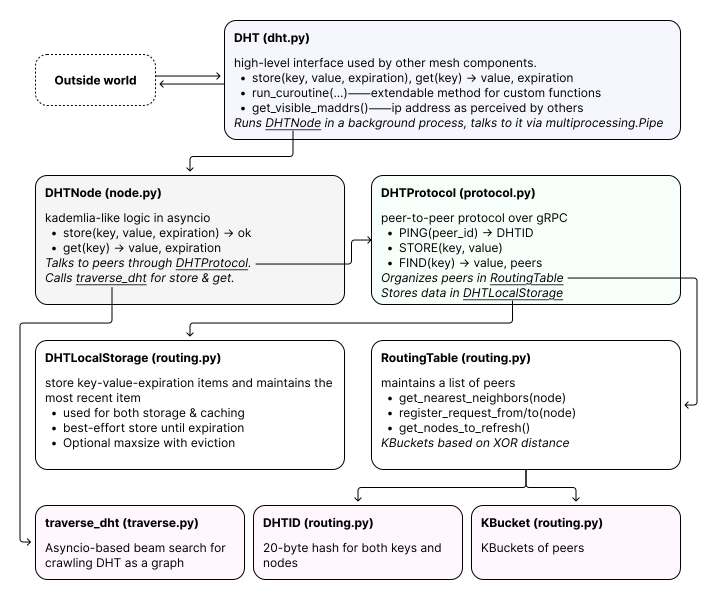
.png?alt=media&token=cafeaa77-d9ff-4c12-bfa8-358d1b4338d5)
